I keep reading about using the the left, right and middle buttons to do different things in Dopus, e.g selecting multiple items, opening folders in new tabs, 3-button buttons on toolbars. How are people doing this??? I click my mouse buttons to try these and nothing works except clicking on folders and showing context menus from folders. How can I configure the buttons? I love Dopus, but it's so hard to use and there's no one easy way to do something - there's loads!
Actions can be defined in Filetypes settings. For example open folder in destination lister with middle button use command "go openindual" in "all folders > actions > middle doubleclick".
If you use a Logitech mouse with SetPoint you might need to configure the buttons forward, back or middle to standard behaviour.
Thank you for your reply! I'll try that. I had a feeling I had to configure something, although I was hoping it was all built in! 
I don't have a logitech mouse, just a standard 2-buttton one with a scroll wheel in the middle that you can click.
Middlebutton in toolbar is activated by default.
If you use dual view, you can add "multifunc" to the drive buttons to open in left lister with left click and right with right click.
Yes, it works! I had no idea! How can I select multiple items with mouse buttons?
You can first set up a three way button:
-> options -> customize. Opus is in customize mode now, & by clicking an amoty space in a tool bar you can choose -> new -> new tool bar button. When you choose "edit" on that button (per right click on it), you can set it to "three way button".
That is, you have to add two more buttons by dragging them to the new three way button. You can use predefined buttons (like from -> options -> customize -> commands - all commands, which is in the first tab of the customize dialog. The screen shot shows a three way button in edit mode, with it´s actual three sub-buttons.

[quote="abr"]You can first set up a three way button:
That is, you have to add two more buttons by dragging them to the new three way button. You can use predefined buttons (like from -> options -> customize -> commands - all commands, which is in the first tab of the customize dialog. The screen shot shows a three way button in edit mode, with it´s actual three sub-buttons.
[/quote]
Excellent! thank you. 
By default (except maybe in Power mode), clicking files with the middle mouse button toggles their selection without affecting other files. (The same as holding Ctrl while left-clicking them does.)
If you find it doesn't it's probably because your mouse drivers are configured to do something else when the middle button is pushed. You need to set the button to "Middle Button" or "Generic Button" or similar in the drivers.
No, the middle button definetly doesn't do anything - I don't know how to configure the mouse except through Control Panel/Mouse options. Is this what you're talking about?
What make & model of mouse is it?
it's just a generic PC Line ps/2 compatible mouse. I didn't install any drivers, i just plugged it in.
Don't know then, sorry. I'd expect the middle button to work by default without drivers but I might be wrong or it might depend on the way the mouse is wired up.
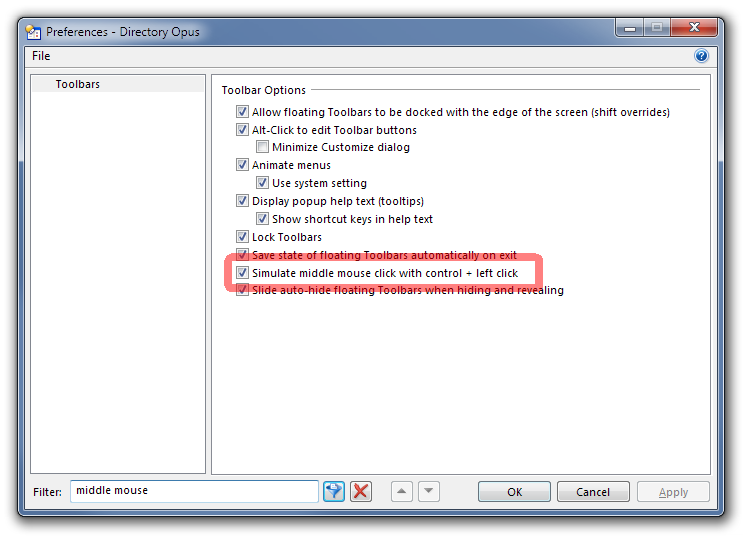
You could turn this on and use Ctrl-Click to access the middle button action of toolbar buttons:
Thanks for the tip. I will also try and install drivers for the mouse and see if that'll help.