I will start a new thread anyways but while writing this up I was shown the following thread by the forum software with similar title and same issue... Locked tabs jump to end of tab list accidentally from 2008!
...If, The tab is slightly dragged while locked and in a sub-folder away from home directory, the home directory determined when the tab was locked with "Locked (allow folder changes)".
Demonstration:
The video wasn't playing so converted to gif as last resort
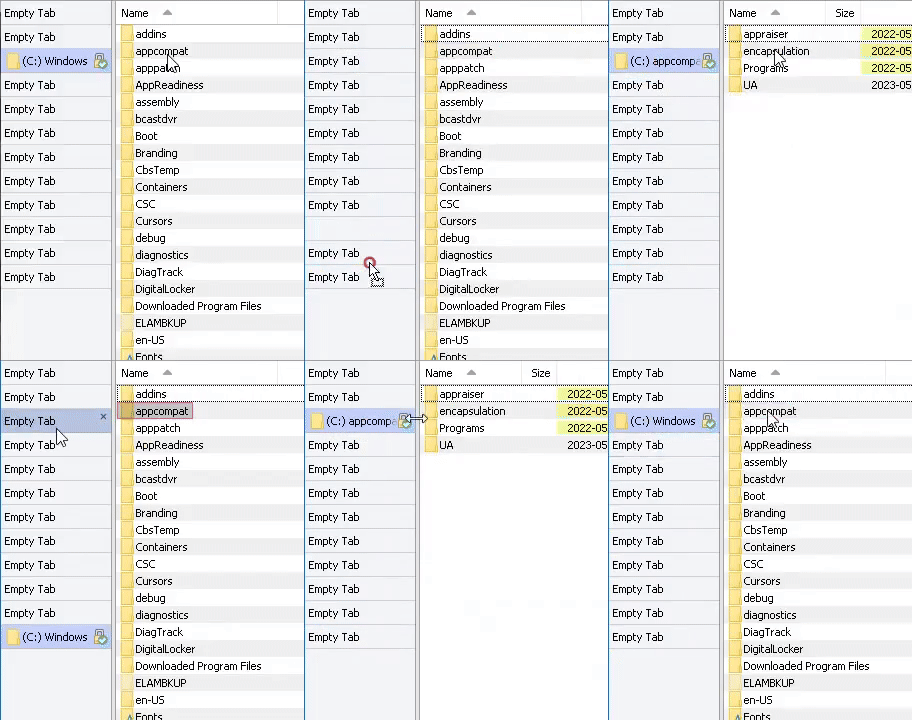
Steps to trigger:
- Change to vertical tab bar (on the left side of lister) and open 10 tabs.
- Lock the 2nd or 3rd tab from the top by Alt + Double-Clicking the target tab for the "Locked (allow folder changes)" setting. Note: Positioning the target tab at 2nd or 3rd tab facilitates easier mouse trajectory for step 5. See image below.
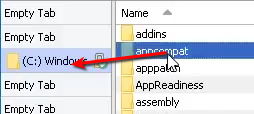
- Might not matter but adjust the tab divider width to match the text length of the target tab.
- Navigate into a sub-folder located near the same coordinates on Y-axis as the locked tab for an ideal mouse pointer location for next step. See image below.
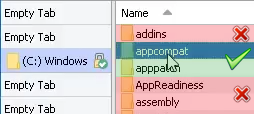
- Rapidly move the cursor over the locked tab and click, performing a near-instantaneous drag and release with minimal movement.
While I intend to return to the home directory via clicking the locked tab, the slight drag and immediate release cause the tab to jump to the bottom of the list and I sometimes don't even notice. Consequently, when attempting to navigate back to that specific tab later, it is no longer in its expected location.