Does anyone have an issue with 13.24 on Intel UltraX7 vPro (I have Graphics card Intel(R) Arc(TM) B390 GPU (128 MB))?
Recently moved to it with Win11 and both Dopus .21 and now .24 just start using memory when started. Even with nothing but idle, memory in Task Manager keeps going up until somewhere north of 1000MB the UI stops responding to some clicks. New listers will no longer open and menu items that are clicked will not open but will remain highlighted for a while. Eventually no clicks will be accepted and Process has to be killed. ctrl-shift-win-b does not help.
Done basic troubleshooting with multiple AIs but all end up with 'Hmm, new Intel Platform... maybe a Dopus bug...
Thanks Leo - did that but traces (across the first 10 stacks) were generally windows components and the first non-win is dopus... How do I go about checking that? (took screenshots). Thanks
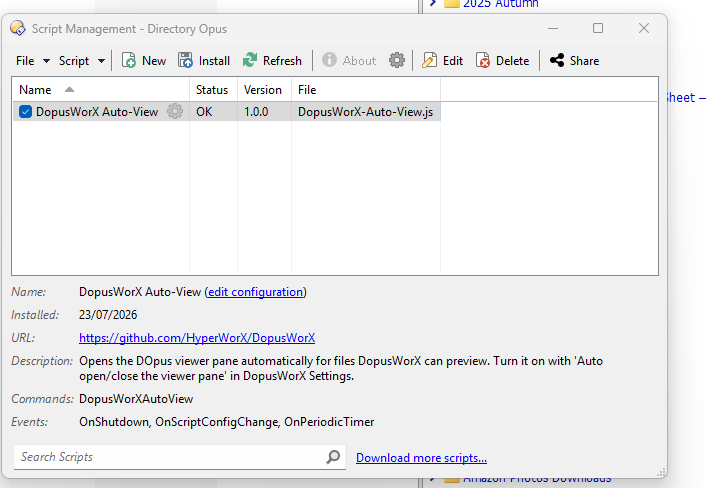
Thanks for quick reply - I only have one (now disabled)... and indeed, now that I think about it, I installed that one recently. DopusWorX was my updated Markdown Viewer (now looking for another one
The plugin is working just fine here, no problems other than a minor bug with pdf export .
Reportedly, that will be fixed along with a few other minor things in the next version.
But certainly, I have not encountered the memory problem above.
I came across this plugin a while ago and had been meaning to try it someday, but after seeing how the script addin actually does things (which, as far as I understand, is basically just a helper), I think I'll pass.
I guess this is another great example of "AI reasoning". It can stitch together patterns from a massive pile of existing data, but once you move into a niche area with very little training material (like JScript and the Opus scripting API) you get... this .
Well Yes !
I know that you understand the script addin far better than I do and I do respect your opinion.
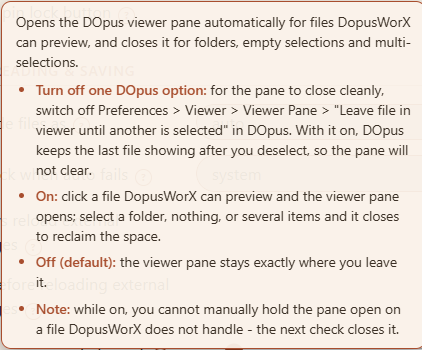
But it does work very well apart from the problem that surfaced in this thread, which as I pointed out above is easily avoidable with only a preferences choice .
"AI reasoning" aside,
easily stitching together patterns into output that makes sense is also kind of the whole point of the plugin. And this one does succeed in doing that. I already prefer it over Obsidian.
It simply works much better with what I need to do than other options.
I guess I could buy a subscription to Overleaf or go all in with MathCad at $859 USD / year, but all I really need can be solved by simple notes made with this, or perhaps exported as a vector PDF to a word document program for other things. And it lives native within Directory Opus !
I have started working on finding what really works of AsciiMath Syntax and what can convert to/from LaTex. I have found two obscure AsciiMath bugs already, but they don't work in Obsidian either.
The Latex versions of those obscure characters do though .
One is an escape character conflict, you can't escape the double -- in --->_(a)^(b) which renders as a over b with a long horizontal arrow dividing them. I did say it was obscure.
So, here is some of what I found today. Rendering depends on your font choice.
All that matters in the end is what was stitched together renders.
In such cases, it is better to change your workflow than to try to find a nonexistent tool that supports it.
For instance, OneNote has a convenient way to input formulas:
Another option is to write formulas by hand using a Wacom tablet. Concepts is an amazing app for that.
There is also WolframAlpha that offers a Python Notebook like interface but with formulas looking like math formulas, not Python code.
I personally like OneNote. I can view it on any device without any mumbo jumbo, and it looks exactly the same on any device. Also, I can copy-paste images and files, and I don't need to think about where they need to be stored or how. Also, the interface is straightforward: just point and click. No need to remember any syntax.
I guess this is another great example of "AI reasoning". It can stitch together patterns from a massive pile of existing data, but once you move into a niche area with very little training material (like JScript and the Opus scripting API) you get... this
Several months ago, my C++ build failed because I ran out of space for some reason. Then I found that Codex consumed 400GB of my disk to store logs. Turned out it was a bug that took them 2 weeks to fix. AI didn't implement logging rotation. It probably wasn't part of the prompt.
There is a tweet where the Claude Code team is proud that their console app achieves 60fps. It requires 2 GB of RAM as well. Just to show the text on the console.
These apps are benchmarks of what AI is capable of. These apps are created by the best-paid SW devs in the world using the most advanced AI models that ordinary people don't have access to, and an unlimited amount of tokens.
Yes, that's kind of how I ended up liking Obsidian and the AsciiMath plugin.
LaTex syntax can be difficult to remember and WYSIWYG software that lets me write easy to remember AsciiMath on the fly is a real game changer. Instead of scribbled notes with many mistakes, I can quickly type out a page.
I find equation GUIs cumbersome and tedious to use especially when expressions become filled with subscripts, dots, exponents, complex fractions, and whatever.
But that's only one opinion and it won't change the world.
So Yes, changing my workflow does again seem to be the answer.
Well, I won't be purchasing a MathCad subscription anytime soon.
Interesting. When I needed to do homework for the math course, I used a Wacom tablet and drew formulas manually. I gave up on any math DSL because, in complex math expressions, you always get stuck and need to figure out how to draw this or that using the DSL. Also, if I want to edit an expression, I can just use an eraser and then redraw the part that needs to be corrected. With a DSL, you have to mentally parse the DSL and render it in your head to know where you need to introduce the change so that you have the right math expression.
I have never used AsciiMath though.
Also, what I haven't tried, because the technology wasn't there: draw formulas manually and then ask AI to translate them to a digital formula in OneNote, for example.


 .
.