I have a toolbar called Favorites that houses my most frequent locations. I wish to be able to middle-mouse click on those folders to have them open in new tabs. Is that possible?
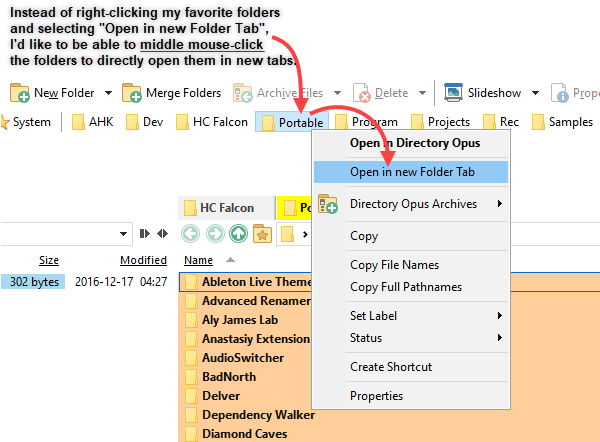
I have a toolbar called Favorites that houses my most frequent locations. I wish to be able to middle-mouse click on those folders to have them open in new tabs. Is that possible?
I don't think you can at the moment, but we will add that.
We'll add this in the next update.
@Jon and @Leo First of all, thanks so much for adding the MULTIFUNC argument to the Favorites and Recent commands – it lets me middle-mouse click my Favorites to open them in new tabs, which is exactly what I wished for!
However, in all its glory, I think this 'three-button' operation (which I'll admit might suit some people) actually slows things down for me, due to old habits and because, now, I'm forced to actually think and consider whether I want to open a favorite in left or right pane.
TL;DR. In the past, I never really paid attention to which pane was active when opening favorites. Unless I specifically wanted to open them in left or right pane, in which I'd switch pane prior to left-clicking faves. My wish is to be able to still use left-click as normal (open in active pane instead of left pane specifically) and still use middle-click to open in new tab, in whatever the active pane is.
That makes sense. We're thinking of adding some additional modes for the different buttons in the future.
Is it possible to open a folder in a new tab that has been middle clicked on in the Favourites bar without switching to that folder? (ie, just creating the new tab but not opening it)
You can do that if you have the latest beta installed, by adding this to the commnad:
KEYARGS "mmb:NEWTAB=nofocus"
The Favorites Bar command is a little special, due to having to translate the name of the favorites branch it displays, but the whole replacement command looks like this:
@ctx:="Favorites SHOWICONS USEQUALKEYS NOOPENINTABS AUTOCREATE BRANCH=""" + LanguageStr("FavoritesBar") + """ KEYARGS ""mmb:NEWTAB=nofocus"""