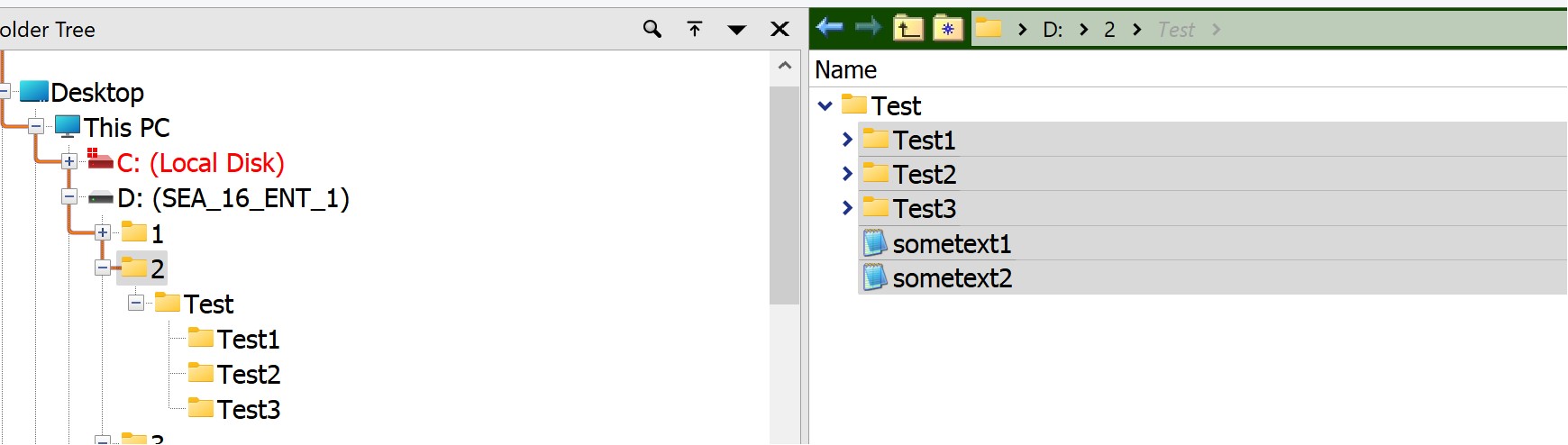
I found folder expansion feature in FIle Displays very useful. However, how I can move files/folders up one level from expanded view? I tried Copy MOVE TO .. but this command moves folders/files UP TWO levels. Example: I have folder D:\2\Test\ in the Test folder I have folders Test1, Test2, Test 3 and files sometext1.txt and sometext2.txt.
I'm working in folder 2 (in Folder tree) and it shows folder Test in Display view. I can click to the triangle on the left of folder Test and expand it to see subfolders Test1...Test3 and files sometest1 and sometest 2.
Everything is good there, I can move up these files and subfolders manually or delete, no problem . Hovewer, Copy MOVE TO .. (or Copy MOVE TO=.. )
moves everything to the D:\ (up two levels) instead of moving them to folder 2. How I can create button/command to move files/folders up ONE level from expanded view?
Try
Copy MOVE FILE={filepath} TO={filepath|..\..}
Fantastic, thats works, thank you!