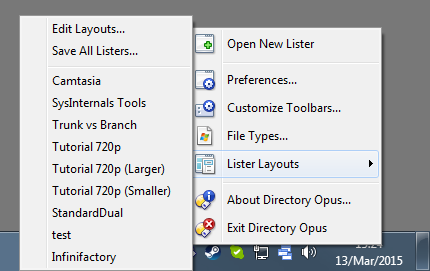
I have always had a Directory Opus icon on the taskbar and have gone to Lister layouts by right clicking the icon and selecting the Lister I wanted to use, since one of the recent updates this functions seems to have disappeared.
The default menu has not changed in a long time and still includes the layouts list as a sub-menu, like this:
If you need to edit the menu, use Settings > Customize Toolbars > Context Menus > Tray Icon.
To quickly add a list of layouts to the menu, after opening it for editing, go to the Customize dialog's Commnads tab, then type layout into the filter at the bottom, and you'll see a Saved Layouts - List item which you can drag to the menu.