ddjksa
October 8, 2025, 7:06am
1
Hi
I can display the number of files in each individual zip file in a lister window but is there an easy way to display the total number of files within 2 or more selected zip files perhaps on the status bar? I'm using V13.10 x64 Build 9004
TIA for any help.
lxp
October 8, 2025, 3:16pm
2
ddjksa:
is there an easy way
Not super easy, but doable. A script can sum up the values, store the result in a variable, and display it in a button or the status bar.
Here's a script and a button. The column needs to be visible for the script to work.
function OnInit(initData) {
    initData.name = 'SumFileCountTotal';
    initData.version = '2025-10-08';
    initData.url = 'https://resource.dopus.com/t/number-of-files-in-selected-zip-or-archive-files/57418/2';
    initData.desc = 'SumFileCountTotal';
    initData.default_enable = true;
    initData.min_version = '13.0';
}

function OnAddCommands(addCmdData) {
    var cmd = addCmdData.AddCommand();
    cmd.name = 'SumFileCountTotal';
    cmd.method = 'OnSumFileCountTotal';
    cmd.desc = 'SumFileCountTotal';
    cmd.label = 'SumFileCountTotal';
    cmd.hide = false;
    cmd.icon = 'script';
}

function OnSumFileCountTotal(scriptCmdData) {
    var cmd = scriptCmdData.func.command;
    var tab = scriptCmdData.func.sourcetab;

    if (!tab) return;

    var sumFileCountTotal;

    if (tab.selected_files.count > 0) {
        sumFileCountTotal = 0;
        for (var e = new Enumerator(tab.selected_files); !e.atEnd(); e.moveNext()) {
            var item = e.item();
            if (!item.InGroup('Archives')) continue;
            var fct = item.metadata.other.filecounttotal;
            if (typeof fct != 'number') continue;
            if (isNaN(fct)) continue;
            sumFileCountTotal += fct;
        }
    } else {
        sumFileCountTotal = '---';
    }

    tab.Vars.Set('SumFileCountTotal', sumFileCountTotal);
    // DOpus.Output('SumFileCountTotal: ' + sumFileCountTotal);

    cmd.UpdateToggle();
}
Save CommandSumFileCountTotal.js.txt to ↓
%appdata%\GPSoftware\Directory Opus\Script AddIns
@label:="SFCT: " + $tab:SumFileCountTotal
Set COLUMNSADD=filecounttotal
SumFileCountTotal
XML
<?xml version="1.0"?>
<button backcol="none" display="both" label_pos="right" textcol="none">
<label>SFCT</label>
<icon1>#newcommand</icon1>
<function type="normal">
<instruction>@label:="SFCT: " + $tab:SumFileCountTotal</instruction>
<instruction>Set COLUMNSADD=filecounttotal</instruction>
<instruction>SumFileCountTotal</instruction>
</function>
</button>
How to use buttons and scripts from this forum
This version is over a year old. Treat yourself to something fresh
ddjksa
October 12, 2025, 6:03am
3
Thanks very much @lxp for the detail and effort. Apologies for the delay but off-web for the last few days! It does seem very involved - surprised that it's not a feature that Opus has already included.
DDJ
lxp
October 12, 2025, 8:02am
4
You might be the first one asking for it
The script also counts the number of files and folders within folders.
lxp
October 12, 2025, 2:11pm
6
It shouldn't
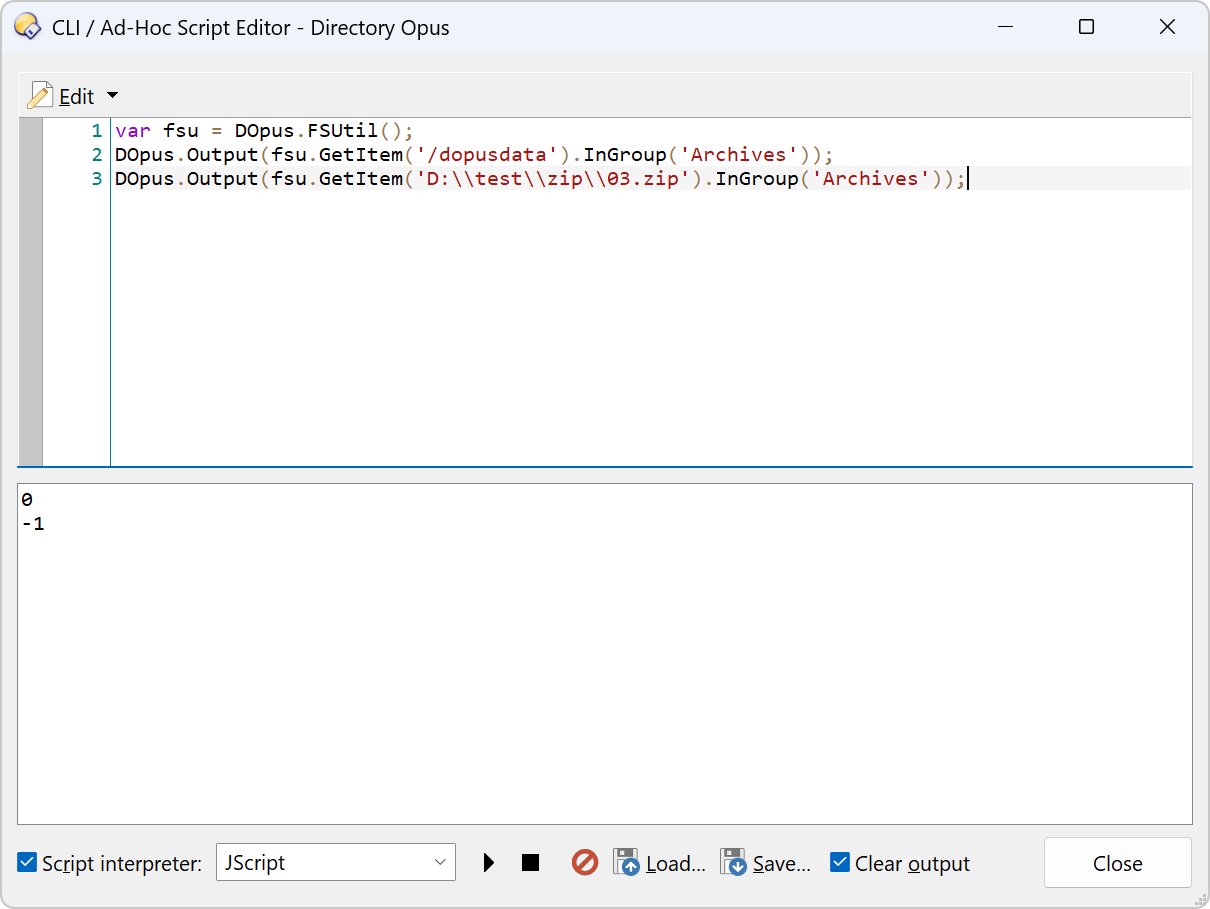
Did you add folders to the FileType group Archives?
var fsu = DOpus.FSUtil();
DOpus.Output(fsu.GetItem('/dopusdata').InGroup('Archives'));
DOpus.Output(fsu.GetItem('D:\\test\\zip\\03.zip').InGroup('Archives'));
Open a File Display with folders and files in it with nothing selected.
Run the button for the script.
Folders will have numbers in the Files (total) column for the total of all folders and files within the folder.
lxp
October 12, 2025, 7:22pm
8
Oh, Flash File System, you don't say...