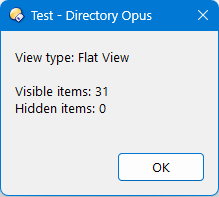
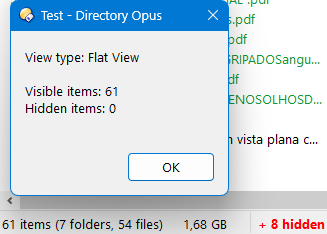
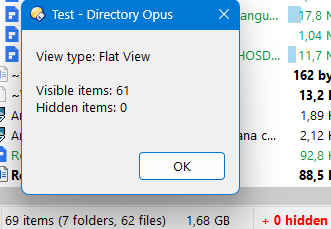
Hi, could anyone help me get the number of hidden elements in flat view? As it is, you always tell me 0. In normal view it works fine, but any suggestion will be welcomed. Thank you.
Regarding your concern, when in flat view, this code is doing the following:
var visibleItems = tab.stats.files + tab.stats.dirs;: You count all files and folders in the tab
for (; !eFiles.atEnd(); eFiles.moveNext()) { totalGeral++; } Then count all files
for (; !eDirs.atEnd(); eDirs.moveNext()) { totalGeral++; } Then count all folders
hiddenItems = totalGeral - visibleItems Substract the first with the sum of the two others
This should be zero everytime.
You do not take into account the visibility of the files.
If you want to know how many hidden (according to the filesystem hidden attribute) items, you need to actually check for that (as it's done when in non-flat view). The code below only changes the part when the (isFlat) condition is true:
function OnClick(clickData) {
    var cmd = clickData.func.command;
    var tab = clickData.func.sourcetab;

    // 1. FLAT VIEW VERIFICATION
    var isFlat = cmd.IsSet("FLATVIEW=Grouped") ||
                 cmd.IsSet("FLATVIEW=Mixed") ||
                 cmd.IsSet("FLATVIEW=MixedNoFolders");

    var visibleItems = tab.stats.files + tab.stats.dirs;
    var totalGeral = 0;
    var hiddenItems = 0;

    if (isFlat) {
        // FLAT VIEW (Enumerators)
        var eFiles = new Enumerator(tab.files);
        for (; !eFiles.atEnd(); eFiles.moveNext()) {
			if (eFiles.item().attr & 2)
				hiddenItems++;
			else
				totalGeral++;
		} // Files in the tab

        var eDirs = new Enumerator(tab.dirs);
        for (; !eDirs.atEnd(); eDirs.moveNext()) {
			if (eDirs.item().attr & 2)
				hiddenItems++;
			else
				totalGeral++;
		 }   // Folders in the tab

        //hiddenItems = totalGeral - visibleItems; // Hidden in the tab?
    } else {
        // NORMAL VIEW (FSUtil)
        var folderEnum = DOpus.FSUtil.ReadDir(tab.path);
        while (!folderEnum.complete) {
            var item = folderEnum.Next();
            if (!item) break;

            if (item.attr & 2) {
                hiddenItems++; // Incrementa ocultos se encontrar atributo de oculto
            } else {
                totalGeral++; // Incrementa visíveis se não atributo de oculto
            }
        }
    }

    // 2. SHOWEVERYTHING LOGIC
    var showEverything = cmd.IsSet("SHOWEVERYTHING=on");
    if (showEverything) {
        visibleItems = isFlat ? totalGeral : (totalGeral + hiddenItems);
        hiddenItems = 0;
    } else {
        if (!isFlat) visibleItems = totalGeral;
    }

    // 3. RESULT
    var dlg = clickData.func.Dlg();
    dlg.title = "Test";
    dlg.message = "View type: " + (isFlat ? "Flat View" : "Normal") + "\n\n" +
                  "Visible items: " + visibleItems + "\n" +
                  "Hidden items: " + (hiddenItems < 0 ? 0 : hiddenItems);

    dlg.buttons = "OK";
    dlg.Show();
}
Notes:
I did not change the logic behind the totalGeral way of counting (which is not counting the hidden files, since when enumerating files/folders you either increment totalGeral if the item is not hidden and increment hiddenItem instead otherwise).
I also kept your logic with the hidden attribute, even if the fact that a file is displayed or not can depend on that but also on other conditions (settings, filters, ...)
You could also simplify that (in the isFlat part) by only enumerating tab.all (which regroups all files and folders displayed)
And finally, you could even simplify further by using the same logic for both cases. Since the tab.all returns all displayed items, you should not need to act differently when in flat view or not:
function OnClick(clickData) {
    var cmd = clickData.func.command;
    var tab = clickData.func.sourcetab;

    // 1. FLAT VIEW VERIFICATION
    var isFlat = cmd.IsSet("FLATVIEW=Grouped") ||
                 cmd.IsSet("FLATVIEW=Mixed") ||
                 cmd.IsSet("FLATVIEW=MixedNoFolders");

    var visibleItems = tab.stats.files + tab.stats.dirs;
    var totalGeral = 0;
    var hiddenItems = 0;

	for (e = new Enumerator(tab.all); !e.atEnd(); e.moveNext()) {
		if (e.item().attr & 2)
			hiddenItems++;
		else
			totalGeral++;
	}

    // 2. SHOWEVERYTHING LOGIC
    var showEverything = cmd.IsSet("SHOWEVERYTHING=on");
    if (showEverything) {
        visibleItems = isFlat ? totalGeral : (totalGeral + hiddenItems);
        hiddenItems = 0;
    } else {
        if (!isFlat) visibleItems = totalGeral;
    }

    // 3. RESULT
    var dlg = clickData.func.Dlg();
    dlg.title = "Test";
    dlg.message = "View type: " + (isFlat ? "Flat View" : "Normal") + "\n\n" +
                  "Visible items: " + visibleItems + "\n" +
                  "Hidden items: " + (hiddenItems < 0 ? 0 : hiddenItems);

    dlg.buttons = "OK";
    dlg.Show();
}
"Hidden in the file system" and "hidden in an Opus tab" both mean the files are invisible, but they are different concepts. Are you sure you want to mix them?
@PassThePeas, many thanks for everything, for your recommendations, for your scripts and for the time available. Your scripts in normal view work fine, but in flat view it doesn't show the desired result. It does not show exactly the total number of visible and hidden elements as you do in the Status bar. I'm going to show you a couple of images because one image says more than a thousand words.
They won’t always be the same, as they’re counting very different things (as Lxp explained).
The tab object has several ways to access the count or list of items currently hidden from view from Opus’s perspective. Go the manual page for it and search for “hidden” to find them (there are several, depending on what you want).
@lxp, my intention is to obtain the same values shown in the status bar, that is, the hidden files in the tab, which are sometimes completely hidden, and other times visible even with Hidden attributes. Thanks.