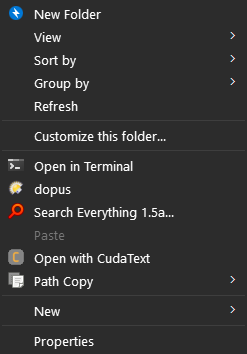
Hey all! I am not sure if this is the right place to post this, but I recently made a pretty nifty context menu item that allows you to open the current directory that's already open in the default Windows file explorer in Directory Opus instead.
NOTE: my context menu item has an icon but I didn't include it in the script shared on here because the code requires you to specify a specific path to the icon.
Windows Registry Editor Version 5.00

[HKEY_CLASSES_ROOT\Directory\Background\shell\dopus\command]
@="\"C:\\Program Files\\GPSoftware\\Directory Opus\\dopus.exe\" \"%V\""
Windows Registry Editor Version 5.00

[HKEY_CLASSES_ROOT\Folder\shell\DOpus Here]
@="Open in Directory Opus..."
"Icon"="C:\\DirectoryOpusPortable\\App\\DirectoryOpus\\dopusrt.exe"
[HKEY_CLASSES_ROOT\Folder\shell\DOpus Here\command]
@="\"C:\\DirectoryOpusPortable\\App\\DirectoryOpus\\dopusrt.exe\" /acmd GO  \"%V\" NEWTAB /O"
If you want something similar, but for the context menu of files as well as folders, where using it on a file will open the parent folder in Opus and select the file, see WKen's post here: