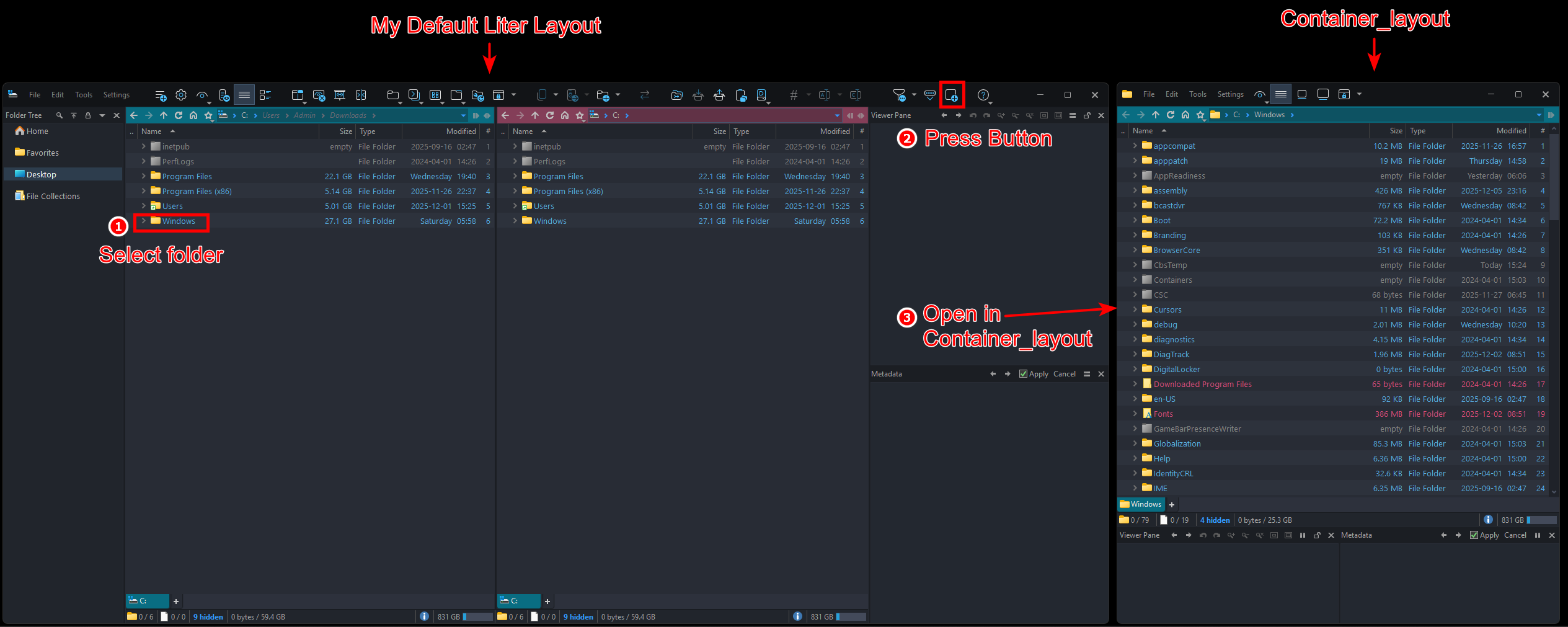
I have a button command to open a folder container in a specific layout like this:
Go FROMSEL LAYOUT=Container_layout
The problem is that every time I press the button, it opens a new layout, and I end up with multiple layouts open. Is there a command like findexisting for layouts? What I want is a command that can open folders in only one existing layout. Any help is greatly appreciated.
Thanks @lxp, but that command replaces my main or default layout. What I want is for me to select a folder in my main lister (default lister) and press a key, then the command will open the folder in the new layout (Container_Layout) if it doesn't already exist, but keep my default layout. However, if Container_Layout already exists, then the folder will open in the same layout (Container_Layout). I hope my explanation is clear enough.
Thanks @lxp, but the script still replaces my default lister with Container_layout instead of keeping my default lister and opening a new "Container_layout".
Maybe I have another way to explain it... hopefully it works.
Essentially, I just want to select a folder in my default lister and then press the key command:
Go FROMSEL LAYOUT=Container_layout
and that command will open the selected folder in the NEW layout "Container_layout" without replacing my default layout/lister. Up to this point, this command works perfectly.
But the problem arises when I select another folder in my default lister and press the key command again, it opens another new layout "Container_layout", so now I have two "Container_layouts" open.
What I want is for the command to try to find an existing "Container_layout" first instead of opening a new one. What I want is for it to use only one "Container_layout" when I press the key command.
Ah, finally it worked. I thought it would just need a simple command line, but it turns out it requires a script. Thanks again @lxp for your help, it was very helpful and I appreciate it.
Some of you might be curious about my request above, which is to replicate what's available in OneCommander. If you have a long catalog, such as a texture catalog, you can view them side-by-side in OneCommander. On the left side, you'll see a list of your catalogs, and on the other side, you'll see the contents of the selected folder as thumbnails.
Personally I prefer to use Dopus for things like this because Dopus has more features, one of which is in Dopus you can enlarge the image to see the details just by clicking and holding the image in the viewer pane and it is very, very useful.
Or you can use another script from @dasota to see the contents of the folder. Info Bar
I usually don't mind having a gazillion listers open, but there's definitely something charming about reusing them. Updating an existing lister causes far less visual distraction than drawing a new one.
So yes, perhaps there should be a flag like useexisting for LAYOUT in Prefs and Go.
Another reason I insist on opening it with the same layout is because I use format locking for "Container_layout" and I can open any folder with a different format but it always displays the same format in "Container_layout". If I open another folder with a new layout, not the existing one, the format locking will be lost and I have to reapply the format locking.