Hi, I've been using this script in a button to launch powershell in Windows Terminal Preview at the current folder
CLI DOSPROMPT=powershell EXEC="C:\Program Files\PowerShell\7\pwsh.exe"
Now, I want to have another button for the same function, but with admin permission. I tried:
@admin
CLI DOSPROMPT=powershell EXEC="C:\Program Files\PowerShell\7\pwsh.exe"
,
CLI DOSPROMPT=powershell,admin EXEC="C:\Program Files\PowerShell\7\pwsh.exe"
and
@admin
CLI DOSPROMPT=powershell,admin EXEC="C:\Program Files\PowerShell\7\pwsh.exe"
but they all don't work.
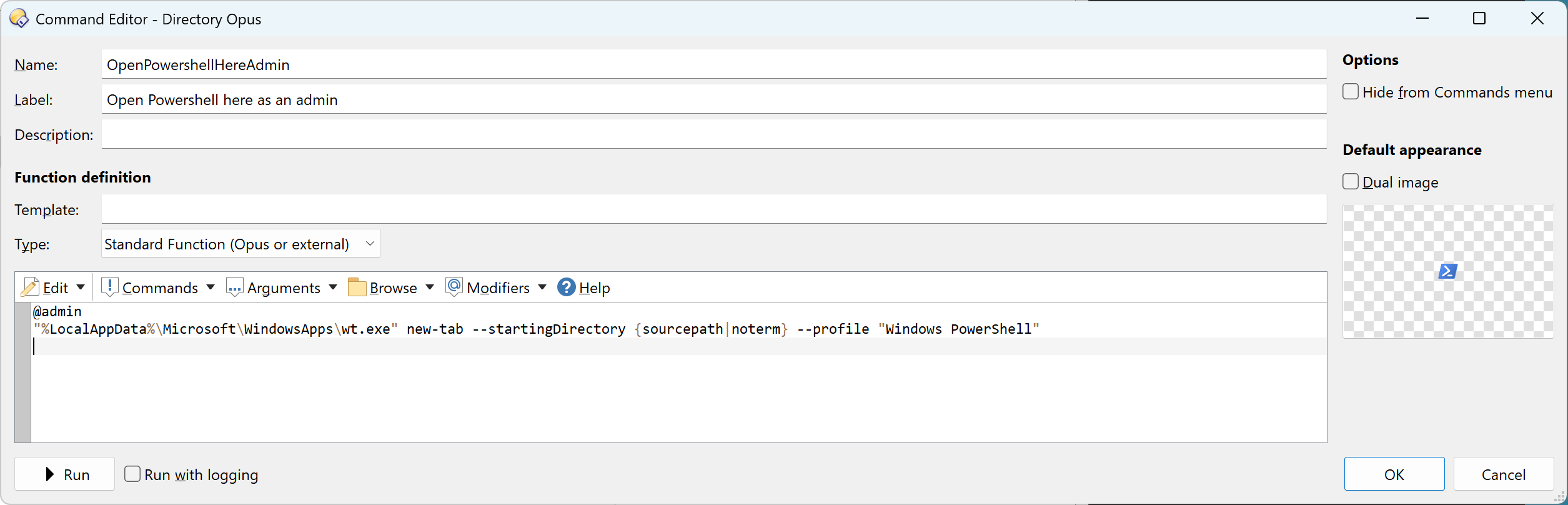
I have the same button, but it opens "Windows Terminal" with PowerShell:
I don't know why you need to use
CLI DOSPROMT and so on. I think you can just do:
@admin
"C:\Program Files\PowerShell\7\pwsh.exe" -WorkingDirectory {sourcepath|noterm}
What happens when you press the button?
Using the command in the screenshot and changing the profile name worked. Thank you.
I'm still curious about why the methods I wrote don't work because I took it from the documentation
Using the command in the screenshot and changing the profile name worked.
No problem. Windows Terminal is better than raw PowerShell anyway.
I'm still curious about why the methods I wrote don't work because I took it from the documentation
I don't know. I have never used this CLI syntax. But I also don't know why "C:\Program Files\PowerShell\7\pwsh.exe" -WorkingDirectory {sourcepath|noterm} didn't work for you.
fred
June 6, 2026, 3:39pm
7
I have had this button for years to open a pwsh terminal as admin in the list:
wt --window -1 new-tab --startingDirectory "{sourcepath$|noterm}" --title "{sourcepath|nopath|noterm}" --profile "PowerShell 7 [admin]"
But I can not figure it out how to run a .ps1 file as admin in the same profile.
This
@nodeselect
@nofilenamequoting
pwsh.exe -ExecutionPolicy Bypass -NoExit -File "{filepath$}"
in context menu of .ps1 works well for run as NON admin though.
But
@nodeselect
@nofilenamequoting
@admin:pwsh.exe -ExecutionPolicy Bypass -NoExit -File "{filepath$}"
doesn’t open in terminal but in a console.
EDIT:
This works:
@nofilenamequoting
@nodeselect
@admin:wt.exe -d "{filepath$|..|noterm}" pwsh.exe -NoExit -ExecutionPolicy Bypass -Command "& '{filepath$}'"
Hourra !