Hi
I open Dopus 9.5.3.0 from a shortcut on my Win 7 Pro, 64-bit, desktop - The target path is e:\program1\GPSoftware\Directory-Opus\dopus.exe /autolister d:
The focus is in the file list pane in Details view. In the Folder Tree d: is selected with a faded greyish-blue color. I would like the focus to be on d:\ in the Folder Tree pane when Dopus opens - just like it is in Win XP's Explorer. Is there a way to do this?
(FWIW, that has changed in newer versions of Explorer.)
If just having a hotkey to set focus to the tree would be enough, you can bind the command Scred provided to a hotkey.
If you still want to be able to open a window with the focus on the tree, the only way I can think of will only work reliably for the first window that you open. (After that, unless you add a delay between the commands, it may set focus to the tree in an existing window, not the newly opened one. Adding a delay should work but the question is how long to make the delay. )
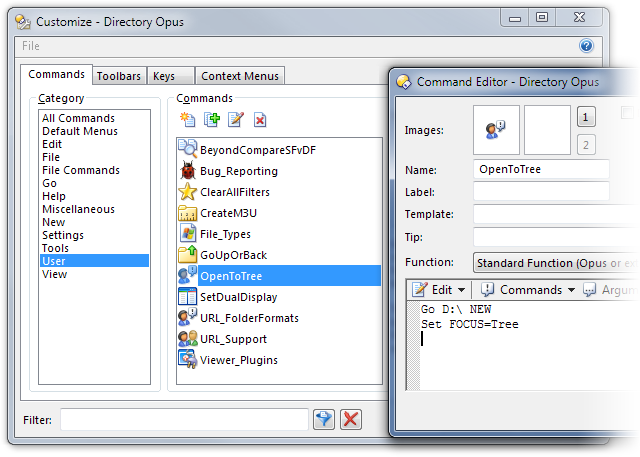
To do that, go to Settings -> Customize and create a User Command called OpenToTree which runs this:
Thanks Scred and leo. I won't return to the computer's location until 12 June so I shall apply the code then. Afterward, I shall post back here with the results. Again, thank you for the help.
I followed leo's instructions, and now when I execute the desktop shortcut using "e:\program1\GPSoftware\Directory-Opus\dopusrt.exe" /cmd OpenToTree, Directory Opus opens with the focus in the folder/directory pane on drive D:. This works for the first instance of Dir Opus that I open. If I leave the first instance open, and then open a second instance of Dir Opus, the focus in the second instance is in the file list pane. (I use the Details view).
Questions:
leo, how do I add a delay between the commands?
Both leo and Scred show the following in their posts:
CODE: SELECT ALL
What is this, and why isn't it used in the command?
[quote="County"]Both leo and Scred show the following in their posts:
CODE: SELECT ALL
What is this, and why isn't it used in the command?[/quote]
That's because it's not part of the text that either of them wrote... it's part of the forum's implementation of adding text to the special {code} boxes in forum posts. If you mouse over the Select all text - you'll see that it is a hyper-link, which - if clicked, will 'select' (highlight) all of the text within the {code} box for easy copying and pasting into other apps (such as pasting the XML definition for an Opus button to a toolbar in customize mode)...
Back to your real question - I'm not sure that you'll be able to get a method to work reliably for what you want to do. You can try various things to add a delay - but it may not always work like you want. I couldn't even get it to work with an @confirm dialog inserted in-between the two other commands...
steje - thanks for the information on CODE: SELECT ALL.
Does Dir Opus have the ability to include navigation keystrokes into a USER command? If it can, then I can have Dir Opus do a default open to the file list, and then have the shift+tab keystrokes applied automatically to move the focus to the Folder Tree.
You'd have the same problem (in fact, more problems) sending keystrokes as using Set FOCUS=Tree -- the issue is ensuring the new window is open and ready before telling it to do things.
If you really want to do this, send GPSoftware a feature request for a proper "open a window and set focus to the tree" command/argument. That'd be better than anything I can think of. (Adding a delay to the command would probably work most of the time, but it'd be a kludge at best.)
Thanks leo. I have just submitted a feature request as you recommended. Could you please advise how and where to set a delay within the command set:
Go D:\ NEW
Set FOCUS=Tree
 )
)