Is there a way to add a dropdown button that displays all the current windows opened by Directory Opus (dopus.exe), allowing you to click on each window in the list to navigate to it, similar to a dropdown folder menu button?
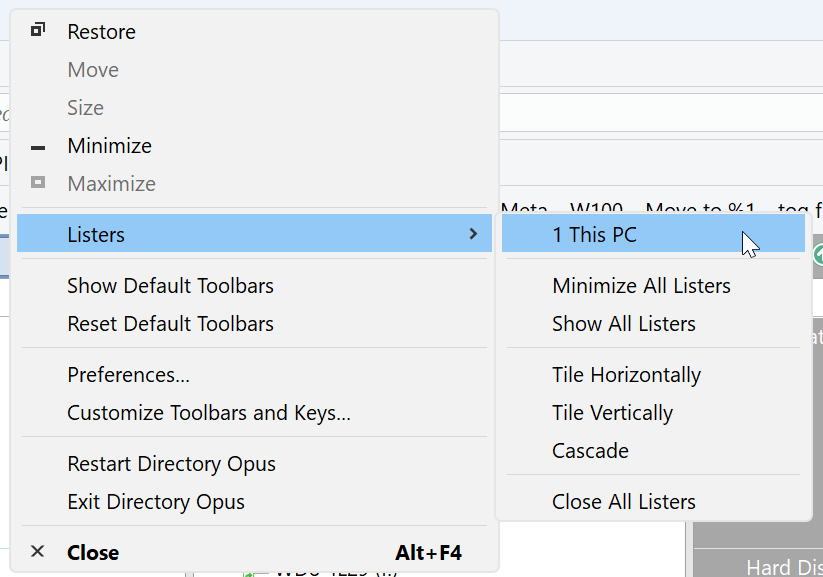
I don't have that 
What version are you running ?
Self-created menu using "Set LISTERCMD?"
This menu has been around for a while.
To reach it via the context menu, you probably need to uncheck Preferences / Toolbars / Options / Move top-row toolbars into the window title bar.
It's also available via left-click on the Opus icon in the left corner.
Thanks for the info.
I see it in neither of those places in 13.13.4 nor in Default Toolbars. For me it is not a loss as I could create those options if I wanted any of them accessible.
How many listers are open? The menu will not show if there's just one lister open.
That's the secret, With another lister opened, the option appeared. Thanks, again!
That's great! However, I can't help but ask if a customized button can be created. This would reduce mouse operations and bring convenience.
I am not aware of any command that would support this. Could be something like Go LISTERLIST that creates a dynamic button. Certainly seems useful.
A script could create a dialog that shows all open listers. I am not sure, though, if there is a control that doesn't require a confirmation after the selection. That extra step would be a bit clumsy.
Maybe you like CycleListers. That script lets you cycle through listers like documents.
The closest thing I can think of would be to use this :
And instead of building the menu statically, build it dynamically with the list of openend listers.
Bits of CycleListers could be reused, or ones from SwitchLister :
EDIT : This is not a dynamic button exactly, but kind of acts like it.
A bit "quick and dirty" (could use more information about each lister displayed) but, it can be something like this :
// GoListersList
// (c) 2025 Stephane

// This is a script for Directory Opus.
// See https://www.gpsoft.com.au/endpoints/redirect.php?page=scripts for development information.


// Called by Directory Opus to initialize the script
function OnInit(initData)
{
	initData.name = "GoListersList";
	initData.version = "1.0";
	initData.copyright = "(c) 2025 Stephane";
//	initData.url = "https://resource.dopus.com/c/buttons-scripts/16";
	initData.desc = "";
	initData.default_enable = true;
	initData.min_version = "13.0";

}

// Called to add commands to Opus
function OnAddCommands(addCmdData)
{
	var cmd = addCmdData.AddCommand();
	cmd.name = "GoListersList";
	cmd.method = "OnGoListersList";
	cmd.desc = "";
	cmd.label = "GoListersList";
	cmd.template = "";
	cmd.hide = false;
	cmd.icon = "script";
}


// Implement the GoListersList command
function OnGoListersList(scriptCmdData)
{
//    var menu = DOpus.Create.OrderedMap();
	var menuItems		= DOpus.Create.Vector();
    var activeTabs		= DOpus.Create.Vector();

	for(var eListers = new Enumerator(DOpus.listers); !eListers.atEnd(); eListers.moveNext())
	{
		var l = eListers.item();

		//DOpus.Output("Lister title = " + l.Title);
		var panes = "";
		switch(l.dual) {
			case 0:
				// panes = "#gridlines";		// Single
				panes = "[S]";		// Single
				break;
			case 1:
				// panes = "#dualvertical";	// Double Vertical
				panes = "[DV]";	// Double Vertical
				break;
			case 2:
				// panes = "#dualhorizontal";	// Double Horizontal
				panes = "[DH]";	// Double Horizontal
				break;
			default:
				DOpus.Output("Unknown panes type = " + l.dual);
				// panes = "#view";
				panes = "[?]";
				break;
		}

		// TO DO : Count up/down tabs to add indescription
		menuItems.push_back(l.Title + " " + panes);
		activeTabs.push_back(l.activetab);
	}

    // show popup list
    var cmd = scriptCmdData.func.command;
    var dlg = scriptCmdData.func.Dlg;
    dlg.choices = menuItems;
    dlg.menu = 0;
    dlg.Show();

    // run command
    if (dlg.result && dlg.result < activeTabs.count)
    {
    	cmd.SetSourceTab(activeTabs[dlg.result - 1]);
        cmd.RunCommand("Set LISTERCMD=tofront");
    }
}
A slightly more advanced version, with customizable entries :
- Drive letter can prefix each entry
- First folder in path can also be added
- Tab count (per pane) can also be displayed
- The layout the lister is coming from can also be appended at the end
Changed way to display the single/dual listers (vert. & horiz) with some unicode characters.

Opusinstall:
GoListersList.opusscriptinstall (1.8 KB)
Source:
// GoListersList
// (c) 2025 Stephane

// This is a script for Directory Opus.
// See https://www.gpsoft.com.au/endpoints/redirect.php?page=scripts for development information.


// Called by Directory Opus to initialize the script
function OnInit(initData)
{
	initData.name = "GoListersList";
	initData.version = "1.1";
	initData.copyright = "(c) 2025 Stephane";
//	initData.url = "https://resource.dopus.com/c/buttons-scripts/16";
	initData.desc = "";
	initData.default_enable = true;
	initData.min_version = "13.0";

	// settings & defaults
	initData.config_desc = DOpus.Create.Map();
	var option_name = "";

	option_name = "Display Drive";
	initData.Config[option_name] = true;
	initData.config_desc(option_name) = "Set to true to display the drive letter in the listers list.";

	option_name = "Display Beginning of path";
	initData.Config[option_name] = true;
	initData.config_desc(option_name) = "Set to true to display the beginning of path in the listers list.";

	option_name = "Display Tab counts";
	initData.Config[option_name] = true;
	initData.config_desc(option_name) = "Set to true to display the number of tabs in the lister.";

	option_name = "Display Layout";
	initData.Config[option_name] = true;
	initData.config_desc(option_name) = "Set to true to display the layout the lister came from, if any.";
}

// Called to add commands to Opus
function OnAddCommands(addCmdData)
{
	var cmd = addCmdData.AddCommand();
	cmd.name = "GoListersList";
	cmd.method = "OnGoListersList";
	cmd.desc = "";
	cmd.label = "GoListersList";
	cmd.template = "";
	cmd.hide = false;
	cmd.icon = "script";
}


// Implement the GoListersList command
function OnGoListersList(scriptCmdData)
{
//    var menu = DOpus.Create.OrderedMap();
	var menuItems		= DOpus.Create.Vector();
    var activeTabs		= DOpus.Create.Vector();

	for(var eListers = new Enumerator(DOpus.listers); !eListers.atEnd(); eListers.moveNext())
	{
		var l = eListers.item();

		//DOpus.Output("Lister title = " + l.Title);
		var panes = "";
		switch(l.dual) {
			case 0:
				panes = "║ ■";		// panes = "[S]";		// Single [≪■≫] ≺ ■ ≻  ║ ■ ║
				break;
			case 1:
				panes = "║ ◀ ▶";	// panes = "[DV]";	// Double Vertical ◀▶  [◄ ►]  ≪≫ ≺ ■ ≻  ║ ◄ ► ║
				break;
			case 2:
				panes = "║ ▲ ▼";	// panes = "[DH]";	// Double Horizontal ▲    [▲ ▼] ▲ ▼ ⊙  ≺ ▲ ▼ ≻  ║ ▲ ▼ ║ ⧫   ◇   ◈ ▲ ▼
				break;
			default:
				DOpus.Output("Unknown panes type = " + l.dual);
				panes = "║ ?";
				break;
		}

		var itemName = "";
		var pathParts = l.activetab.path.Split();

		if (Script.Config["Display Drive"]) {
			if (pathParts[0][0] != ":")
				itemName += "[" + pathParts[0] + "] ";
		}

		if (Script.Config["Display Beginning of path"] && pathParts.count > 1 && pathParts[0][0] != ":")
			itemName += pathParts[1] + "\\(...) ";

		itemName += l.Title + " " + panes;

		if (Script.Config["Display Tab counts"]) {
			if (l.dual) {
				itemName += " ║ " + l.tabsleft.count + " tab" + ((l.tabsleft.count > 1) ? "s" : "") + " ◤";
				itemName += " - " + l.tabsright.count + " tab" + ((l.tabsright.count > 1) ? "s" : "") + " ◢";
			}
			else
				itemName += " ║ " + l.tabs.count + " tab" + ((l.tabs.count > 1) ? "s" : "") + " ▬ ";
		}

		if (Script.Config["Display Layout"] && l.layout != "")
			itemName += " ║ [" + l.layout + "]"

		menuItems.push_back(itemName);
		activeTabs.push_back(l.activetab);
	}

    // show popup list
    var cmd = scriptCmdData.func.command;
    var dlg = scriptCmdData.func.Dlg;
    dlg.choices = menuItems;
    dlg.menu = 0;
    dlg.Show();

    // run command
    if (dlg.result && dlg.result < activeTabs.count)
    {
    	cmd.SetSourceTab(activeTabs[dlg.result - 1]);
        cmd.RunCommand("Set LISTERCMD=tofront");
    }
}
Thank you very much. I created a button and used your command. The list shows, but when I click on an entry hoping to jump to the corresponding window, nothing happens. Is this not achievable?
Sorry, small bug in the script : it's not working if you choose the last item in the list.
That version fixes this:
GoListersList.opusscriptinstall (1.8 KB)
// GoListersList
// (c) 2025 Stephane

// This is a script for Directory Opus.
// See https://www.gpsoft.com.au/endpoints/redirect.php?page=scripts for development information.


// Called by Directory Opus to initialize the script
function OnInit(initData)
{
	initData.name = "GoListersList";
	initData.version = "1.2";
	initData.copyright = "(c) 2025 Stephane";
//	initData.url = "https://resource.dopus.com/c/buttons-scripts/16";
	initData.desc = "";
	initData.default_enable = true;
	initData.min_version = "13.0";

	// settings & defaults
	initData.config_desc = DOpus.Create.Map();
	var option_name = "";

	option_name = "Display Drive";
	initData.Config[option_name] = true;
	initData.config_desc(option_name) = "Set to true to display the drive letter in the listers list.";

	option_name = "Display Beginning of path";
	initData.Config[option_name] = true;
	initData.config_desc(option_name) = "Set to true to display the beginning of path in the listers list.";

	option_name = "Display Tab counts";
	initData.Config[option_name] = true;
	initData.config_desc(option_name) = "Set to true to display the number of tabs in the lister.";

	option_name = "Display Layout";
	initData.Config[option_name] = true;
	initData.config_desc(option_name) = "Set to true to display the layout the lister came from, if any.";
}

// Called to add commands to Opus
function OnAddCommands(addCmdData)
{
	var cmd = addCmdData.AddCommand();
	cmd.name = "GoListersList";
	cmd.method = "OnGoListersList";
	cmd.desc = "";
	cmd.label = "GoListersList";
	cmd.template = "";
	cmd.hide = false;
	cmd.icon = "script";
}


// Implement the GoListersList command
function OnGoListersList(scriptCmdData)
{
//    var menu = DOpus.Create.OrderedMap();
	var menuItems		= DOpus.Create.Vector();
    var activeTabs		= DOpus.Create.Vector();

	for(var eListers = new Enumerator(DOpus.listers); !eListers.atEnd(); eListers.moveNext())
	{
		var l = eListers.item();

		//DOpus.Output("Lister title = " + l.Title);
		var panes = "";
		switch(l.dual) {
			case 0:
				panes = "║ ■";		// panes = "[S]";		// Single [≪■≫] ≺ ■ ≻  ║ ■ ║
				break;
			case 1:
				panes = "║ ◀ ▶";	// panes = "[DV]";	// Double Vertical ◀▶  [◄ ►]  ≪≫ ≺ ■ ≻  ║ ◄ ► ║
				break;
			case 2:
				panes = "║ ▲ ▼";	// panes = "[DH]";	// Double Horizontal ▲    [▲ ▼] ▲ ▼ ⊙  ≺ ▲ ▼ ≻  ║ ▲ ▼ ║ ⧫   ◇   ◈ ▲ ▼
				break;
			default:
				DOpus.Output("Unknown panes type = " + l.dual);
				panes = "║ ?";
				break;
		}

		var itemName = "";
		var pathParts = l.activetab.path.Split();

		if (Script.Config["Display Drive"]) {
			if (pathParts[0][0] != ":")
				itemName += "[" + pathParts[0] + "] ";
		}

		if (Script.Config["Display Beginning of path"] && pathParts.count > 1 && pathParts[0][0] != ":")
			itemName += pathParts[1] + "\\(...) ";

		itemName += l.Title + " " + panes;

		if (Script.Config["Display Tab counts"]) {
			if (l.dual) {
				itemName += " ║ " + l.tabsleft.count + " tab" + ((l.tabsleft.count > 1) ? "s" : "") + " ◤";
				itemName += " - " + l.tabsright.count + " tab" + ((l.tabsright.count > 1) ? "s" : "") + " ◢";
			}
			else
				itemName += " ║ " + l.tabs.count + " tab" + ((l.tabs.count > 1) ? "s" : "") + " ▬ ";
		}

		if (Script.Config["Display Layout"] && l.layout != "")
			itemName += " ║ [" + l.layout + "]"

		menuItems.push_back(itemName);
		activeTabs.push_back(l.activetab);
	}

    // show popup list
    var cmd = scriptCmdData.func.command;
    var dlg = scriptCmdData.func.Dlg;
    dlg.choices = menuItems;
    dlg.menu = 0;
    dlg.Show();

    // run command
    if (dlg.result && dlg.result <= activeTabs.count)
    {
    	cmd.SetSourceTab(activeTabs[dlg.result - 1]);
        cmd.RunCommand("Set LISTERCMD=tofront");
    }
}
Thanks a lot! It's very neat just as what I expected. My gut tell me it can be done, you rock! 