Oh yes did I mention I don't know the name, am just looking for duplicate names amongst thousands of files & folders. So pretty much exactly the same as the current duplicate file finder but a searching for partial filename matches. The filesize will be different.
Necro'ing this thread from oct 2024, now February 25, 2026 . .
I have a similar question.
I'd like a more "loose" duplicate finder search, so that anything with the same name shows up and without having to input any name into the search field, only specifying extension.
For example, I'd like a generic search to be able to show me results like these all in one search, without having to specify the root word. A search for "all similar names" so to speak, so I can see which are duplicates even without the same name, and so I can see if similar names exist in different locations. Searching each name separately would take way too long, I'd like to be able to just find similar file names, of various "root" names, intelligently, all at once in a single search on multiple drives at the same time.
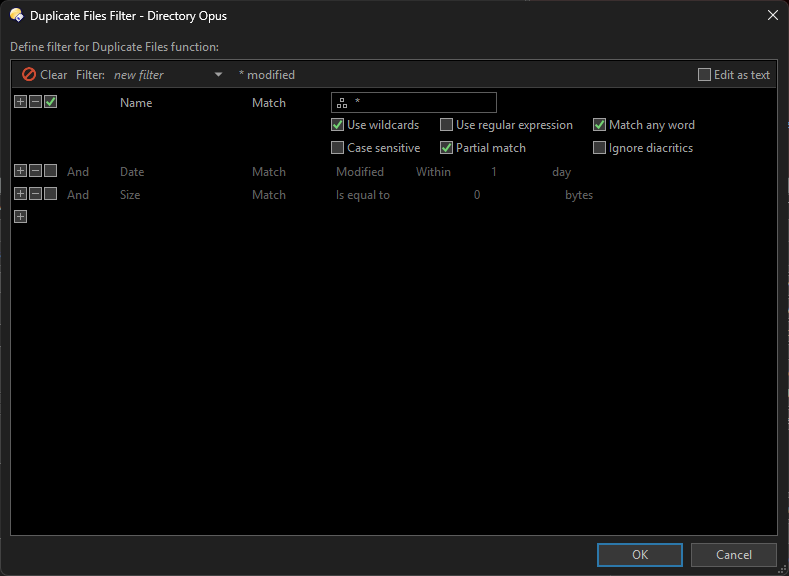
Did some digging in the duplicate file finder interface and found this window popup for extended options, so I checked the two relevant ones. Looks promising.
Still not getting the result I wanted, because even that filter, at least as it stands without me editing it more somehow, seems based on exact strings of a root word, where I want all files with the word "dog" AND all the files with the word "bird" for example to show up. To be clear, I don't want to put any word in the search, I want all similar "topic" files to show up from a search automatically, grouped as "similars". As it is, it's only showing me exact duplicates when the search "seed" is blank.
I could try "any word" but then things like "A." or "the." would show up too much as "similars". Is there any way to omit super common words in order to get the kind of result I want from setting the filter to "any word" (as in , any word except these very common I specify) ?
e.g. The words "the," "and," and "of," and "a" belong to two main grammatical categories:
articles and conjunctions/prepositions
You could make an evaluator column that modifies the filenames however you want (e.g. removing certain words, all punctuation, spaces etc.) and then set that as the comparison criteria.
Thanks for the suggestion. Yes, I can do that with opus or bulk rename utility. The problem I have is that so far, whatever I do, there doesn't seem to be a way to make a loose search for "similars" without providing a seed word for the search. I just want opus to search my drives for anything with the word dog, bird, cat, mouse and show all of those files grouped together, as well as other word categories.
My hope was for something like this:
. . . . . . . . . . . .
Similars Search Result (no input searchword seed, set to "any word" -* a , - at , - the , - of *) :
Still, it would be nice if some code could scrape and find the results like that, even if just a results dump readout, exportable text file that was inoperable, but showed the file locations. I didn't put directories in my hypothetical example but that was the idea.
Edit: A google search gave me some suggestions which might work. I'll check them out eventually. It's just nice when opus does so many things that are functions built into the suite rather than 3rd party. The searches it does are great, but I guess it doesn't have a "fuzzy" search feature like I am seeking.
. . . google suggestions . . .
dupeGuru: Free and open-source, it excels at finding similar filenames (even with typos or slightly different naming conventions) and allows customizing search criteria. It runs on Windows, macOS, and Linux.
AllDup: Highly versatile for finding duplicates on multiple drives or network shares. It offers options to search for similar file names, file extensions, and sizes.
UltraFinder: A robust tool that supports searching multiple drives, filtering by extension, and finding partial/similar name matches.
Puran Duplicate File Finder: A fast, free tool that can scan multiple drives and allows for specific file-type filtering.
Czkawka: A fast, multi-functional tool designed to find duplicates, including by name, on large drives.
Key Features to Look For
Fuzzy Matching: Allows searching for "similar" titles (e.g., Image-01.jpg and Image01_final.jpg) rather than exact matches.
Filter by Extension: Limits results to specific file types (e.g., .txt, .mp4) to narrow down results.
Multi-Drive Scan: Capability to add multiple drives or folders in one scanning session.