PeakFilter is a script command for Directory Opus that makes it easy to quickly filter the current file display based on almost any column.
It can be used as a regular Directory Opus command, an interactive filter with a UI, or as a FAYT command.
This is a WIP project. Meaning can change at any time and it may contain bugs.
Main features:
Virtually supports (almost) any Opus column.
Many modes: FAYT, Dialog, Command.
Define custom names(alias) and types to refer to a specific column.
Filter/search by columns even if they are not visible in the current file display.
Support for filtering items inside expanded folders.
Specialized syntax depending on the column data type (date, number, size, duration, and text).
Cache usage per item to speed things up.
Dialog mode is specially crafted as an easy-to-use filter companion.
Many other details I can't remember right now...
Main Changes
PeakFilter is the evolution of Filter by Column, so most of its manual should still apply (syntax, etc.), with the following changes/additions:
Custom names and custom types now have their own dialog. Accessible via PEAKFILTER EDITCOLS and via Dialog Mode (the pencil icon).
Dialog Mode can now follow the active tab (across Listers), detect changes in the current file display, and many other things. Most of these options are toggleable at runtime.
FAYT Mode now supports real-time suggestions, just like Dialog Mode, but adapted to work as a FAYT extension.
Caching values per item makes the whole process much smoother. And since it runs in another process, it doesn't "lock" the script, so you can cancel or close at any time.
Flag searches now fully support Opus wildcards as another flag. Any mode flag is also supported.
You can load and use Opus filters from the same command.
Multi mode is not supported at the moment.
When implicitly referencing a column by its number, the index is now taken into account (previously there was an internal check that could be confusing).
In dialog mode, the filterall param is no longer needed and should not be used anymore, since it will cause a fallback to the "Name" column due to an invalid keyword being detected. By default, the dialog starts with only visible items, but you can unhide them at any time with the "Show all items" button or by pressing F6. (I may change this later so that all previous filters are cleared before opening the dialog, unless you include the ONLYVISIBLE arg).
TO DO:
Implement the ANY flag for multi-value columns (specifically the AND part).
Multi-columns Mode (still under analysis, probably not going to make it in).
Save and load script own filters (even from FAYT).
Add a better config dialog for the FAYT options (?).
Dialog Mode in Header Context Menu :
Easiest way to quickly start Dialog Mode is by include a new entry using this command into your column header menu (in Settings > Customize Toolbars and Keys > Context Menu > Column Header).
@label:=format(original_label, %headername%)
@hideif:=%headerindex%==-1 or %headerkey%=="index"
PeakFilter DIALOG="%headerkey%"
Consider this script a test, so I can add/remove things at my discretion.
Without proper feedback, I will most likely stop publishing updates. Remember this is a free tool, made in my free time.
Some TODOs might not actually make it in, depending on how difficult or useful they turn out to be.
If you find any error, set the log level to debug and post the error with an appropriate explanation and a way to reproduce it (that makes it much easier for me to fix it).
Initially I planned to save filters created with the script, but I don't have a clear idea yet of when and what to save. For me, it should be when you type something in Dialog Mode and then press the Save Filter button, since that's when the internal filtering is applied (not when you select an entry from the list, although it's also possible to derive a filter from that).
The ANY mode for multi-value columns should apply to each value separately, acting as a toggle between AND and OR. It's not currently implemented because doing so would break the current code structure, where the same functions are reused for Dialog Mode and FAYT Mode (they are essentially the same now, aside from obvious UI differences). I need to figure out a way to implement it while keeping that structure.
FAYT Mode fixes a state to return to when the FAYT field is empty; this can change depending on whether "Filter only visible" is enabled.
This script makes heavy use of per-item caching for every value that needs to be accessed. And it's known that JScript isn't great at cleaning up unused memory, and there's no way to manually free memory instantly, so use the dialog sensibly. The longer you keep it open, the more items you make it "see", the more Opus' memory usage will grow. Even after closing the dialog, the memory won't be freed instantly right after.
Currently known issues
When in Dialog Mode, the dialog should enable or disable itself depending on the current active path type. With the Follow active tab option enabled, sometimes when you change tabs fast enough, Opus won't return a valid Tab object, and in that case the dialog will show as disabled even when it shouldn't. Switching back and forth to another tab or path should fix it.
I hope you find it as useful as I do, and that you enjoy using it as much as I enjoyed making it.
(And if you can post some real usage videos so others can see what the script is really about, I would really appreciate it, I'm too lazy to do it myself )
When filtering by extension, filetypes groups are also included, just like in Opus filter menu.
When filtering by any date-type column, some common values are also included, like today, yesterday, etc.
This "special" entries can affect multiple entries at once.
Most hotkeys can be seen in buttons tooltips.
Multi values syntax: semicolon separated string, where each entry is treated as a single value. The any match flag changes the logic between AND (all values must match) to OR (any possibly value must match).
How wonderful!! Thank you very much for sharing this with us. Your contributions are certainly very useful to many and add a lot of value to DOpus, making it an even more complete tool for everyone! Thank you for your huge contribution!
I immediately went to test the new version of Filter by Column (now PeakFilter) and unfortunately I was unable to run the script. I don't know if other people had the same problem.
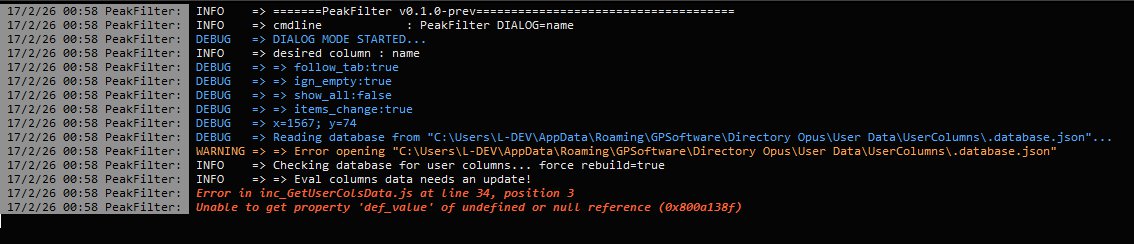
I created a button with the command "PeakFilter DIALOG=name" and when I click on it, I notice that the dialog window starts to blink, but immediately disappears. I am attaching the log generated by the "debug" mode of the log.
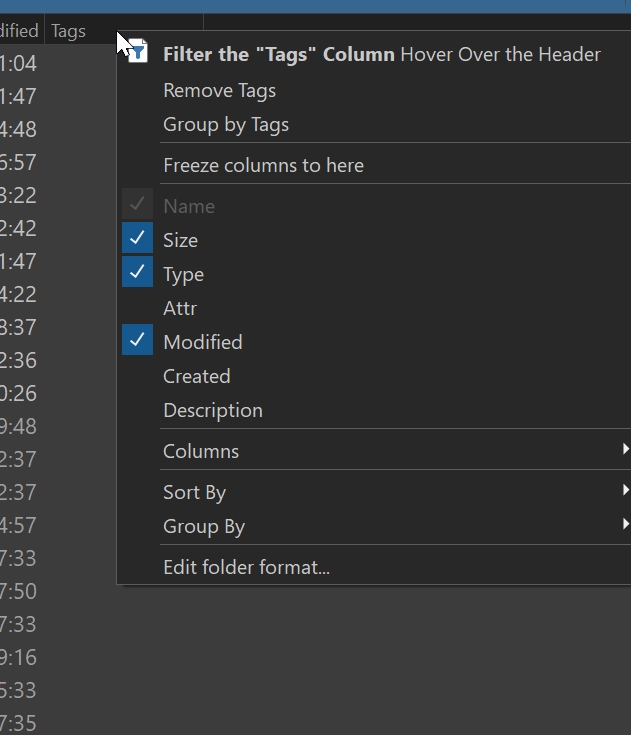
Place the following code in a Column Header Context menu button using Customize:
//https://resource.dopus.com/t/peakfilter-script-add-in-wip/58602

@label:=format(original_label, %headername%)
@hideif:=%headerindex% == -1 or %headerkey%=="index"
PeakFilter DIALOG=%headerkey%,filterall

// This works only in a context menu
Use this as a label:
<b>Filter the "%1" Column</b> Hover Over the Header</b>
Use this as a description:
Hover Over the Column Header to Select the Column to Filter By
With the mouse over a column header, left click to get to PeakFilter
Thanks. I'm not at my computer right now, but I quick check the code and it looks like that error is because I wrongly assume that everyone have at least one evaluator column. I'm going to update a fix tomorrow. Thanks for the feedback.
In the meantime, you can workaround the issue by creating a evaluator column, also enable at least one shell column.
There's no easy/clean way to tell which user columns you currently have, that's why the script needs to read several files from your Opus config. I thought that those files already exists when you install Opus but it seems is not the case.
The filterall param is deprecated since it's not needed anymore (it's the default behaviour now, you can include ONLYVISIBLE new arg to start filtering only visible items). Only include the columns keyword, otherwise it will fallback to name.
Thank you very much for the quick and attentive response. I tested the corrected version and once again encountered an error. The log is below. I am using a test VM with DOpus version 13.21.4 installed. Command used: "PeakFilter DIALOG"
Thanks. That seems a remnant from old times. DIALOG should expect a value now. I'm going to fix it.
Try using the button from the first post (the one you place in the header menu) or use DIALOG=name
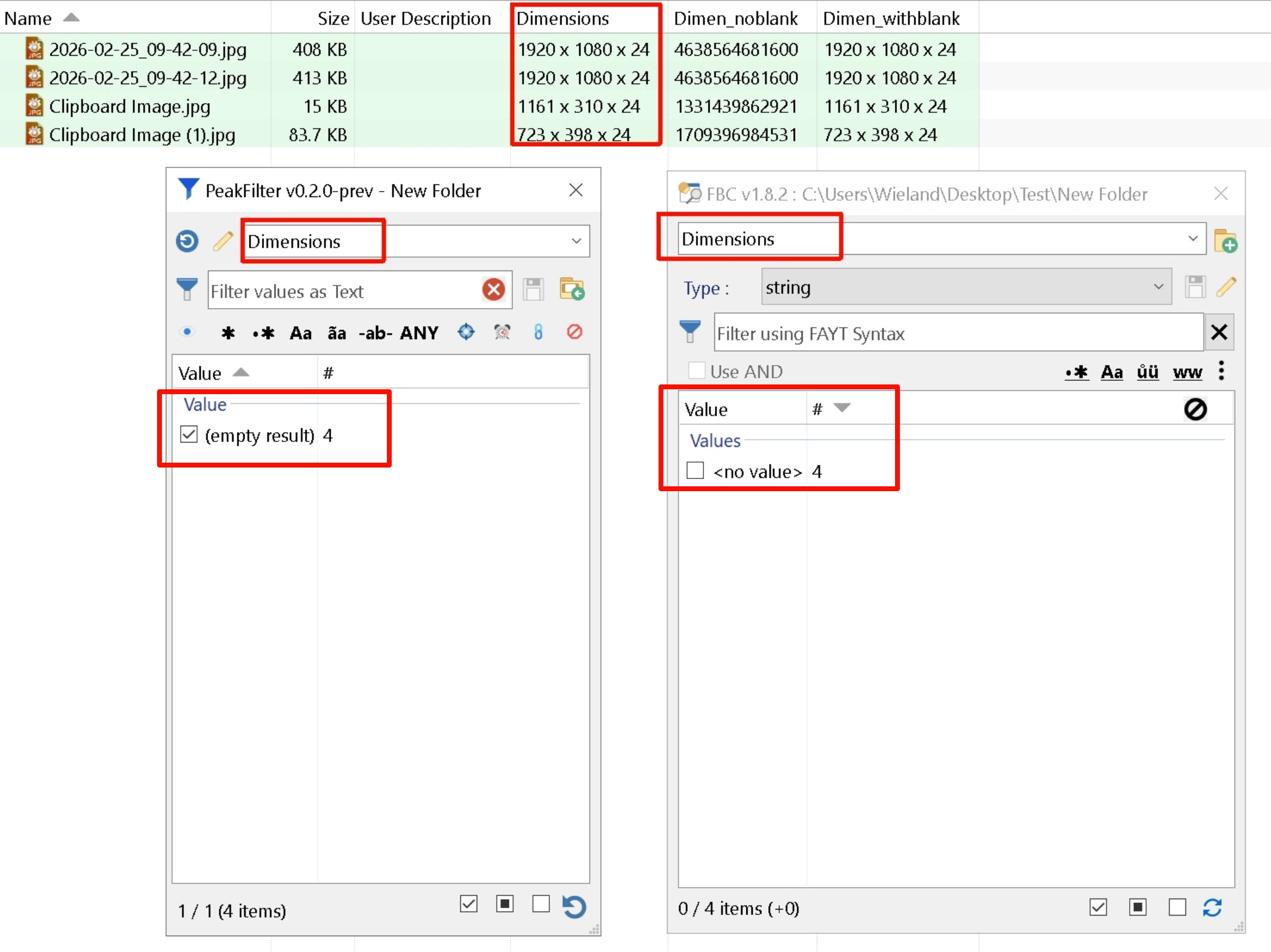
I found a bug when filtering the Dimensions column.
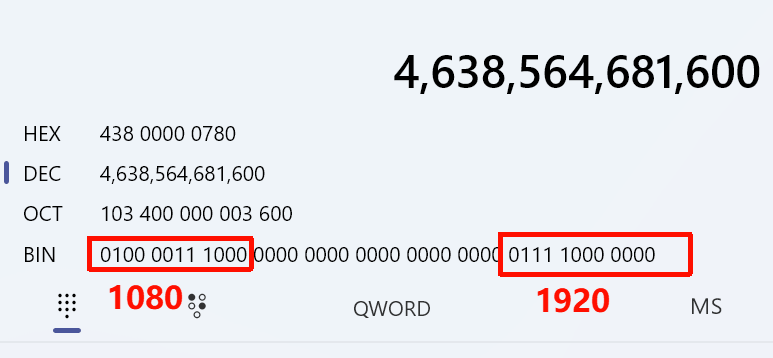
There are some images where the Dimensions column clearly has values (e.g., 1920 x 1080 x 24), However, when I try to filter this column using the script, it results in [empty results].
I also tried the old version Filter by Column, the results were similar.
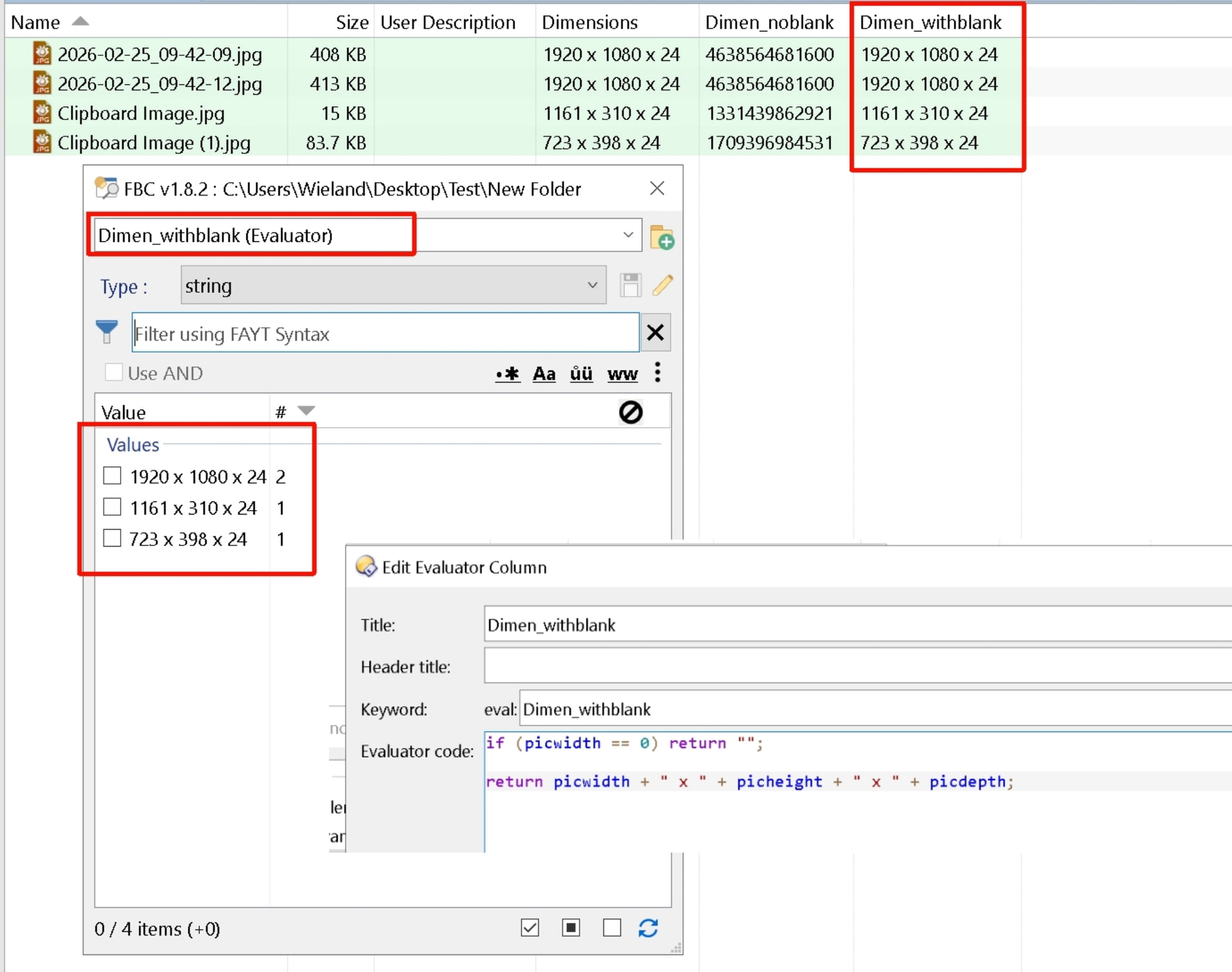
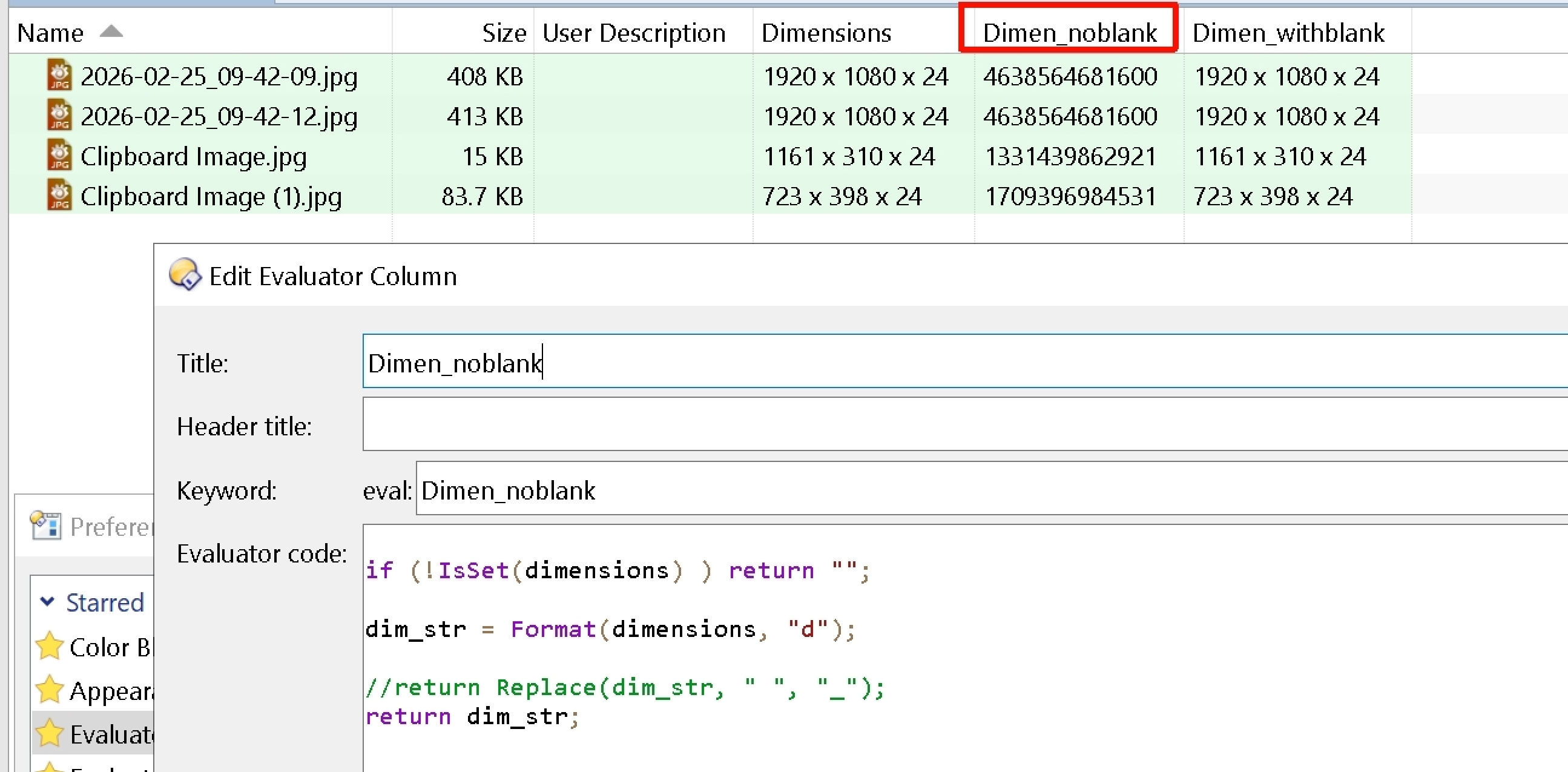
Initially, I suspected the script might have trouble handling the spaces within the column string. To test this, I created a Evaluator column to strip out all spaces from the Dimensions value.
However, I discovered a very specific behavior in how the value is being processed: regardless of how I format the string, the value 1920 x 1080 x 24 seems to be interpreted as a massive integer: 4638564681600.
Thank you for these filters before-most.
I have only used the Dialog Mode and PeakFilter's default way of sorting by the value instead of the amount and how the arranging stays the same between selections is definitely useful.
In PeakFilter 'Select None' can be clicked at the bottom but it doesn't stick between searches. All of the files are loaded and selected every time the search term is changed, which will slow down overall process of making several consecutive searches.
FilterByColumn only selects those files that are clicked without selecting all in-between searches.
The behavior like in FilterByColumn or an option to have 'Select None' as the default would be beneficial.
A way of having the default sorting between 'Value' and '#' user definable too could be useful if an update ever changes it or if a user wants to have it the other way around.
Actually, as far as I remember, in FBC it didn't work like that either. What happened was that the list was kind of a totally separate entity from the file display. So if you typed something in FBC, the results showed up in that list but not in the file display. You also had to manually select the results from that list for make them affect the file display. There were many things I didn't like about FBC, and that was one of them. Now, every time you type something in the dialog, the result in the file display is instant, and the list represents what you see in the file display (like a true filter).
Actually, it's faster now (both because of how it's coded and because both lists are tied together, so no extra steps are needed). As for doing consecutive searches on the same column where the results are chained, that's something I had thought about happening when you press F7 (the set snapshot button), so the filter would only take into account what's currently visible. I might implement it someday, but FWIW, it's not in my use case, so it has very low priority. Note that chained seaches in the same column are only applicable for certains types. (mostly text).
About sorting, I was thinking of doing some things there too, but I'll have to wait and see if there are any changes in the scripting API related to that.
Actually, it's faster now (both because of how it's coded and because both lists are tied together, so no extra steps are needed). As for doing consecutive searches on the same column where the results are chained, that's something I had thought about happening when you press F7 (the set snapshot button), so the filter would only take into account what's currently visible.
By several consecutive searches I mean unrelated searches following each other, all filtering the same original file set. When there is a huge amount of files to filter from consecutively and swiftly, it ends up with the full file list being loaded and shown in-between each of these unrelated searches, with everytime needing it's processing. Compared to how it goes in FilterByColumn.
Yes, like a real filtering process would do it IMO.
I don't remember exactly how FBC worked anymore, I just remember that I didn't like it.
Regarding processing time, since everything is cached, it should be very short. Even the listview has some improvements to speed up loading. Obviously there will be limits, and that will depend on what you call a huge amount of items.
I don't think I'm fully understanding you, so if you could demonstrate your point with a video (not a gif) that would be ideal.
I finally got it working, I have been banging my head against the wall last days why it wasn't while following the installation instructions above for the Dialog Mode in Header Context Menu.
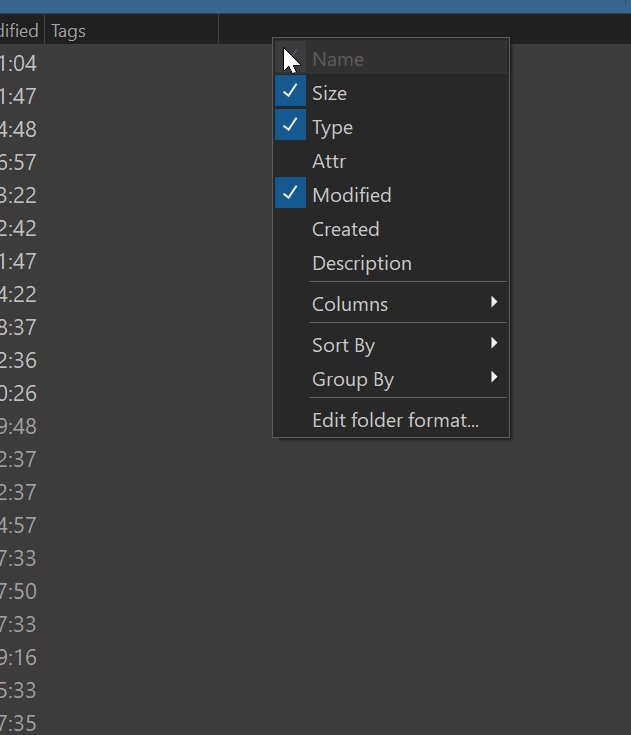
The new entry in the column header context menu is shown/listed when you right click on a named/labeled column but not when you right click on an empty column header (which I have in all my folder formats). This maybe obvious to most, but that took me quite a while to figure this out.
Some initial findings on my first try as feedback:
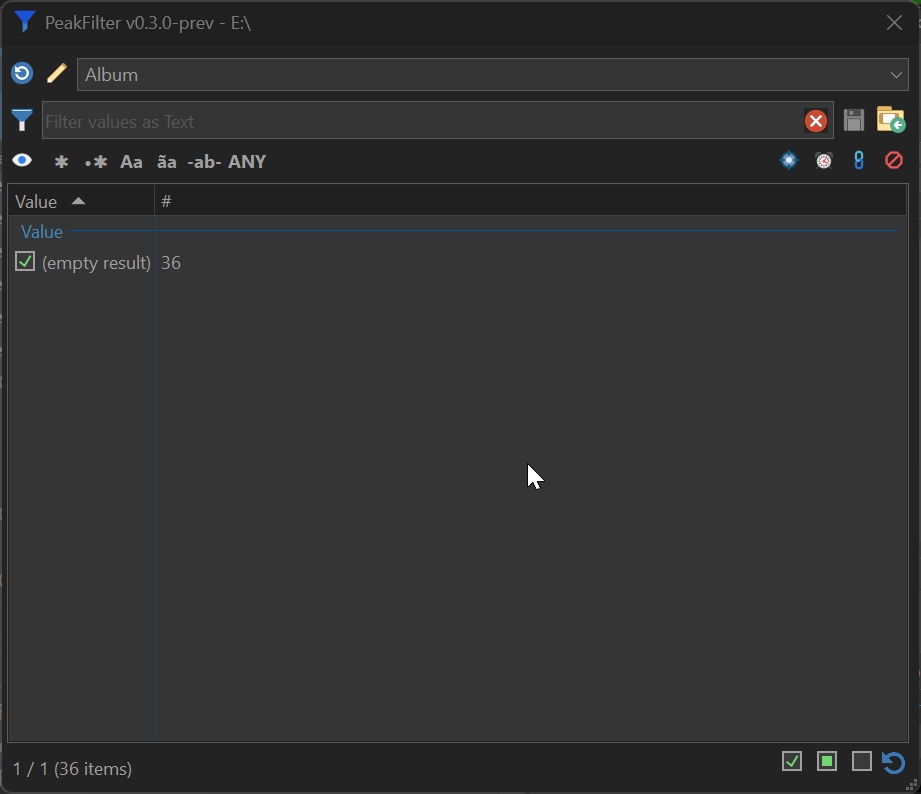
FAYT in the top list field does filter out the search entry results, but that list gets only displayed after clicking the pull down arrow (not during typing).
When you have selected a header name form the top pull down list (for example 'Album' as in the screenshot below), and delete/backspace the 'Album' text, the text jumps back in.
These behaviours maybe intentional, I don't know, I've only just tipped my toes in the water of this powerful add-in. Thank you @errante for all those amazing next-level scripts and contributions you add to DOpus making it even more versatile.
This is a WIP project. Meaning can change at any time and it may contain bugs.

 )
)