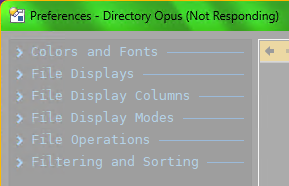
this is happening on two different computers, run win10 and win11. for a couple weeks now.
Directory Opus 13.24.10 (Beta) Build 9520 x64
OS 10.0 (B:19044 P:2 T:1) SP 0.0
open prefs, type to search, it starts building the index, (i thought it was pre-built when updateing?), gets as far as Filtering and Sorting and then freezes for nearly 3-5 minutes before the windows closes itself. or it stays there till i crash all the dopus.
It's hanging when it's creating the Preferences / Folders / Folder Formats / Automatic Formats page (while building the index).
Creating that page initialises the list of folders including their icons, and the actual hang is coming when retrieving the icon for a network path (\Ds\p2) which is presumably offline.
We'll improve this in the next update not try to touch network paths when retrieving the icon, but in the meantime you should be able to prevent it by turning off the Preferences / Miscellaneous / Advanced: [Cosmetic] custom_network_folder_icons option.
and \\Ds\p2 no longer exist. it was a testing share when setting up a nas a couple months ago. searching for in /dopusdata and its not in any of my settings files. windows must be holding onto this old address in nethood somewhere?
.... ah i found itI in %LocalAppData%\GPSoftware\Directory Opus\State Data\AutoFormats\formats.xml & ~.\folders.xml,
on a side note ramble... windows networking share handling can be ridiculous a lot of the time huh? everything will randomly lag and freeze as well. this is all new sense getting a NAS which is 10g Hard-Wired to my main rig.
i wrote a ahk app that will when given a list of files\dirs will sort them into missing or existing list for me. ... doped all the dirs form the auto-format.xml into and windows it is causing that to freeze as well. HA! a whole 15 lines can take windows local network down.
it reported 60 missing network folders out of 285... before i just stopped it.