Hiya y'all!
I'm new to having NAS! been at home computer geek for 25+ years and never really dellt with local networking. usually had single computer set up with 9 hdds. media eats up space. this nas is kinda of awesome! very easy to set up and go in just a few hours.
I'm moving multiple TBs of data\media over SMB on a hardwired nas box. A Lot of media! Imaging libraries of hundreds-of-thousands per drive. EG... adobe is outta control with their sidecar metadata files.
Obviously its not going to be as fast as moving internal internally, which is to be naturally expected. windows own networking oddities needs to be it own rant. 
So my general seeking advice question \ conversation is...
Under
Preferences / File Operations / Progress Indicators / Counting Files (Progress Indicators)
- [x ] Counts files ...
The options are- all local and network
- local only
- fix local only
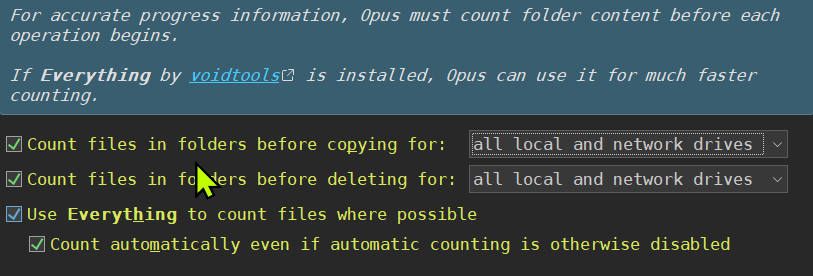
I feel like counting the files SHOULD on or at lease recommended.
Though what's your advice and experience with turning them off?
Would it speed local networking that much?
Would it speed dopus up?
Should it stay?
Which do you use?
- X