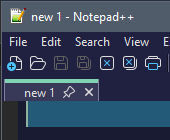
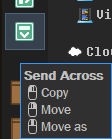
In a dual lister when I close the last tab on one of the sides dopus converts the dual lister to a single lister. (I either accidently closed it with a hotkey or moved it to the destination.)
To avoid this happening I have to lock the first tabs. But if I don’t want to have them always locked there is nothing I can do to protect the dual lister style. Or if I decide to move that tab across to the destination I can’t do that.
Could you create an option to protect dual listers as dual, when closing the last tab please.
If the last tab on a side is closed it would be replaced with a new empty or default tab.
Sounds like this can be done with a script monitoring OnTabClose, checking if we're closing last tab from a dual lister, and either opens some default tab, or denies tab closing (returning True as the docs describe)
// (c) 2025 SALESSIO

// This is a script for Directory Opus.
// See https://www.gpsoft.com.au/endpoints/redirect.php?page=scripts for development information.


// Called by Directory Opus to initialize the script
function OnInit(initData)
{
	initData.name = "ProtectDualLister";
	initData.version = "1.0";
	initData.copyright = "(c) 2025 SALESSIO";
//	initData.url = "https://resource.dopus.com/c/buttons-scripts/16";
	initData.desc = "";
	initData.default_enable = true;
	initData.min_version = "13.0";

}

// Called to add commands to Opus
function OnAddCommands(addCmdData)
{
}

function OnCloseTab(closeTabData) {
	// dout("Closed Tab: " + closeTabData.tab.displayed_label);
	var tab = closeTabData.tab;
	var lister = tab.lister;
	if (lister.dual == 0)	return false;	// single lister
	// dout("DUAL Lister");
	// Are we trying to close the last tab ?
	if (tab.right) {
		// dout("Closing right. Count = " + lister.tabsright.count);
		if (lister.tabsright.count == 1) {	// Last tab, not closing
			dout("Trying to close the last tab of one side of a dual lister. Closing denied.")
			return true;
		}
	}
	else {
		if (lister.tabsleft.count == 1) {	// Last tab, not closing
			dout("Trying to close the last tab of one side of a dual lister. Closing denied.")
			return true;
		}
	}
}


function dout(msg, error, time) {
	if (error == undefined) error = false;
	if (time == undefined) time = true;
	DOpus.output(msg, error, time);
}
EDIT: This could be enhanced with a script config so you can enable/disable the behaviour, or as said in previous post, opening another tab before closing instead.
EDIT2: V1.1 - Behaviour can be enabled/disabled in the script configuration dialog (from the Scripts Manager). Note that this is a global behaviour,this is not configurable per lister. ProtectDualLister.opusscriptinstall (1.3 KB)
Updated code
// AsunderSpecials
// (c) 2025 SALESSIO

// This is a script for Directory Opus.
// See https://www.gpsoft.com.au/endpoints/redirect.php?page=scripts for development information.


// Called by Directory Opus to initialize the script
function OnInit(initData)
{
	initData.name = "ProtectDualLister";
	initData.version = "1.1";
	initData.copyright = "(c) 2025 SALESSIO";
//	initData.url = "https://resource.dopus.com/c/buttons-scripts/16";
	initData.desc = "";
	initData.default_enable = true;
	initData.min_version = "13.0";

	// Script configuration
	// settings & defaults
	initData.config = DOpus.Create().OrderedMap();
	initData.config_desc = DOpus.Create().OrderedMap();
	initData.config_groups = DOpus.Create().OrderedMap();
	initData.config_group_order = DOpus.NewVector('ACID', 'Misc');

	var option_name = "";
	var option_group = "";

	option_group = "Main Settings";
	option_name = "Enable Dual Lister Tab Protection";
	initData.Config[option_name] = true;
	initData.config_desc(option_name) = "In a dual lister, when enabled, prevents last tab of either side to get closed.";
	initData.config_groups(option_name) = option_group;
}

// Called to add commands to Opus
function OnAddCommands(addCmdData)
{
}

function OnCloseTab(closeTabData) {
	// dout("Closed Tab: " + closeTabData.tab.displayed_label);
	var enabled = Script.Config["Enable Dual Lister Tab Protection"];
	if (!enabled) return;
	var tab = closeTabData.tab;
	var lister = tab.lister;
	if (lister.dual == 0)	return false;	// single lister
	// dout("DUAL Lister");
	// Are we trying to close the last tab ?
	if (tab.right) {
		// dout("Closing right. Count = " + lister.tabsright.count);
		if (lister.tabsright.count == 1) {	// Last tab, not closing
			dout("Trying to close the last tab of one side of a dual lister. Closing denied.")
			return true;
		}
	}
	else {
		if (lister.tabsleft.count == 1) {	// Last tab, not closing
			dout("Trying to close the last tab of one side of a dual lister. Closing denied.")
			return true;
		}
	}
}


function dout(msg, error, time) {
	if (error == undefined) error = false;
	if (time == undefined) time = true;
	DOpus.output(msg, error, time);
}
I’m thinking if the devs won’t do it I’ll just go back to locking the first tabs.
Monitoring all tabs at all times doesn’t seem like enough benefit for that processing cost.
Up to you.
FWIW:
a) All tabs are already monitored at all times (or nearly ... since here we're only talking about when it gets closed).
b) If "the devs" won't do it: how do you think they'll do it any other way than monitoring when you close a tab and check if it's the last of its pane?
c) Do you notice any of that mentioned processing cost? Everything here happens in memory and is really fast.
It does not monitor all tabs at all times. It is only called when a tab is about to be closed.You can use Help TASKMANAGER to see which script is running.
It runs a short script just before a tab is closed. That isn’t an event which happens 60 times a second or anything like that. There’s no rational reason to care about the processing cost of that, and it’s a good solution.
Ya, I gather that, but I have so much bloat tacked onto my dopus that it’s already threatening to be laggy with basic browsing around folders, so I’m trying to keep bells and whistles but also as lean as possible. And if my computer dies of old age I’m dead in the water, so every time I add more I get nervous. When microsoft had said win 10 will be their last operating system they weren’t kidding.
I’m not sure but it seems like injecting code into the base program is usually more elegant than jerry rigging scripts onto it. We both know I have no idea what I’m talking about but still.
Ah, I forgot about the taskmanager. I’ve added it to my custom file menu. It says 8 background tasks but they are not showing up. I’ll have to look into that.
(Custom file menu because the devs added the hold modifier for tooltips but Alt makes the main menu highlight so I replaced the factory file menu with my own)
Good, I’m glad you agree to add it to your program, since it’s a good solution.
Nice try but I doubt yet another option will be added somewhere when such a simple solution can be used, with next to no overhead compared to an internal one.
That event handler is there exactly for this kind of use cases.
Not my call though
I don't really see the need for a Preferences option for this. If you accidentally close the last tab in a dual display, it's just one click to re-open the dual display again. If that bothers you, install the add-in PassThePeas provided above.
Sorry to be a bother but your script actually doesn’t work for me. The major trouble with the dual lister is when I want to swap over the last tab to the opposite lister, and your script doesn’t handle that scenario (Accidental tab close is minor). I can use locking tabs, you’ve put enough effort into this already.
Hmm.. I didn’t know about that copy feature. I wish the modifier was Shift. That’s my copy button for everything else (Ctrl is move). Maybe I can just put that on a hotkey and build muscle memory to only use the keyboard. Currently I have Ctrl + Tab to send the tab across. Shift + Tab = swap listers, Tab = swap focus.
I had originally requested an empty or home tab when the last tab is lost. I got the idea from Notepad++. Closing the last tab and it just creates a new blank document instead of closing the program. Closing the last internet browser tab won’t close the browser, just creates a new home tab. That is ideal.
So that my lister style is protected, so that I have to manually change it myself, using my style menu button, instead of it auto changing based on a tab close.
I put some commands on my left button:
@keydown:none
Go SWAP @keydown:ctrl
Go TABMOVE=active
Set FOCUS=Dest @keydown:shift
Go CURRENT OPENINDEST NEWTAB
With the Protect Dual Lister script, that’s close enough.
Using dual vertical listers, would be cool if my arrow buttons could swap their functions based on which side is currently focused so they always point in the direction of what they would do. That would be neat.

 that’s nice thanks.