Please explain what do you mean by workspace (virtual desktops?) and what behavior you expect to see: "Whim" workspace support · Issue #163 · JoyHak/QuickSwitch · GitHub
This issue will be used to track further development.
Please explain what do you mean by workspace (virtual desktops?) and what behavior you expect to see: "Whim" workspace support · Issue #163 · JoyHak/QuickSwitch · GitHub
This issue will be used to track further development.
Hey, thanks for responding. I don't think Whim uses virtual desktops. Interface IWorkspace | Whim
Regarding the behaviour, I always have dopus in workspace 4, but if i save something from a browser in workspace 2, for example, the listers in workspace 4 will not appear in the popup menu.
I'm working on a new option – display locked tabs. Currently my algorithm searches for lock icon on the tab. If you know any useful information, like where lock icon can be placed (at the right/left) or how DPI affects icon size – please share it. Because right now I'm struggling with coordinates so I need to know every possible icon placement.
We could add that information to the output of dopusrt.exe /info %temp%\pathlist.txt,paths if it would be useful.
That would be useful because I didn't found any way to retrieve information about locked tab state so I started with my own method 
I also notice that ExplorerDialogPathSelector, retrieves the listers in other workspaces so it might be worth checking how it does it as well. To my knowledge, it doesnt have your handy auto-switch capability though. @ThioJoe
It uses dopusrt which itself interacts with all Listers. I don't want to use dopusrt, I want to interact with the UI of each Dopus instance directly. It's much faster (~16ms for 17 tabs in the upcoming release).
03.02 16:31:32 Dopus active : 0.000495
03.02 16:32:18 Dopus active : 0.004740
03.02 16:32:25 Dopus active : 0.001349
03.02 16:32:29 Dopus active : 0.000564
03.02 16:32:31 Dopus active : 0.001603
03.02 16:32:34 Dopus active : 0.000383
03.02 16:32:37 Dopus active : 0.000373
03.02 16:32:38 Dopus active : 0.001419
03.02 16:32:40 Dopus active : 0.000870
03.02 16:32:41 Dopus active : 0.001390
03.02 16:32:42 Dopus active : 0.002025
03.02 16:32:43 Dopus active : 0.004215
03.02 16:32:45 Dopus active : 0.001799
03.02 16:32:45 Average: 0.001633
03.02 16:33:33 Dopus active : 0.000418
03.02 16:33:36 Dopus active : 0.002196
03.02 16:33:40 Dopus active : 0.002348
03.02 16:33:42 Dopus active : 0.000922
03.02 16:33:43 Dopus active : 0.001087
03.02 16:33:44 Dopus active : 0.000594
03.02 16:33:46 Dopus active : 0.001467
03.02 16:33:47 Dopus active : 0.002326
03.02 16:33:48 Dopus active : 0.000478
03.02 16:33:49 Dopus active : 0.000644
03.02 16:33:51 Dopus active : 0.002880
03.02 16:33:52 Dopus active : 0.001688
03.02 16:33:54 Dopus active : 0.000854
03.02 16:33:54 Average: 0.001377
But I want to be careful, so I need to know if it's possible to change the lock icon, change it's placement or disable it at all.
I don't think trying to interpret the pixels in Opus's UI is a good idea. Even if it worked with the current version, it could break when we change something, or with configurations you didn't think of.
Also, padlock icons can be turned off in Preferences, so they may not be there at all.
All options are available on Settings > Theme tab. Depending on the feedback, only one variant will remain.
Active pane only: displays paths only from the active pane of each supported file manager. The active tab will be the first one from each manager regardless of this option. If the adjacent Show locked tabs is checked and all tabs from the active pane of some manager are locked, paths from this manager will not be displayed.
Filter by windows:
Both options also include displaying paths from virtual desktops.
Theme > Apply dark theme).Explorer were displayed incorrectly (#149).1, the recently opened one has index 2, and so on. This option allows you to ignore other windows.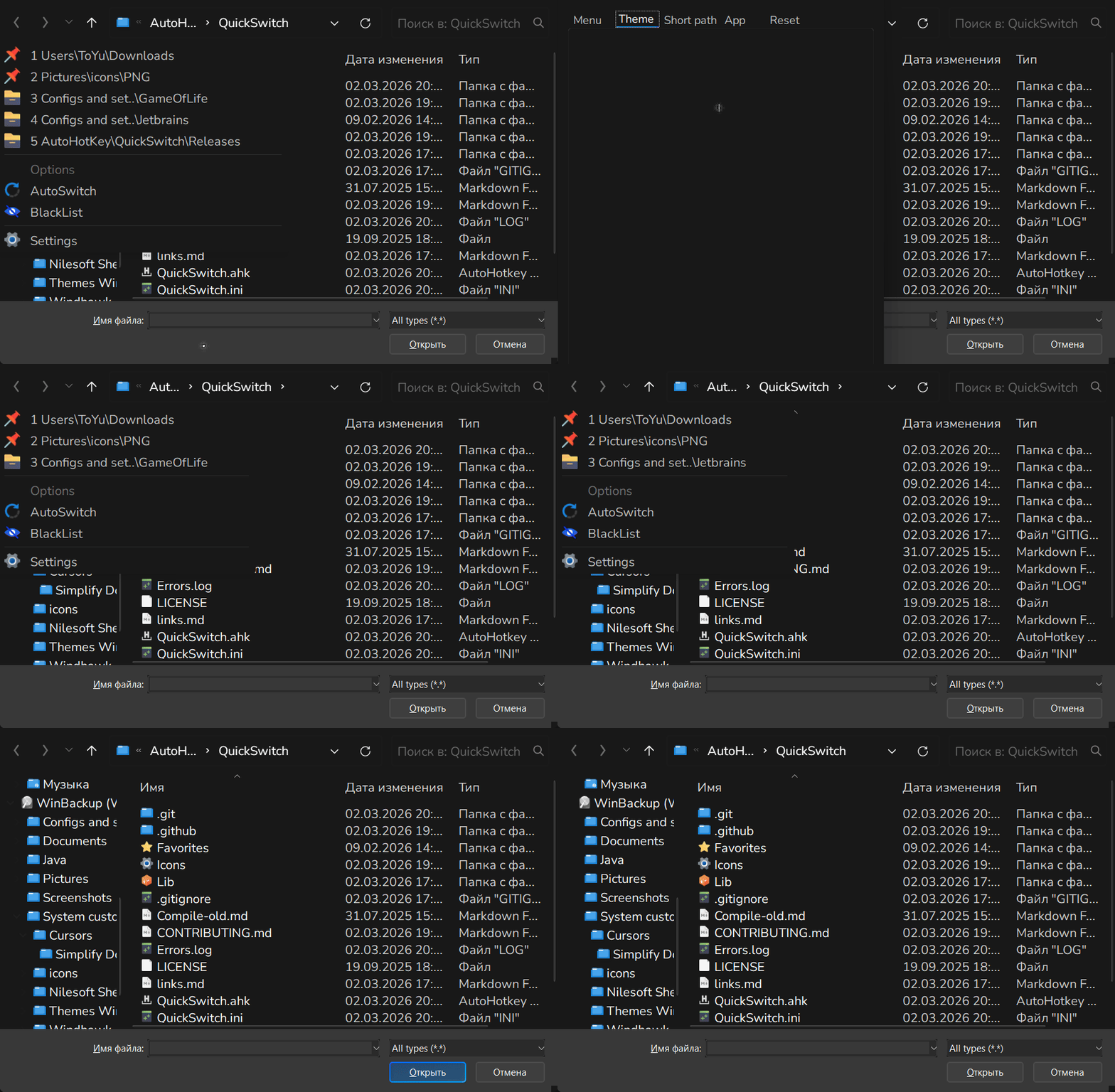
0 (see above) or displays the paths from lister according to the selected index. If you recently opened a file manager in another desktop (#162), select index 2 to see its paths.I downloaded 1.915 from github and when I run it I get a folder in the system tray that lets me suspend hotkeys and pause scripts and exit, but i don't see that options menu I see in your other posts. Is the only functionality to alter options is editing the quickswitch.ini?
Nevermind I found it once i opened a save/open dialog. sorry for the stupid question. My setup is using black text on black background, what option can i alter to change that?
My setup is using black text on black background, what option can i alter to change that?
I recently discovered that it happens on white themes. Open Menu Settings > Theme tab > Apply dark theme.
Please open Win+R, type regedit.exe, paste HKEY_CURRENT_USER\SOFTWARE\Microsoft\Windows\CurrentVersion\Themes at the top and send a screenshot/export keys from this leaf. I want to see why this happens on white-themed machines.
You can make QuickSwitch better! Join the discussion on improving usability and friendliness: Current UI doesnt feel intuitive · JoyHak/QuickSwitch · Discussion #169 · GitHub I'd welcome any concept arts and new design ideas.
You can also add new task to the current task list for user experience improvement.