It seems “Off-Topic” is the place for pie in the sky wishes for DO?
Ok here is one.
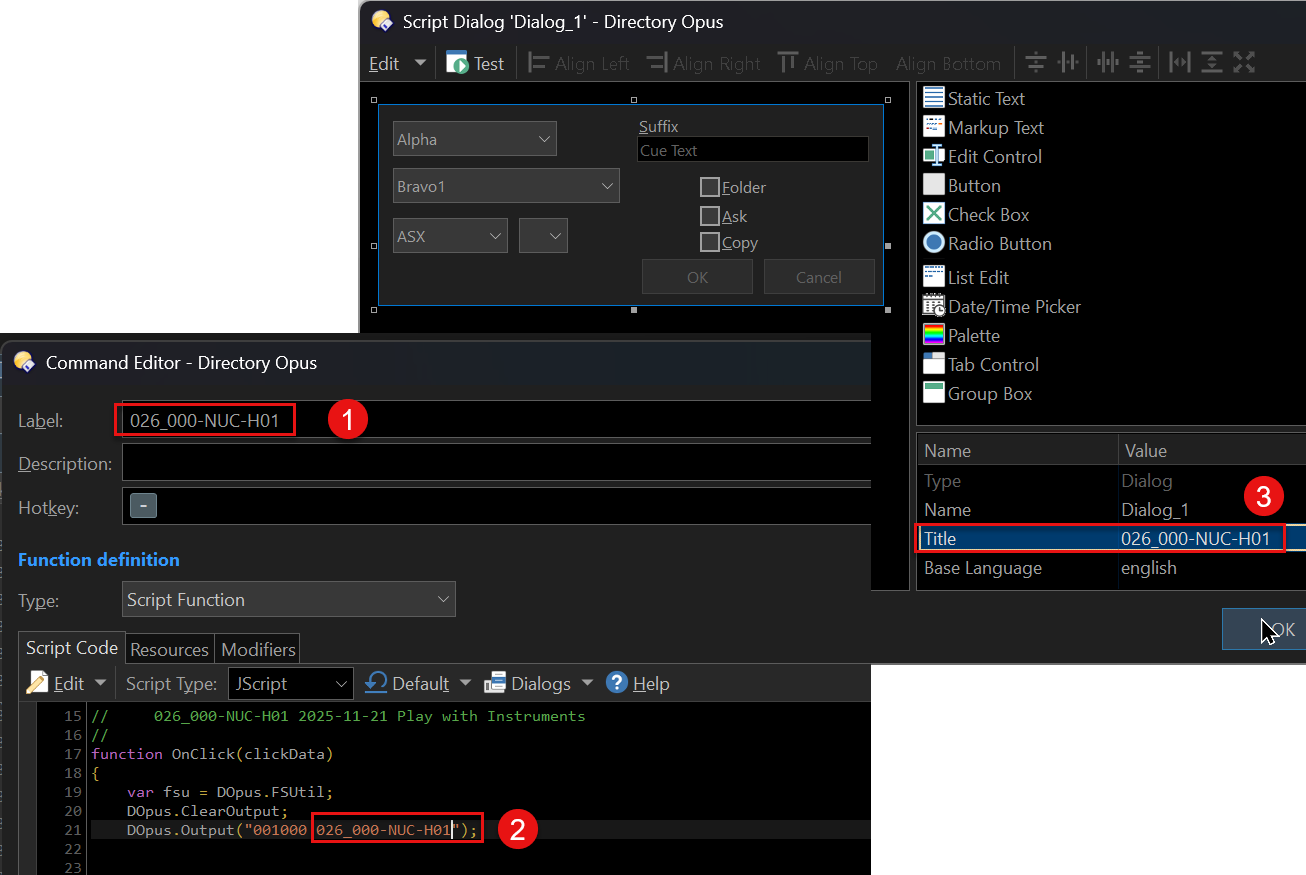
When I update the version on a script that runs a dialog box I have to do it in 3 places manually.
Imagine I being able to access one of them from the other locals?
So for example if this location
Command Editor > Label Field (Loc 1)
Could be accessed from within the Editor with an Opus internal environment variable reference of some sort e.g. @EditorLabel or some such. Then I don’t have to update Location 2
And the same reference in location 3.
Now all I have to update is the Command Editor label.
Make sense?
Or maybe there is an existing/better way to do this?
Wouldn'‘t be the first time….

Does Opus resolve "regular" variables (with global scope) in a label maybe or by using an Evaluator? I did not check. That dialog title should be easy to update / set from within the script.
1 Like
Yes.
@label:=$glob:MyVar
1 Like
Yes, now that I see it, I remember having played with that variant already. I was actually thinking of using the expression directly as part of the Label field in the button editor, but that @label syntax should work as well. It probably also allows to concatenate static text with a version string from a variable. So @slouw, there you go and thanks lxp! o)
So…….. after some months…
I feel like I am being naive here.
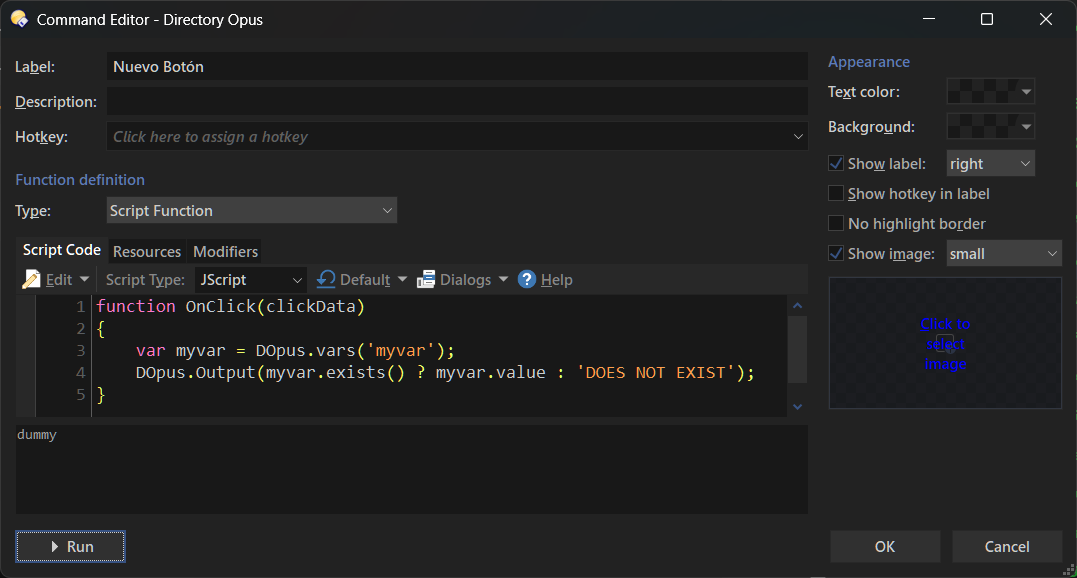
I create a button
Some simple script to create a variable, make it global I think,
and then try and make the label dynamically named with the contents of the label.
What am i doing wrong?
Gratitude….
The label field probably does not support variables and / or modifiers?!
Putting a variable right in that label field is quite a reasonable idea, iirc I had the same some time ago, but did not try (or did I(?), I'm not sure), but I think for now, you need to move the label modifier and assignment it into the button code (above the jscript part).
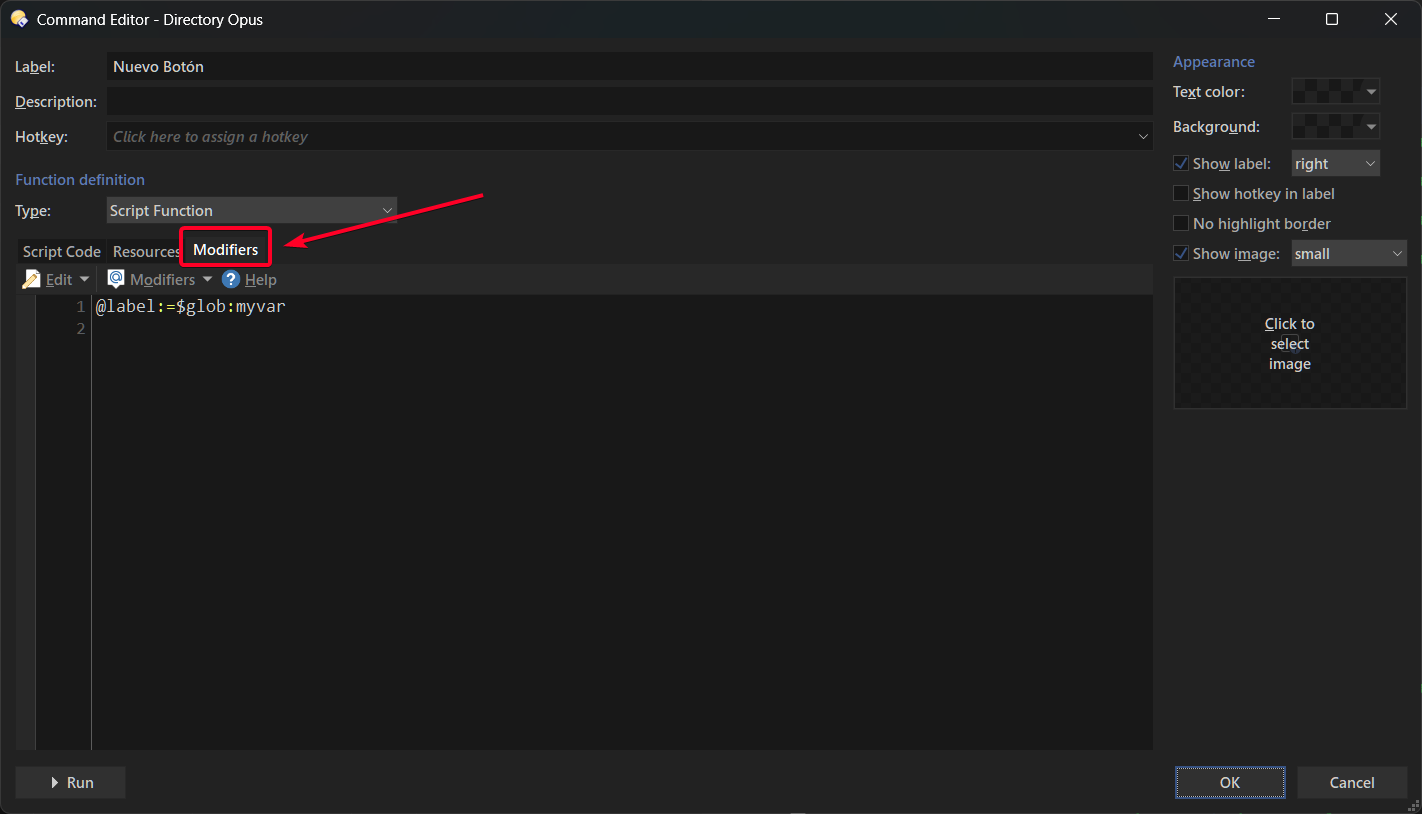
You need to use it in the Modifiers Tab:
Also, FWIW, it would be better to use a Script Add-In instead.
Also, the dialog's title doesn't necessarily have to match the script name, you can use a regular name and then change the actual title to whatever you want inside the script.
Thank you very much I will read and absorb…..
Happy Easter
Thanks again always appreciate the help.
I am reading in the GVar(s) successfully into my script and have it availalble in there and am using them. But populating the Label is not working
What am I doing wrong?
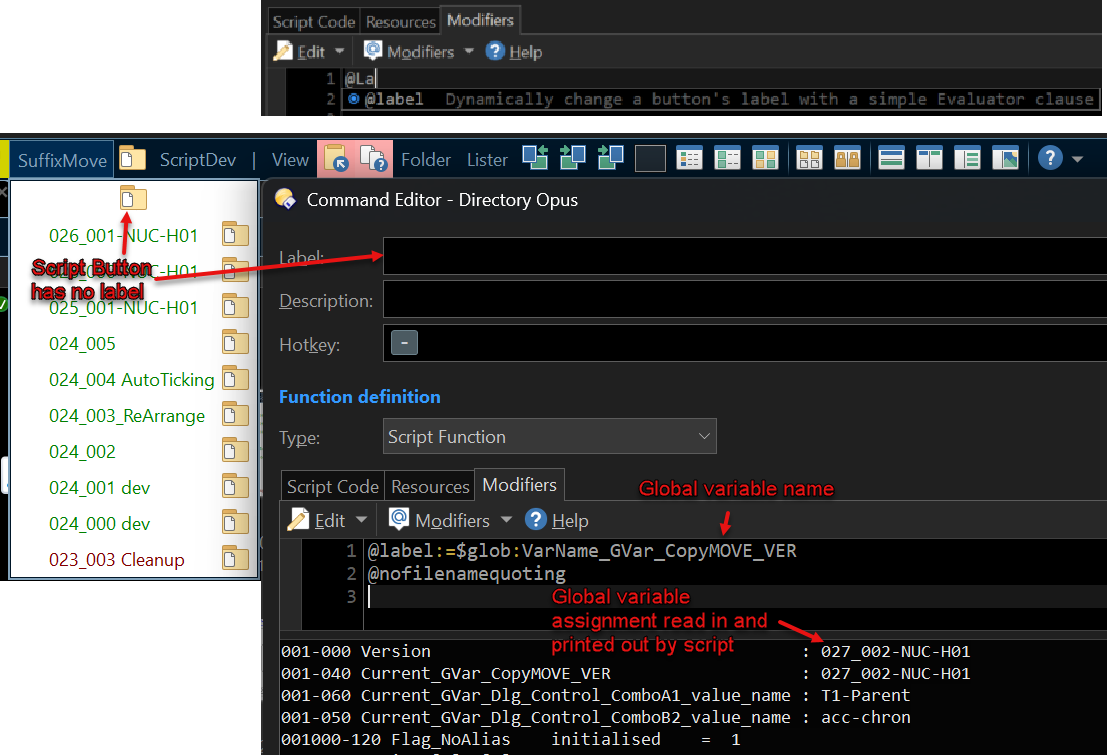
The label won't show when you're in Customize mode, just in case you're expecting it to.
Thanks @Jon
Funny I got it working with this sample script
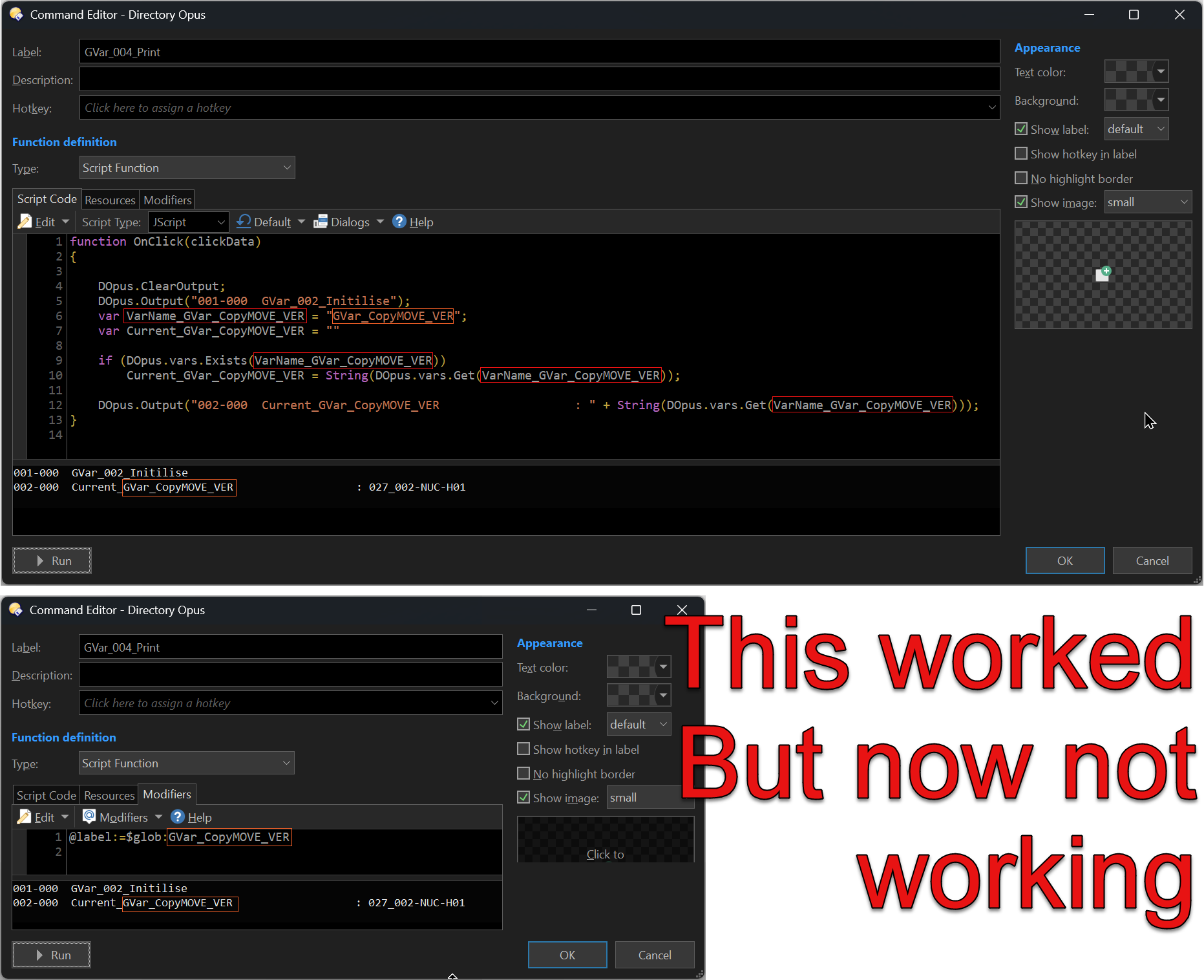
My “Main” script where I want to get it working does not work.
My main script already has @nofilenamequoting
So I just added the required line so it looks like this:
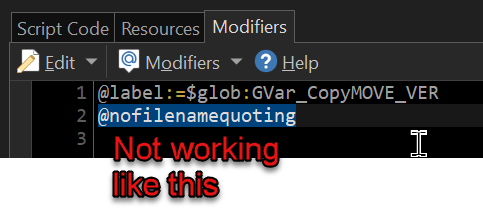
So I added @nofilenamequoting to my sample script and broke it.
Removed @nofilenamequoting from my sample script but now it wont work?
Retarted Opus still my sample scrip will not work now.
Puzzling…..
DOpus Button.dcf (1.1 KB)
Above is my test script
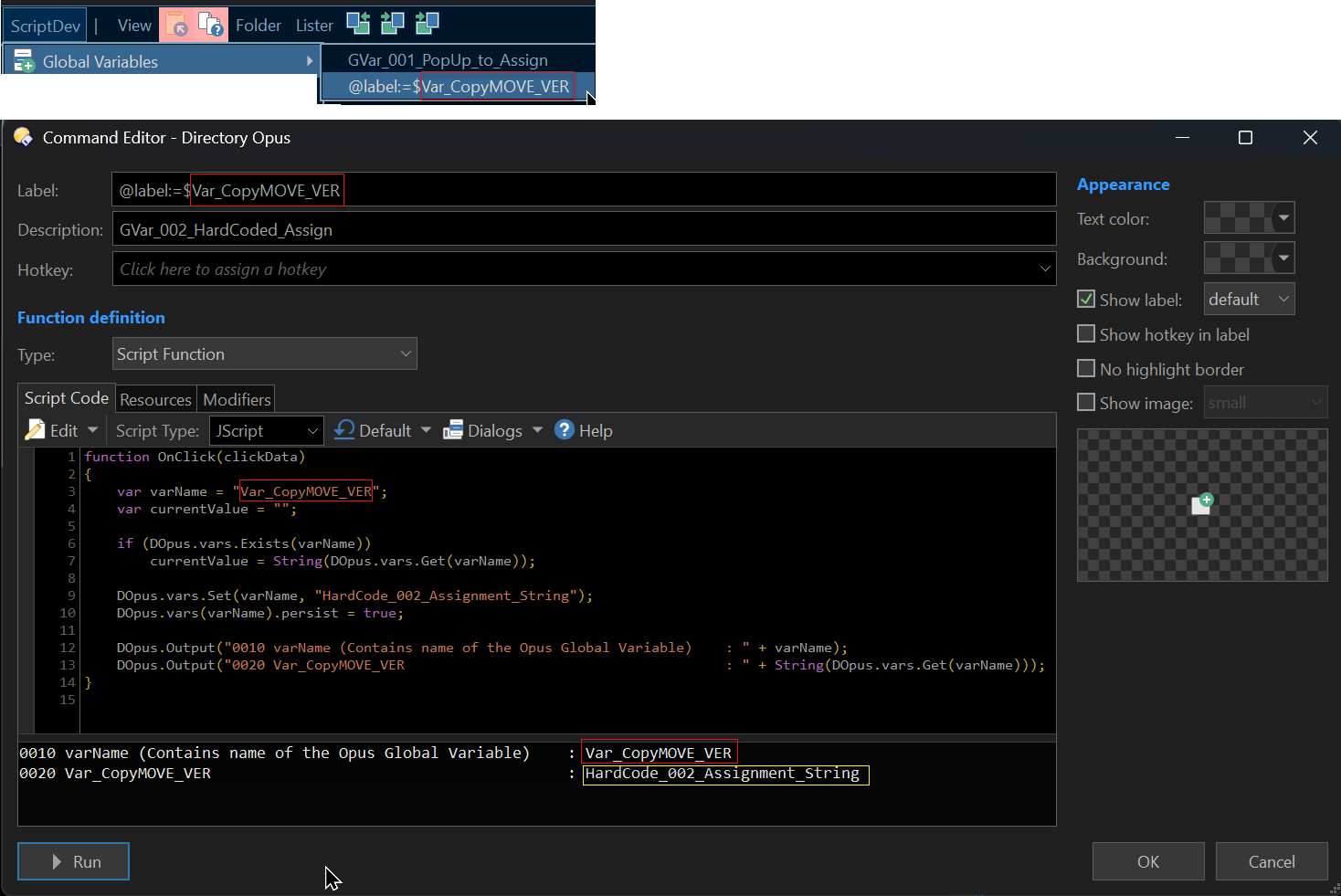
It references a Global variable called
GVar_CopyMOVE_VER
It WAS working then I broke it but cant unbrake it…..
Going to reload my PC now and make coffee then test again
Wish me luck….
If you're changing the value in the script itself you need to force the toolbars to update to show the new value. Add clickData.func.command.UpdateToggle(); to your script after you modify the value.
1 Like
Thank you again @Jon
I inserted this toggle command as you suggest but no change.
For clarity
Script0/Main script - The original script from which this enquiry arose
Script
 /Test script - For specific testing only. Got it to work then broke it and I cannot fix it again. (“This worked but now not working” - above. Also the button attached above is Script 1)
Script /Test script - Manually created from scratch now. IDENTICAL to Script1a. This at this point is WORKING.
Consider 1A (Broken) and 1B(Control - working)
I have tried to present them as clearly as possible with screenshot below.

At this point I think it worth stating the version I am running
Directory Opus 13.15 Build 9259 x64
OS 10.0 (B:26200 P:2 T:1) SP 0.0
Upgraded to latest stable release
Directory Opus 13.22 Build 9428 x64
OS 10.0 (B:26200 P:2 T:1) SP 0.0

Standby for test
No change whatsoever accept that Script 0 picked up a different icon.
Script 1a = Still broken, still showing GVar assignment upon mouse over
Script 1b = Still working
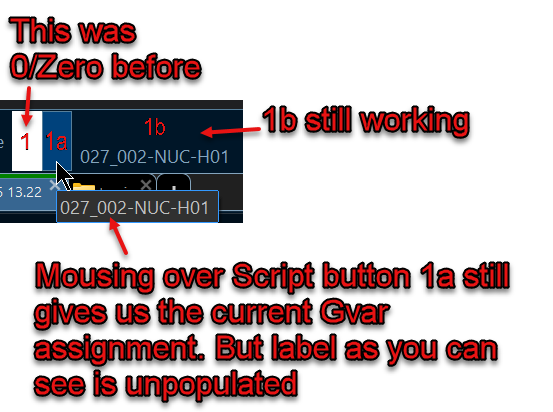
Next steps - I am on my work laptop tomorrow. Will see if fault happens there also.
Wouldn't it be better if you uploaded the actual buttons so people can help you without having to decipher an image?
And like I mentioned before, if you switch to script add-ins or even script-based user commands, you'd only need to use a single regular variable inside your script.
About the label, wouldn't it be easier/faster to just type it manually in this case? Because assuming you follow my advice and convert them into commands, you'd still have to type the name of the command to use anyway.
Yes indeed @errante uploading the buttons is an obvious thing to do.
Here they are.
Some more feedback:
I am at work and so on my work laptop so different opus instance.
Directory Opus 13.22 Build 9428 x64 OS 10.0 (B:26100 P:2 T:1) SP 0.0
This is was I upgraded my home computer to.
I import the buttons to this work laptop and test.
1a = Broken (Same as my home PC)
1b = Working (Same as my home PC)
Recall 1a is the same (I think???) as 1b just 1a had @nofilenamequoting added then removed.
Here are the buttons 1a and 1b attached.
The 3rd button GVar_002_Initilise will create the gvar and assign it a string value.
You need to run that before 1a or 1b.
GVar_002_Initilise.dcf (3.1 KB)
1a.dcf (1.2 KB)
1b.dcf (1.3 KB)
@errante re other comments I need to read up a little to understand what you are saying
script add-ins - Need to read up
script-based user commands - This is I ++think++ what I am doing already?
Re type in the command I use a hotkey for the script that I want to deploy this with (If I get this working)
Thank you!!!
Both buttons change their label for me.
Note that in order to directly note this whenever you change the variable value, you need to use:
clickData.func.command.UpdateToggle();
At the very end in your GVar_002_Initilise button.
Almost. What you're doing is embedding your command in a button.
For a user command, you do (kind of) the same, but here:
You can define your variables there, but instead of being globally scoped, you can tie them to the dialog itself (I'm not really understanding that part from your commands TBH, so that's up to you).
Then in a button, you simply reference your newly created command. You can manually set the label there since it'll be easier (or you can continue to use global variables, again that's up to you).
You can also reuse your user commands based on the arguments you pass, etc.