DOPUS can read video-metadata and display them greatly in columns:
How can i use some of these in a Rename Script? For example, for the file shown above, how can a Rename Script read the video-metadata and append this info in the filename-end as :
original-filename [720, AVC-8bit, AAC-2.0, Audio_1, Subs_0]
@PassThePeas thanks for the feedback. It seems that the video-attributes of the file are NOT metadata but rather some DOPUS video analysis that populates these. Is this the case for DOPUS to display the video attributes? In this case, is there some native (DOPUS) way to i tap into these video-data-analysis-by-DOPUS via some script?
Thank you.
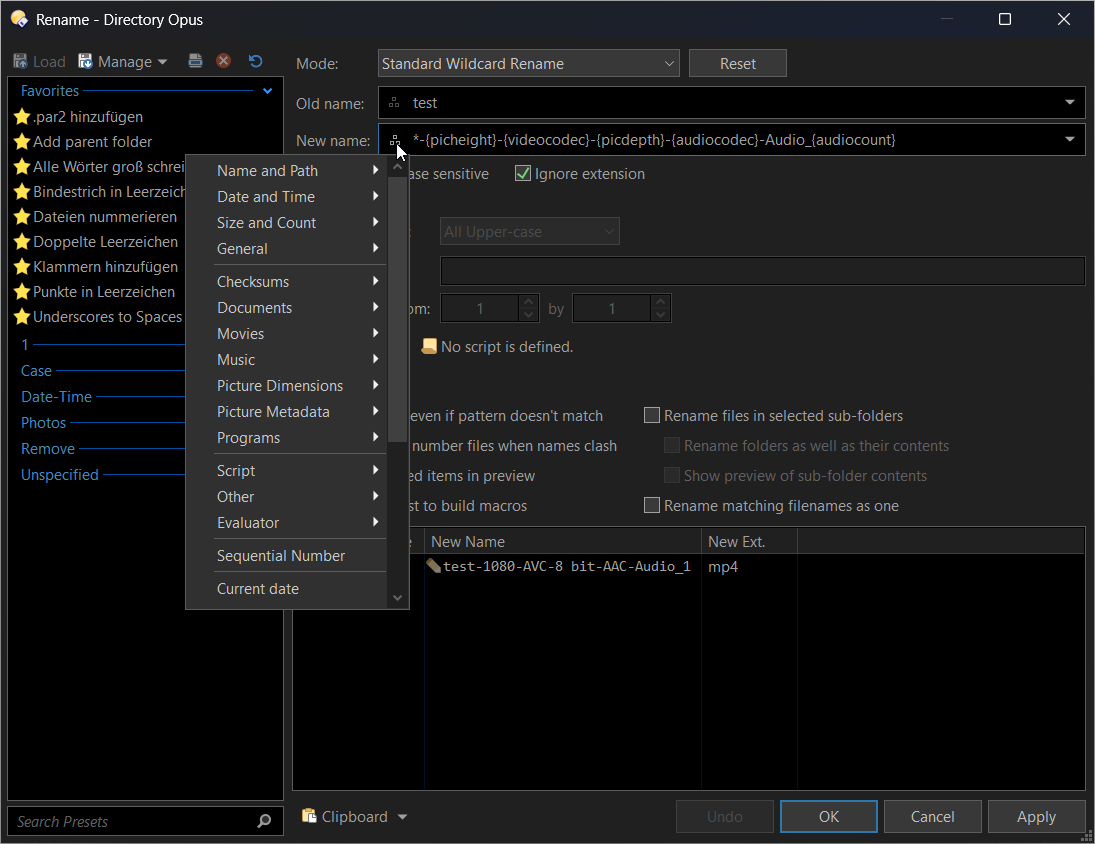
This does the job to fetch - most - of the video-attributes. However it does so in the Standard-Wildcard-Rename mode. Is there any way to fetch these values via a JScript? If so, the script can afterwards use the values to format them as needed (clean-up, use to rename a folder instead of the filename, etc).
Alternatively, is it possible in a single-step to run the Standard-Wildcard-Rename run first AND a script afterwards?
The Script is in the Scripts Addins folder and active in DOPUS script management (Tools/Scripts) but strangely I fail to use a button to call it. I add a button using Standard Function with the script name (@script "Rename-File-to-Video-metadata.js") or the full-path (@script "C:\Users\georg\AppData\Roaming\GPSoftware\Directory Opus\Script AddIns\Rename-File-to-Video-metadata.js") but in both cases i get Script Engine '"Rename-File-to-Video-metadata.js"' could not be opened
Any ideas? (for the time being I am using this script directly within the button)
There are two type of scripts: Script buttons and Script Add-ins.
Script buttons have their code directly in a button and use the OnClick function as the entry point (no need for a OnInit function there).
Script Add-ins have their code in a dedicated file in the /dopusdata/Script Addins folder (where yours is stored now). Those script can be used to create new commands, new columns, ... They need an OnInit function and their entry point will differ wether they are for commands or columns. For commands (your use case), you'd need an OnAddCommands function to declare the name and "template" of your command (parameters scheme) and the entry point (a function) for each command implemented in the script.
When the command is implemented in the script add-in, you can then call it from anywhere you'd call a command in Opus (button, other scripts, dopusrt, ...).
Note that you can also create include script which you can then ... include in other scripts (buttons or add-ins).
I choose between buttons or add-ins mainly depending on the complexity and need to use in different context (e.g. mainly toolbars).
In your case, for now, I'd stick to a script button, but if you intend to extend the functions behind your rename, then it's quite easy to turn a script button into a command in a script add-in:
Go to the script management dialog and create a new script, choosing your command name
Opus will initialize the script boilerplate for you
If you named your command MyNewCommand, the OnAddCommands will be filled (without template) for this name, and the entry point will look like function OnMyNewCommand(scriptCmdData).
You can then basically paste the content of the OnClick function into that function, just replacing clickData by scriptCmdData (I think objects differ slightly but most properties are the same).
Find other opusscriptinstall in this forum, pick one for a command, install it and see how it's done.
Here is the final script to RENAME a MOVIE FOLDER retaining the original name (up the the release-year) using the Video-metadata of the containing video-file. Here is a sample output: Movie-Title (2025) [WEB-DL, NF, 1080p, HDR10, x265-10bit, DDP-5.1, Audio_1, Subs_58]
@script JScript
function OnClick(clickData) {
var tab = clickData.func.sourcetab;
var fsu = DOpus.FSUtil();

var mainCmd = clickData.func.command;
mainCmd.deselect = false;
mainCmd.SetModifier("noprogress", true);

var enumFolders = new Enumerator(tab.selected_dirs);

while (!enumFolders.atEnd()) {
    var folder = enumFolders.item();
    var folderPath = String(folder.realpath);
    var originalFolderName = String(folder.name);

    DOpus.Output("===== Processing: " + originalFolderName + " =====");

    // 1. Find first video file
    var folderEnum = fsu.ReadDir(folderPath);
    var videoFile = null;

    while (!folderEnum.complete) {
        var file = folderEnum.Next();
        if (file && !file.is_dir) {
            var ext = String(file.ext).toLowerCase();
            if (ext == ".mkv" || ext == ".mp4" || ext == ".avi" ||
                ext == ".m4v" || ext == ".mov" || ext == ".wmv") {
                videoFile = file;
                break;
            }
        }
    }

    if (!videoFile) {
        DOpus.Output("No video file found! Skipping.");
        enumFolders.moveNext();
        continue;
    }

    var originalVideoName = String(videoFile.name);

    // =========================================================
    // META EXTRACTION
    // =========================================================

    var fileCmd = DOpus.Create.Command();
    fileCmd.SetSource(folderPath);
    fileCmd.AddFile(videoFile);

    var sep = "__SEP__";
    var uniqueID = new Date().getTime();
    var tempPrefix = "TMP_" + uniqueID;

    // Pattern: TMP_...__SEP__Subs__SEP__Audio__SEP__Height...
    var renamePattern = 'Rename REGEXP PATTERN="(.*)(\\..*)" TO="' + tempPrefix + sep + '{subtitlecount}' + sep + '{audiocount}' + sep + '{picheight}' + sep + '{hdrtypes}' + sep + '{videocodec}' + sep + '{picdepth}' + sep + '{audiocodec}' + sep + '{mp3mode}' + sep + '\\2"';

    fileCmd.RunCommand(renamePattern);

    // Retry Loop
    var tempItem = null;
    var metaString = "";
    var attempts = 0;

    while (attempts < 15) {
        DOpus.Delay(100);
        var checkEnum = fsu.ReadDir(folderPath);
        while (!checkEnum.complete) {
            var cFile = checkEnum.Next();
            var cName = String(cFile.name);
            if (cName.indexOf(tempPrefix) === 0) {
                tempItem = cFile;
                metaString = cName;
                break;
            }
        }
        if (tempItem) break;
        attempts++;
    }

    var height = "", hdr = "", vcodec = "", picdepth = "";
    var acodec = "", mp3mode = "", audiocount = "1", subtitlecount = "0";

    if (tempItem) {
        var parts = metaString.split(sep);
        if (parts.length >= 8) {
            subtitlecount = parts[1];
            audiocount = parts[2];
            height = parts[3];
            hdr = parts[4];
            vcodec = parts[5];
            picdepth = parts[6];
            acodec = parts[7];

            var lastPart = parts[8];
            if (lastPart) {
               mp3mode = lastPart.replace(/\.[^/.]+$/, "");
            }
        }

        // Restore Original Name
        fileCmd.ClearFiles();
        fileCmd.AddFile(tempItem);
        fileCmd.RunCommand('Rename TO="' + originalVideoName + '"');

    } else {
        DOpus.Output("ERROR: Temp file not found. Rename failed.");
        fileCmd.RunCommand('Rename FROM="' + folderPath + '\\' + tempPrefix + '*" TO="' + originalVideoName + '"');
        enumFolders.moveNext();
        continue;
    }

    // Clean extracted data
    if (subtitlecount == "" || subtitlecount == "0") subtitlecount = "0";
    if (audiocount == "") audiocount = "1";

    DOpus.Output("Extracted -> AudioModeRaw: " + mp3mode);

    // =========================================================
    // FOLDER NAMING LOGIC
    // =========================================================

    var titleWithYear = "";
    var yearMatch = originalFolderName.match(/^(.*?)[\s\.]*([\[\(]?(\d{4})[\]\)]?)/);

    if (yearMatch) {
        var title = yearMatch[1].replace(/\./g, " ").replace(/^\s+|\s+$/g, "");
        titleWithYear = title + " (" + yearMatch[3] + ")";
    } else {
        titleWithYear = originalFolderName;
    }

    var videoFileName = String(videoFile.name_stem);

    var source = "";
    if (/WEBDL|WEBRip|WEB/i.test(videoFileName)) source = "WEB-DL";
    else if (/BluRay|Blu-Ray/i.test(videoFileName)) source = "BD";

    var sourceNetwork = "";
    var combinedName = originalFolderName + " " + videoFileName;
    if (/\bNF\b/i.test(combinedName)) sourceNetwork = "NF";
    else if (/\bAMZN\b/i.test(combinedName)) sourceNetwork = "AMZN";
    else if (/\bATVP\b/i.test(combinedName)) sourceNetwork = "ATVP";
    else if (/\bDSNP\b|\bDSN\b/i.test(combinedName)) sourceNetwork = "DSNP";
    else if (/\bHBOMAX\b|\bHMAX\b/i.test(combinedName)) sourceNetwork = "HMAX";

    var folderParts = [];
    if (source) folderParts.push(source);
    if (sourceNetwork) folderParts.push(sourceNetwork);

    if (height) {
        var h = parseInt(height);
        if (!isNaN(h)) {
            if (h <= 576) folderParts.push("576p");
            else if (h <= 720) folderParts.push("720p");
            else if (h <= 1080) folderParts.push("1080p");
            else if (h <= 2160) folderParts.push("2160p");
            else folderParts.push("4320p");
        }
    }

    // HDR Processing
    if (hdr) {
        hdr = hdr.replace(/Dolby\s*Vision/gi, "");
        hdr = hdr.replace(/,\s*,/g, ",");
        hdr = hdr.replace(/^[\s,;]+|[\s,;]+$/g, ""); // Clean trailing chars like ;
        if (hdr != "") folderParts.push(hdr);
    }

    var vcodecStr = "";
    if (vcodec == "AVC") vcodecStr = "x264";
    else if (vcodec == "HEVC") vcodecStr = "x265";
    else if (vcodec) vcodecStr = vcodec;

    if (vcodecStr) {
        var bitMatch = picdepth.match(/(\d+)/);
        var bitNum = bitMatch ? parseInt(bitMatch[1]) : 0;
        if (bitNum == 10 || bitNum == 12) folderParts.push(vcodecStr + "-" + bitNum + "bit");
        else folderParts.push(vcodecStr);
    }

    var acodecStr = "";
    if (acodec == "AC3") acodecStr = "DD";
    else if (/E-AC-3|Atmos|Dolby Digital Plus/i.test(acodec)) acodecStr = "DDP";
    else if (acodec == "DTS") acodecStr = "DTS";
    else if (/TrueHD/i.test(acodec)) acodecStr = "TrueHD";
    else if (acodec == "HE-AAC") acodecStr = "AAC";
    else if (acodec) acodecStr = acodec;

    // FIXED AUDIO CHANNEL LOGIC
    var audioMode = "";

    // 1. Try to find explicit X.X pattern first (e.g. 5.1, 7.1, 2.0)
    var explicitMatch = mp3mode.match(/(\d+\.\d+)/);

    if (explicitMatch) {
        audioMode = explicitMatch[1];
    } else if (/Stereo/i.test(mp3mode)) {
        audioMode = "2.0";
    } else if (/Mono/i.test(mp3mode)) {
        audioMode = "1.0";
    } else {
        // 2. Fallback: If it's just a single digit like "6" or "5", map it manually
        // Windows sometimes reports "6" for 5.1 channels
        var digitMatch = mp3mode.match(/^(\d+)$/);
        if (digitMatch) {
            var channels = parseInt(digitMatch[1]);
            if (channels == 6) audioMode = "5.1";
            else if (channels == 8) audioMode = "7.1";
            else if (channels == 2) audioMode = "2.0";
            else if (channels == 1) audioMode = "1.0";
            else if (channels == 5) audioMode = "5.1"; // Assume 5 means 5.1 in common parlance if not 6
            else audioMode = channels; // Fallback to raw number
        } else {
            audioMode = mp3mode; // Catch-all
        }
    }

    if (acodecStr && audioMode) folderParts.push(acodecStr + "-" + audioMode);
    else if (acodecStr) folderParts.push(acodecStr);

    folderParts.push("Audio_" + audiocount);
    folderParts.push("Subs_" + subtitlecount);

    var finalName = titleWithYear + " [" + folderParts.join(", ") + "]";
    finalName = finalName.replace(/, , /g, ", ").replace(/\[, /g, "[").replace(/, \]/g, "]");

    if (originalFolderName != finalName) {
        DOpus.Output("RENAMING FOLDER TO: " + finalName);
        mainCmd.ClearFiles();
        mainCmd.RunCommand('Rename PRESET=no FROM="' + folderPath + '" TO="' + finalName + '" TYPE=dirs');
    }

    enumFolders.moveNext();
}
DOpus.Output("===== COMPLETE =====");
}

 in other scripts (buttons or add-ins).