Does anyone have any recommendations for backup software that will backup any/all Alternate Data Stream (ADS) data associated with folders and files (i.e., any ADS info that's attached to a folder or file by any program, not just Directory Opus).
I ask because I discovered that none of the ADS info that I associated with various folders and files via Directory Opus is being backed when I do Folders/Files backups (as opposed to an Image backup) using Macrium Reflect X. If I restore a folder or file from a Reflect X Folder/Files backup, none of the ADS info is restored. Reflect X DOES backup ADS info for disk or partition Image backups.
I'm pretty sure that most (if not all) of the backup software provided by various vendors preserves ADS info in image backups. When you restore from an image backup, ADS info is restored. However, some backup software (e.g., Reflect X) does not backup the ADS info on Folder/File backups.
I’m looking for recommendations for backup software that will backup all ADS information for both Image and Folder/File backups. I’m not looking for other solutions or workarounds… I just want a great backup program that does all the things that a great backup program should do that includes backing up ADS info regardless of what type of backup I’m running (i.e., Image backup, Folder/File backup, Full backups, Incremental backups, whatever).
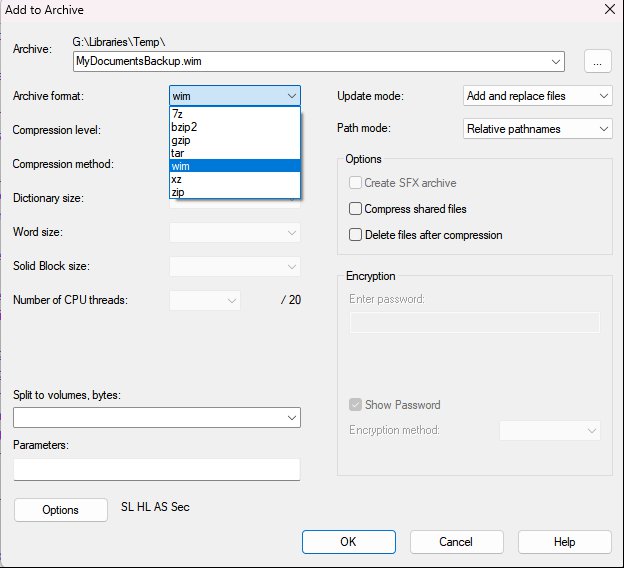
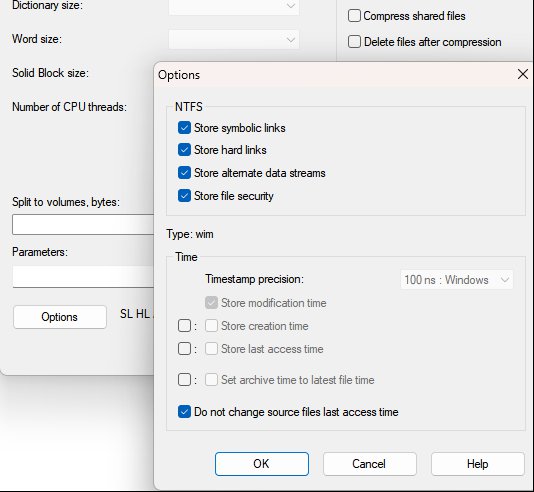
Just a quick note to say that I discovered that 7-zip preserves Alternate Data Stream (ADS) info if you select .wim as the Archive Format for the output archive and you check the “Store alternate data streams” option. You can then open the .wim archive and select whatever files and folders you want to restore and just copy and paste them somewhere. The copies will have whatever ADS info was attached to the originals. You can also open the .wim archive and see which folders/files have associated ADS info. The last screen capture shows a portion of the columns in 7-zip that appear when you open a .wim archive. In that screen capture, the Alternate Streams column is showing that the first file listed in the archive has 1 associated ADS.
If you use .wim archives, you might also want to enable them under Preferences / Zip & Other Archives / Archive and VFS Plugins so you can use Opus to browse them.
Also, I should have mentioned in the previous post that I’m NOT planning on doing my backups using 7-zip. After looking into it for quite a while and looking at a lot of backup software/methods, I decided that easiest way to preserve ADS information is with a backup program that does disk/partition image backups. It’s easy enough to find a backup program out there that at least does that. Regardless of the backup program, images backups seem to always preserve ADS info without having to do any special options or maneuvers. With the exception of bvckup2 and 7-zip, I did not find any backup software that does file/folder backups (as opposed to disk/partition image backups) that preserve ADS info.
Anyway, the previous post was not meant to be a recommendation. I only posted to let people know that, if you want to do just a folder/file backup to preserve ADS info, you can do it with 7-zip by creating a .wim archive (which I didn’t even know existed). If you have a couple of folders here and there that have attached ADS info then maybe using something like 7-zip or bvckup2 is the way to go. I make heavy use of ADS info all over the place across seven 10TB drives so the image backups are the way to go for me.
Someone already suggested robocopy.exe I guess?! It's part of Windows since Windows XP iirc. You only need to make sure to copy / backup to a NTFS file system to keep the NTFS ADS.
WinRar / RAR should also be able to preserve ADS (may need an extra option).
Another solution is to use VHD(x) files in NTFS format, enable compression and dynamic size and these files can also serve as a multipurpose container for huge amount of NTFS data, which you can access / mount easily everywhere, even on Linux (with some restrictions). These VHDx images can be used with any other ADS aware software, like robocopy.exe or dopus.exe. VHDx files can be created / mounted / managed with "all native" Windows tools (like the disk management to create these files) or using powershell etc..
So, I guess you don't necessarily need specialized disk imaging tools, when it comes to preserving ADS? But these tools have they purpose of course. I use R-Drive Image whenever I think I have "disk imaging" needs.
Recently I looked into DISM.exe as well, the "disk imaging tool of Windows"(?). It seems to be capable of doing a lot of imaging stuff as well and if I see that correctly, it makes use of these *.WIM files you were talking about? Interesting.. o)
My problem is different with ADS, many software supports writing it, but none cares about synchronizing and updating ADS. If you have meta data on a 4gb file, let's say a comment in the ADS and you need to update that comment in the backed up file.. no way currently, apart from copying the whole file again, which is nonsense of course.
"Anything" that puts meta data into ADS, should also write a time stamp next to it, so you can tell, if and what meta data has changed - it's the first step in being able to synch and update ADS separately from the actual file data (which are tera bytes these days, impossible to "always copy" for every run of the backup).