Someone flagged this as spam. Thank you to whoever decided it was not spam.
Directory Opus is the best overall application for organizing digital photo collections.
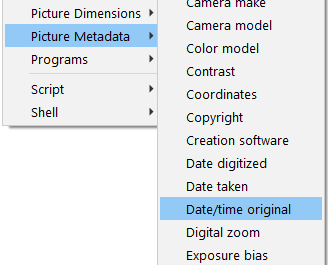
Photo date metadata is not well understood, and I know that the web page I created will help all Directory Opus users who work with photos.
Most Professional Photo Organizers and Photo Managers rely on Adobe Lightroom Classic and/or Photo Mechanic, but with those applications, it’s not even possible to sort by the most reliable date metadata field: EXIF DateTimeOriginal.
Metadata practices vary from camera to camera, and this forum has highlighted how different programs can mess with it or remove it during editing, moving and conversions from one format to another. It appears that DOPUS in conjunction with exiftool (and exiftoolgui) can help photographers standardise their naming and file organisation. There are adhoc standards that have emerged over the years, but this is the first attempt to bring it together and include metadata.
There are also some excellent scripts and discussions scattered throughout this forum that would benefit new users if they were referenced into a central page. Even a simple video demonstration would go a long way in opening up the extensive features within DOPUS. I find that if I miss a few days or weeks of reading the forum then I lose sight of the significant developments in scripts and also in the continual improvements within DOPUS.
Leo expressed his desire to make some more videos that demonstrated DOPUS functionality. That is a good idea! Perhaps bite-sized videos that link show how to use DOPUS (in conjunction with other utilities) to achieve naming and organisational standards.
Metadata practices for dates hardly vary from camera to camera. Having tested millions of photos, I can assure you that since about 2010, cameras add the date to the EXIF DateTimeOriginal field and and another EXIF date field, but people just need to pay attention to EXIF DateTimeOriginal. Before 2010, some cameras added only EXIF DateTimeOriginal.
There very few things people can do with their photos that can “mess with” the EXIF date metadata, like using certain applications for exporting from an Apple Photos Library, and those applications don’t change a photo’s EXIF date metadata if it has one, just add false EXIF dates to photos without any.
But EXIF dates can be deliberately changed–like when the date/time is wrong because the camera date was not adjusted for a different time zone while travelling.
So many things people do with their photos “mess with” the file/system Date Created and Date Modified, but those dates are irrelevant unless you really need to know when a new file was created or when a file was modified–and I’ve never needed to know that.
People need to stop looking at file/system Date Created and Date Modified!
You don’t care to know when you took the picture? And to sort pictures chronologically?
I guess pro cameras would add their proprietary date taken to the metadata. That is technically the same as the date created.
I also take issue with these date things. Do we know the ‘date created’ is the same thing as when the picture was taken, or is date created when the file first appeared on that particular computer? Date modified? What does that mean? Overwritten? Metadata updated? Modified how and by whom? And don’t even get me started about date accessed.
I’m not sure if someone is even able to turn of their gps tracking on a pro camera, in order to forget they did so. I wonder if smart phone image metadata are up to speed with the pro standard now.
As a side note we won’t be needing gps coordinates any more, apparently. Check this out. 4Chan people etc. have been able to do this kind of thing for a while now, but the tech is getting to the point that anyone can run an osint on anyone else.
Your comments and questions are common ones, and that’s one reason I created the resource.
When a photo is taken, the EXIF DateTimeOriginal does match the file’s Date Created. But when files are moved (depending on the format of the drive), exported, downloaded or converted, a new FILE is created and so will have a new date - the date the new FILE was created.
The EXIF DateTimeOriginal does not change! So it’s the only field/column that will reliably sort photos chronologically or that should be used to rename photos by the date they were taken.
That’s why the Date Created should be ignored. I could be the same as the date the photo was taken, but the only way to know for sure is to compare it to the EXIF DateTimeOriginal.
Date Modified can be helpful in my line of work, but not often.
Date Accessed for documents is often useful for businesses.
Interesting.
Sad that all file types don’t have this exif metadata. The windows metadata is pretty bad. I might even have to create my own custom metadata myself, but then I’m doing it all manually, and relying on the Dopus alternate data stream, most likely.
I would create a Genesis field. The date the file was created, and this date would never change for any reason. Copied, backed up, overwritten, doesn’t matter, never changes.
I would have user and system date channels, independent of one another. File was saved? That’s user date modified. File was scanned? That’s system date accessed. File was copied? That’s user date created (Genesis would remain the same. Copy would probably have a copy metadata too. An iteration tag of some kind. “Copy #1”). If backup software did the copy then it’s system date created. Something like that. With a note in the date describing the reason that date was touched. Probably would have the time (not just the day) in there somewhere too, dunno.
If those business people think that ‘date accessed’ is useful, I got news for them. Ask them if they know if their OS doing something like reading the file touches the date accessed, and then it doesn’t tell them it’s the system or a user that touched the date; then consider if “date accessed” is actionable info, or if they are just playing with pixie dust. Not knowing who or what touched that date and why.
The correct way to put it is: regular file management operations don't affect most metadata values, life EXIF ones.
EXIF-CreateDate and EXIF-ModifyDate aren't affected either, but they can be changed.
For example, one of your clients could edit the EXIF-DateTimeOriginal data on purpose, move it to another tag, use it as the creation date, and then delete it.
And for certain types of files (like most RAW images), this gets more complex.
What would you say, for example, if an image didn't have EXIF-DateTimeOriginal but did have Composite-Date/Time Original? Wouldn't that still be usable?
DAM involves doing a bit of file forensics, simply relying on the value of a single tag would be fundamentally wrong, IMHO.
I bought my first digital camera in 1998 mostly because I JUST HAD TO HAVE ONE !
It was a 1.2 MP Sony Mavica FD88 that recorded jpg photos and mpg-1 video onto floppy disks.
It did take good photos though and I still have them.
Those photos contained no EXIF data and the windows created time stamp always defaulted to 01/01/1980 when I copied them to the computer.
Sony's idea of a time stamp for these was to generate an HTML page containing time information on each floppy disk .
My first attack on the problem was to rename the photos so that the filename reflected the date and time the shutter was clicked. I then fixed the created time with Directory Opus.
Later I found that I could add the EXIF Date/Time Original field to these photos also using Directory Opus. In my case, the last modified date was still correct
Interesting! In my work, have never encountered such an early digital photo.
When a photo has no Exif DateTimeOriginal, I do as you did and I look at other dates as well as clues that might be in folder names.
A date like the system/file Created Date can be right if the photo has not been moved much, uploaded to a cloud service and then downloaded, or exported from an application like Lightroom Classic.
I agree that’s a better way to put it, though this thread is just about photo dates.
I’m going to ignore that.
DAM for personal photo and video collections is my career.
I don’t offer opinions about photo date metadata, I offer conclusions based on extensive testing and working with clients’ collections over the past 7+ years.
If you click the link and read what I wrote, I think you’d gain perspective on what I’m hoping to help people with.
Well, I want to stay on topic here.
This is an actual photo from the Sony Mavica FD88 taken indoors and untouched.
This photo of a real de Havilland Canada Otter is dated August 8, 2000 and was taken in Sault Ste Marie, Ontario Canada at the Canadian Bushplane Heritage Centre .
 .
.