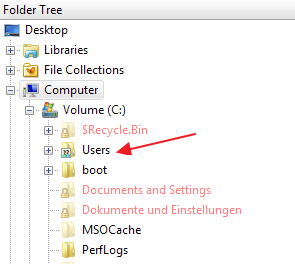
Dear DirectoryOpus-Team
Since Vista (and now in Win7) the names showing in folder tree of DO are really bugging me…
So what's the problem? I will start to explain with some facts:
Up to Windows XP, each language of Windows had his own folder names. For example the User-folder:
English version of Windows: C:\Documents and Settings
German version of Windows: C:\Dokumente und Einstellungen
Since Vista this folder is standardized, so regardless of which language of Windows you have, the folder is generally named
C:\Users
For compatibility they just created symbolic links for the previous folder names, pointing to C:\users.
BTW: In my opinion this change was overdue… I think it's better to have a language independent folder structure.
So far so good… but…
Many of these standardized folder names have a desktop.ini containing a LocalizedResourceName to display the name in language of Windows. For example the desktop.ini of C:\Users looks like
Behind this resource (in a German version of Windows) the string 'Benutzer' is represented. So WindowsExplorer shows instead of the physically name ('Users') the folder as 'Benutzer'. I like in DO that always the physically names are shown (regardless what desktop.ini says)… everywhere? … No! Folder tree is the only component that displays the desktop.ini names! And this is what's really bugging me in DO…
All names in folder tree are shown regarding to these LocalizedResourceName, all other components shown the original name. This is extremely annoying. In folder tree I have to select the folder 'Benutzer' to show the 'Users' folder. In lister I have to open 'Users' for the same…
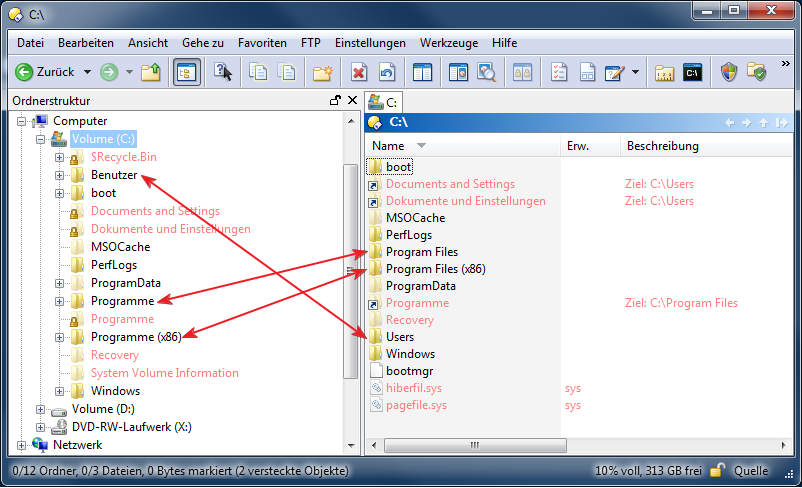
And the C:\Users is only one of a lot folders that have localized names… Take a look at the UserProfile:
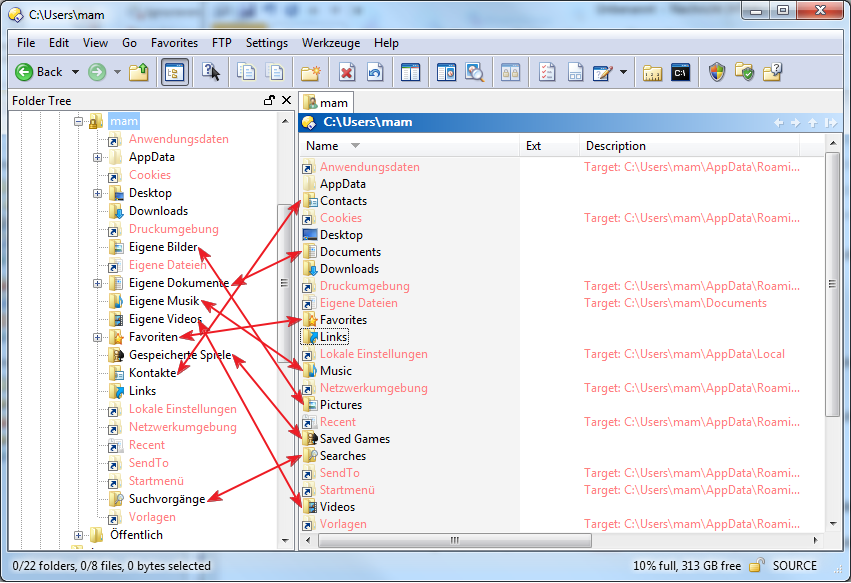
For example: if I want to go to my pictures, in folder tree this is the 'Eigene Bilder', in lister this is the 'pictures' folder… c'mon…. 
I know you guys have a English version of Windows so this does not affect you in any way. But for me (and I think for many other non-English Windows users) this s*cks! Fast and efficient browsing thru folders is impossible. I have always to think: Am I looking for the original or the localized name, depending of where I currently browsing -> In folder tree or folder content… aargghhh….
Please show in folder tree the original, physically names too. If you like you can also make an Option to show physically or localized names (IMO not an necessary*)… BUT PLEASE show always the same name in folder tree AND folder content!
Any Feedbacks are welcome.
regards
maki.
- The LocalizedResourceName is a WindowsExplorer thing… For Example Command knows nothing about it. They recognize only physically names…
BTW: For a Workaround I know that I can modify the desktop.ini and remove the LocalizedResourceName. But 1. this is not very handy because they are many places and 2. I'm using my workstation with other family members, and they use default WindowsExplorer… so I don't want to change these (System-)things…
 but I had to explain this exactly to point the problem... I posted this months ago in German forum... short version -> great discussion -> no solution...
 )
)