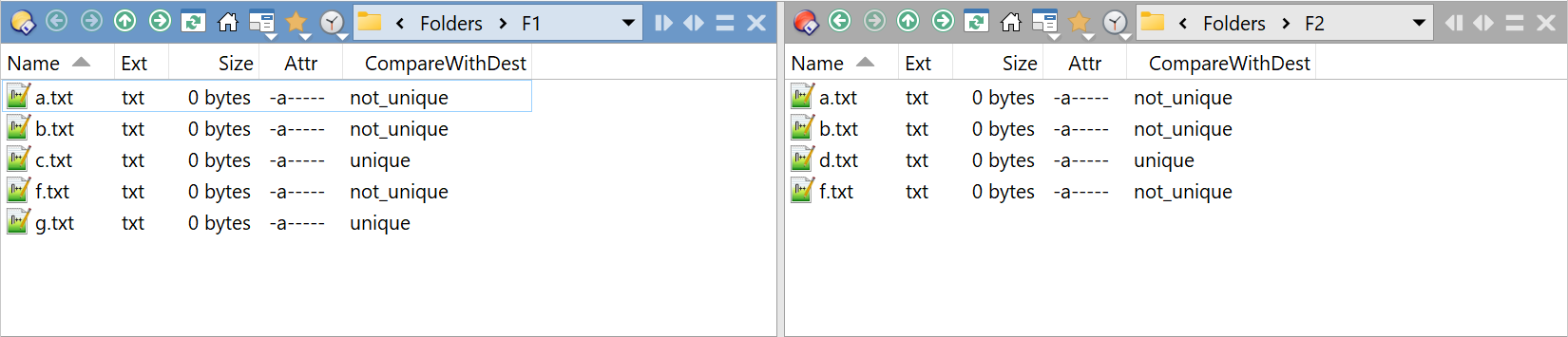
Script columns can access data from the destination and incorporate it into their calculations.
Quickfilters can use these script columns without triggering a recalculation.
However, the behavior is different for filters:
Accessing a script column from a filter forces a fresh calculation, which will impact processing time.
More critically, when called from a filter, a script column loses access to the destination. This typically causes the calculation to fail or return inconsistent results.
It appears to affect all contexts in which filters can be used.
CompareWithDest:  no tab:	D:\57368\Folders\F1\a.txt
CompareWithDest:  no tab:	D:\57368\Folders\F1\b.txt
CompareWithDest:  no tab:	D:\57368\Folders\F1\c.txt
CompareWithDest:  no tab:	D:\57368\Folders\F1\f.txt
CompareWithDest:  no tab:	D:\57368\Folders\F1\g.txt
(Hey, already the tab is unavailable!)
The script:
DOpus.Output('-----');

var err = 'error';
var nu = 'not_unique';
var u = 'unique';

function OnInit(initData) {
    initData.name = 'CompareWithDest';
    initData.version = '2025-10-03';
    initData.url = 'https://resource.dopus.com/t/script-columns-lose-access-to-destination-when-called-from-a-filter/57368';
    initData.default_enable = true;
    initData.min_version = '12.0';
}

function OnAddColumns(addColData) {
    var col = addColData.AddColumn();
    col.name = 'CompareWithDest';
    col.method = 'OnColumn';
    // col.justify = 'right';

    col.match.push_back(err);
    col.match.push_back(nu);
    col.match.push_back(u);

    col.namerefresh = true;
    col.autorefresh = 2;
}

function OnColumn(scriptColData) {
    scriptColData.value = err;
    var item = scriptColData.item;

    var tab = scriptColData.tab;
    if (!tab) {
        DOpus.Output('no tab:\t' + item);
        return;
    }

    if (!tab.path) {
        DOpus.Output('no tab.path:\t' + item);
        return;
    }

    var dtab = tab.lister.desttab;

    if (!dtab) {
        DOpus.Output('no dtab:\t' + item);
        return;
    }

    if (!dtab.path) {
        DOpus.Output('no dtab.path:\t' + item);
        return;
    }

    var fsu = DOpus.FSUtil();

    var itemToCheck = dtab.path + '\\' + item.name;

    var ret = fsu.Exists(itemToCheck) ? nu : u;
    DOpus.Output(ret + '\t' + item + '\t' + itemToCheck);

    scriptColData.value = ret;
}