You could scroll by moving the mouse. MM button again to escape from that mode. It would work on any area in the lister outside of the name column, which would still be able to be the “open in new tab” event. Or even mm button press right on the scrollbar itself would be ok too.
- Please add an option to accelerate horizontal scrolling. User would configure how many lines per command in the settings. Windows only has vertical scroll options cause reasons.
- Please add scrolling hotkeys. A page left/right, same as page up/down but for horiztonal scrolling. But a better hotkey would be a scroll to prev/next column. I would put that on my left/right arrow keys. Push the right arrow key it will jump (scroll horizontally right) to the next column, butting it up to the first column that is frozen. Left key = previous column (move left).
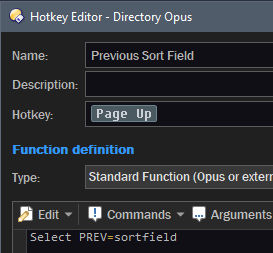
- Scroll to sorted: Whatever column is active for sorting, the page up/down now selects the next type of that column (whatever doesn’t match the current selection is the target).
Example: I have a .jpg currently selected. The lister is currently sorted by file type extension. There are twenty jpgs in this folder. I push page down. It skips those jpgs and jumps to the first png file (including scrolling to it if necessary, scrolling to have that item at the top of the lister). Page up jumps back to the first jpg. Shift + page down selects all of that type.
Or I have 5 files created today. Date created is currently sorted. I push page down and now the first yesterday file is selected, etc. This would be killer.
Hi, thanks for that. I looked around for solutions before posting the requests so I’ve already seen that. In the video the acceleration seems to be too much and I don’t like having the mouse cursor and also an icon. The way google chrome does it is perfect. I wonder if it uses a windows api.
But the real gems would be the left/right by column and the page/up down by column sort.
Autoscroll is usually a feature of the mouse driver, which should (if assigned to a mouse button) work on any window with a scrollbar without needing to configure individual applications.
I would agree, autoscroll is a good thing. For webpages I press the middle mouse button, barely move the mouse down and let go.
I looked for an autoscroll tool for windows and gave up when I encountered the guy that asks for a monthly subscription fee for his auto scroll tool.
The same middle mouse button scroll for Dopus would be nice.
My pdf editor program has the same mm button press scroll too. Click the button, move the mouse down slightly and let go. There you go, autoscroll. But for Dopus you don’t read text, just names of files, so it’s not really the same, except for the viewer pane where you could use it.
There’s probably a universal windows auto scroll tool out there. An autohotkey script maybe. powertoys or sysinternals doesn’t have it. They have some other neat mouse tools though. Even a paid for one, but a subscription fee for that is too far. Binary Fortress - Display Fusion doesn’t have it. Corsiar doesn’t have it, Listary doesn’t have it. Nirsoft doesn’t have it.
I'm surprised if Corsair don't have it as an option, since their mouse and keyboard drivers are very flexible. Unless Logitech have a patent on it or something.
Another option is binding mouse buttons to wheel up/down, cursor up/down, or page up/down. Assuming the buttons repeat when held down, you can scroll using those until the button is released. Page up/down is quite nice, IMO, while keeping the regular mouse wheel for normal, smaller scrolling.
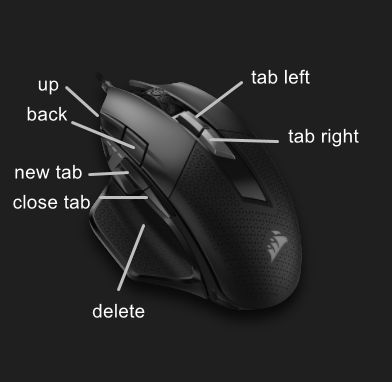
But this new max 4, the free mouse wheel or ticky, side wheel, rechargeable wireless, and that shortcut wheel. That might be enough to be worth the loss of two buttons. The $170 CAN price tag, yikes.
I’ve used this a few times. It seems that it only selects the ones that are currently visible on the screen. The other types in the particular group, that should be selected, are not included in the selection. Is this on purpose?
Works here. I tried sorting by the extension column in System32, selecting a DLL and running the command. It selected several thousand other DLL files.
I got that mouse now. The build is way better than my old mouse.
But the main thing I got it for, the free wheel scroll wheel, is really disappointing.
Oh it will scroll freely, free as a bird. But software still graduates the scroll bar, no matter what the mouse wheel does. Even though the hardware rolls freely, the software still doesn’t.