Search user description in all descript.ion files using Everything

Use Everything to search for all descript.ion files containing the specified string.
Get files that match the description from these .ion files,
and add them to a file collection.
So the search speed is very fast!

Set the path of Everything, see:
Everything路径别名设置 可参看:
EverythingOpus a-better-dialog

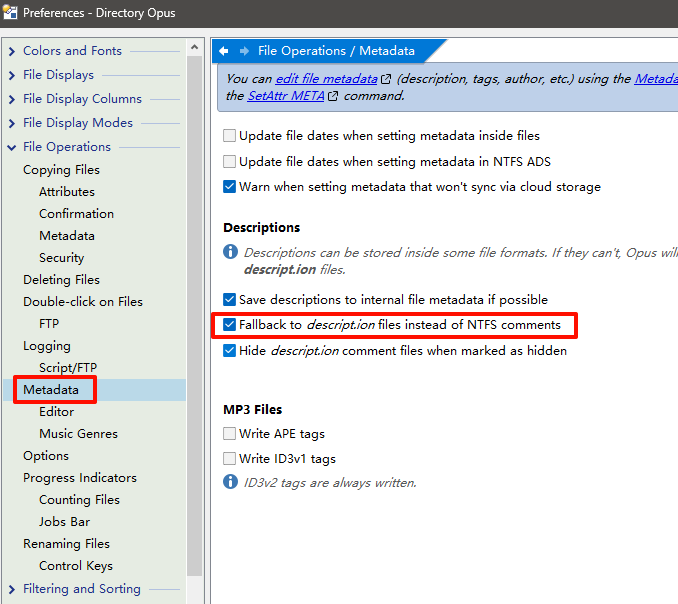
Now, set :save descriptions to descript.ion files instead of NTFS comments.
【选项/文件操作/元数据】勾选<使用descript.ion文件注释系统....>

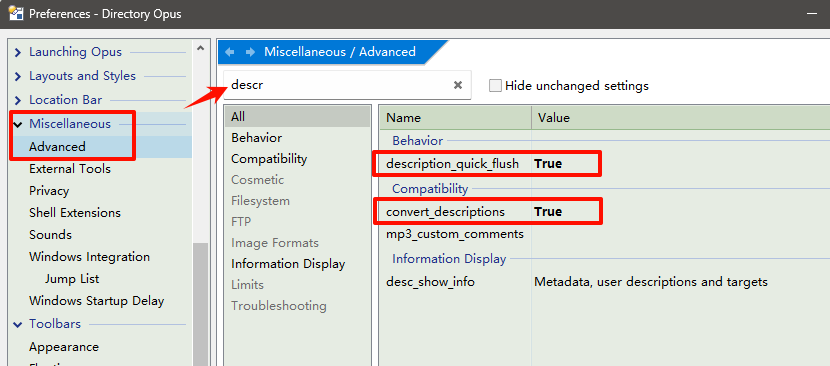
【选项/杂项/高级】
<行为> description_quick_flush 启用 (如果禁用,新添加描述不会立即写入ion,会滞后几分钟)
<兼容> convert_descriptions 启用

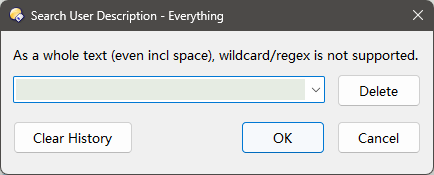
Search dialog:

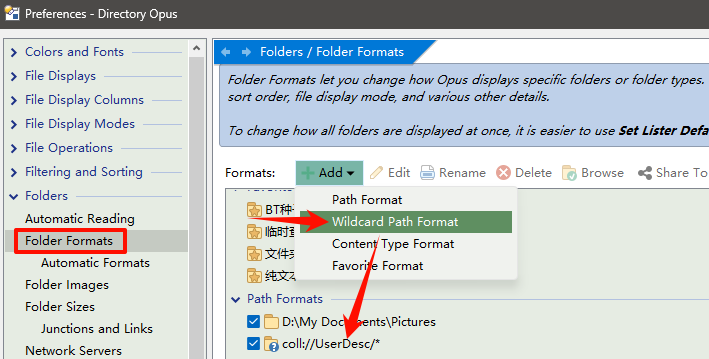
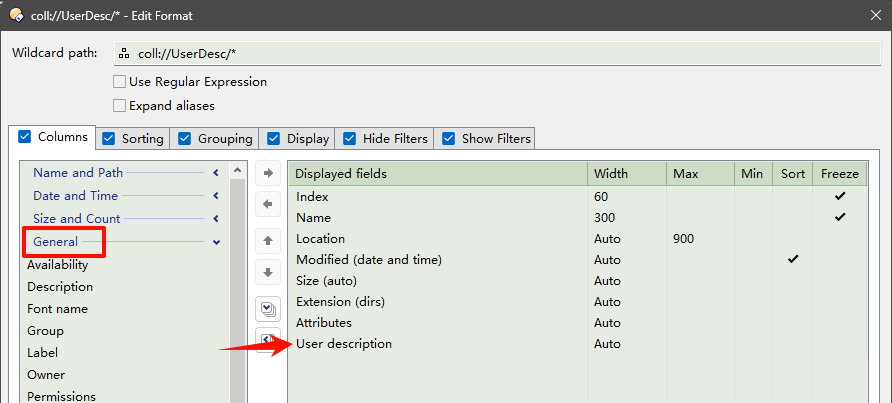
We can save a wildcard path format, auto show the user description column.
【选项/文件夹/文件夹格式】 添加一个通配符路径格式 coll://UserDesc/*


自定义文件夹格式,添加用户说明列

https://www.voidtools.com/forum/viewtopic.php?p=36726#p36726
Everything v1.5a 需要在【工具--选项--高级】将alpha_instance改为false
或编辑Everything-1.5a.ini 添加这个配置:alpha_instance=0
或者在搜索框输入/alpha_instance=0 回车
在Everything文件夹中新建一个空文件(无扩展名) 命名为: NO_ALPHA_INSTANCE (empty file without extension)
这会使 Everything 创建的服务使用名称 "Everything" 而非 "Everything 1.5a", 且标题栏不带 "1.5a" 尾巴
The Everything Service will be named: Everything <and created without 1.5a>
其配置文件也都不带 "-1.5a" 尾巴: Everything.ini Everything.db Filters.csv Plugins.ini

建议使用 Everything v1.5, 功能更强大;v1.4 不支持多标签,不支持汉字拼音

Important !

If you encounter any problems, start Everything Manually, and restart DO, then try again.
如果碰到问题,请手动启动Everything,重启DO,再次尝试,应该OK.

Button download:

en v1.5 : Seacrh UserDescription (comment).dcf (25.5 KB)
chs v1.5 : 搜索用户描述(备注).dcf (25.5 KB)

Convert ADS comment descriptions to descript.ion

转换ADS数据流的备注描述 保存到 descript.ion
First:【Preferences/File Operations/ Metadata】
Do NOT check <Fallback to descript.ion files instead of NTFS comments>
保存用户描述到 descript.ion.dcf (5.6 KB)

5 Likes

Your "Convert ADS comment descriptions to descript.ion" works great. I adapted it to include Pdf subjects too.


“Save descriptions to internal file metadata if possible” Is this checkbox mandatory? If it is checked, comments added to some files will not be written to the descript.ion file and will not be searchable by this plugin. If it is not checked, the comments will be lost if you move an annotated file to another folder.

As I understand it, you just need to enable the copying of metadata/descriptions in File Operation/Copying/Metadata.

1 Like

Thank you, the issue with lost copies has been resolved. However, I'm still wondering why, when this option is enabled, some descriptions are written to the descript.ion file while others are written to the file metadata. Are there any rules for writing to the descript.ion file and file metadata? Which files are not written to the descript.ion file, and which files are not written to the file metadata? Can I write to both the descript.ion file and the file metadata simultaneously in DO?

No idea, sorry.

Answer may be in here though:

OK,Thank you.

Indeed, this error so far has always turned out to be a misperception. When a comment is in both NTFS and descript.ion, deleting one of both will not delete the other one.

In addition, especially for a value taken from descript.ion, you need to do a refresh of the lister view (F5).

PS. A good script for working with descript.ion can be found here:

Can I write to both the descript.ion file and the file metadata simultaneously in DO?

You can write anything to multiple types of metadata simultaneously with a script. But you cannot write to both descript.ion and to the NTFS (ADS) extended comments as far as I know - because in both cases the field 'description' (or 'userdesc') is used, and this field will redirect your comment either to ADS or to descript.ion. This is an implementation choice made by the Opus guys.
See also File comments/ descriptions and "descript.ion" in Opus (it remains to be seen if anyone will pick this up at Opus - it's their decision whether they think the change is worth it or not).