Strange, it won´t work here. It gets stuck somehow.
The DOS window still shows "dopusrt /CMD Copy "F:\USB TO coll://"
where it should be coll://filme, it won´t be added. Is it possible, that some paths, which are different in german XP versions are different, so the command ends up nowhere?
abr my dad always used to tell me the most frustrating problems are the problems where you end up with a red face after they have been solved.
It just dawned on me that the variable name I've been using "FileType", is also an Opus raw command.....:oops:
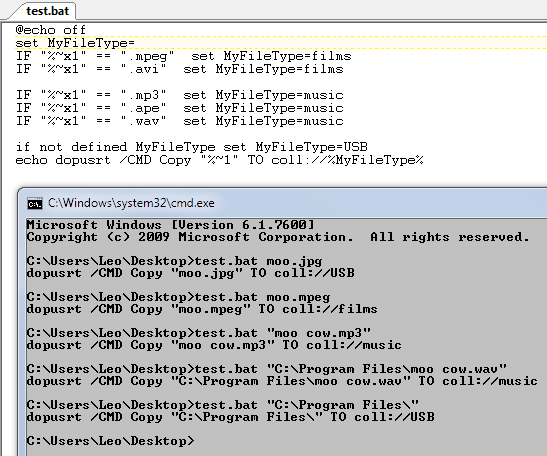
Try adding @externalonly at the beginning of the button code OR in the script change FileType to any other name, for example, MyFileType. Revised script follows.
[code]@echo off
set MyFileType=
IF "%~x1" == ".mpeg" set MyFileType=films
IF "%~x1" == ".avi" set MyFileType=films
IF "%~x1" == ".mp3" set MyFileType=music
IF "%~x1" == ".ape" set MyFileType=music
IF "%~x1" == ".wav" set MyFileType=music
if not defined MyFileType set MyFileType=USB
dopusrt /CMD Copy "%~1" TO coll://%MyFileType%[/code]
hmm, i don´t know why, but i couldn´t get it to work. I changed the FileType name, even to the extent of changing it to "FleTpe", but for some reason no files are actually added. I´m also sure, that i exactly followed your instructions, putting the {f} into the button code etc.
thx anyway, John, maybe anyone like to try it out on their machines, to find out why it doesn´t work on some computers. Is it possible that it is because of different path names on german machines?
AFAIK that shouldn't matter since it's never being used at the start of a line and thus shouldn't ever be interpreted as a command.
(Plus it's in a batch file anyway. Opus just runs the batch file and the only thing that comes back is the final dopusrt command that shouldn't have any literal "FileType" string at all.)
Thank you Leo & tonym. Actually it works now, at least partially. After using tonym´s advice, items are added to their collections, as long as they are music or movies. Other items, however, are tried to be added to the collection root coll:// instead of proper coll://USB, as the error message complains. Obviously the if not defined MyFileType set MyFileType=USB part fails here, fore some reason.
by the way, i already tried to substitute the opusrt with the full path thing, but forgot the quotes around it. One thing i must say, my coll://USB contains another subfolder, maybe that´s a problem?!
Hi,
hope you dont mind me asking you guys a question which is similar to what you are doing, i was going to post my question here as your posts was the closest i could find to what im trying to do, but decided mine was too different so posted a new question.
heres the link if you get a minute:
[Batch edit mulitple files in multiple folders by ftp)

 hmm, i don´t know why, but i couldn´t get it to work. I changed the FileType name, even to the extent of changing it to "FleTpe", but for some reason no files are actually added. I´m also sure, that i exactly followed your instructions, putting the {f} into the button code etc.