When I search for a file in a certain hierarchy of folders, Opus will give me a flat list of files, which does not contain any information as to what subfolder the files are coming from. Is there a way to add this information as a column just to any Search results listers? I could, of course, add such a column to all folder views, but ideally I want this folder format only applied to search results. Alternatively, I could have the folder information added to the infotip, but again I may only want this in search results, not in all folders.
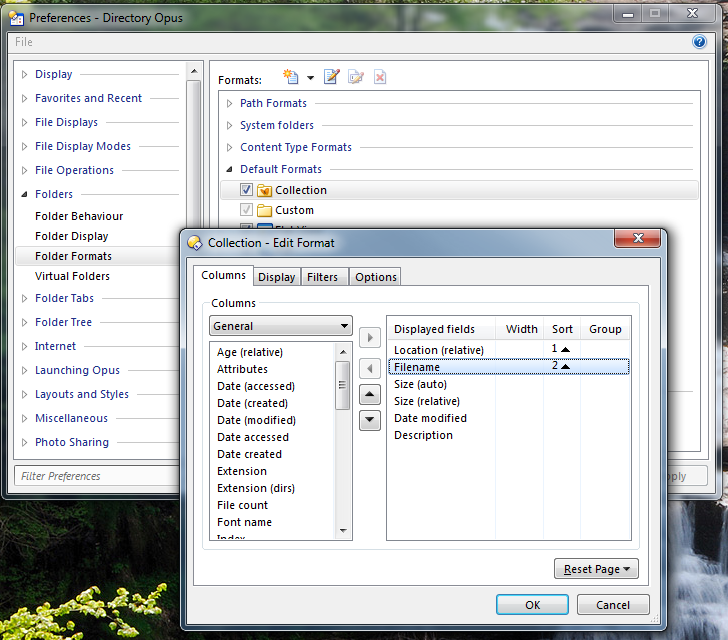
Go to Settings -> Preferences / Folders / Folder Formats and add the Location column to the Collection folder format. Make sure the format is turned on, too.
When adding the column, you can hold Ctrl while clicking on the Sort column to tell Opus to do a multi-way sort. e.g. You'd normally want Opus to sort things by Location, then Filename:
While you are there, expand the Path Formats part of the list and see if you have any formats defined for coll://Find Results or similar. If you do, you'll probably want to add the column to them as well (or delete them so the generic Collection format is used instead).
While fiddling around with this, I found that the infotip item {pathrel} behaves in an unusual (to me anyway) way: If I do a search from the initial folder of the tab I'm in, the infotip shows me the relative location as it should. However, once I have changed the folder in a tab, the infotip will always show a full pathname, not a relative one anymore. In otherwords, this looks as if {pathrel} gives me a path that's relative to the original root of the tab, not relative to the position I am searching from. I'm not sure if this behavior is intended or not.
Hmm, alright, I thought this would work, but it doesn't.
First, minor point: The location column behaves in the same unusual way as the tooltip, see above.
Second, major point: I tried to modify the format for collections, but my modification has no effect: The folder format for the Search results seems "stuck" at the format that was originally defined. Mind you, the format is changing when I get the search results, but it's changing to the Collections format as it was originally defined, not the one that I actually set in the preferences dialog. Bummer, something's wrong here...
O.k., I figured it out, kind of (P.S.: I really wish I could edit my posts...):
The format that's defined for file collections only applies to the collections generated by Opus' own internal find command. If I use the Windows Search-based Search command, then some default format is used that must be defined somewhere, but I don't see where in Preferences I can change it. I tried to create a wildcard path using "Search Results for" as my path specification, but that doesn't seem to work, either. So the question is, how can I define a folder format for these search results?
I have the same question, but I am not quite clear yet how to proceed.
Let's say, I have a standard folder format that I use everywhere. However, for collections, search results and flat view, I'd like to use this format as a starting point, adding a "location, relative" column, and resizing some of the other columns.
Is there a preferred/best way how this can be done?
Starting in a folder with a certain folder format of mine, I use the search box in the toolbar (I suppose the Windows search function is used for this search box). After some seconds, my current folder view is populated with the search results, which is great.
However, the "location" column is missing. No problem, I add it by right clicking on a column header, and choosing "columns -> general -> location (relative)".
Then I'd like to save this current (modified) folder format as standard for "search results", inter alia.
Therefore, I right click on a column header and choose "more...", which makes the folder format options dialog come up. From there, I choose "Save -> for this folder".
However, this obviously doesn't save the folder format as standard for for "search results" which I see by looking in "Options -> Preferences -> Folder Formats".
Thus I'd like to save the currently displayed search results folder format as a "favorite folder format", in order to be able to apply that favorite folder format later on to "Search Results", "Flat View" and "Collections".
However, I can't seem to find a way to save the present format of the currently displayed folder as a "favorite folder format" (or is it called "preferred folder format")
Thanks -- but I already was going to apply my custom ("preferred") format to those standard formats in the Prefs dialog. Problem is, how do I make my customized format from said actual lister actually turn up in that prefs dialog?
You'd normally just edit what's in the Prefs dialog, but if you've done "Save for This Folder" then you'll find your format in the top of the list among the path formats.