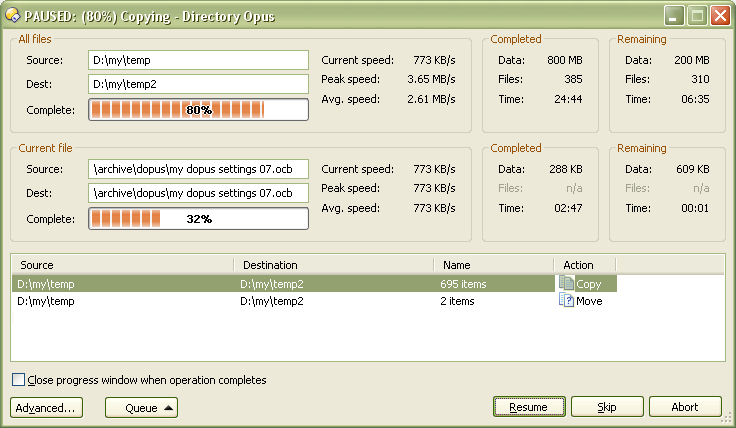
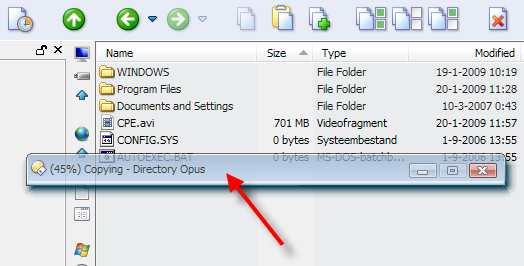
It's annoying when progress window pops up on the top of every Opus window so I cannot drag another file to copy comfortably. In addition it is "always on top" so I can not just click the window behind to work with it.
I have several ideas of solution:
Make progress window appear in the corner of desktop, not just in the center of the window I'm working with.
Make progress window appear minimized
Make progress window appear not minimized but in the background (behind all other windows)
(as an option)
I would also like an additional option to progress bar speed timer.
Small progress window and a button to expand it to window with speed timer (and then a button to make it small again) would be a nice compromise between large window with speed timer and small progress indicator that doesn't tell me almost anything about the progress.
All reasonable options... to restate some of them in my own words as well as add some thoughts; how about things like:
simple/advanced button to switch between the small/full progress meter display similar to the rename dialog
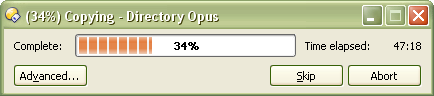
I guess the percent progress and time elapsed are the basics of what info you would want to know from a 'simple' progress bar (attached?)
I sometimes want to know how long it took for a lot of files or a single file to finish copying from source to dest... it might be nice to also have a "Close progress window when operation completes" option that could be set as a default on/off option in Prefs, as well as a checkbox sort of like Internet Explorers 'Download' dialog...? Or maybe make the 'Elapsed Time' for copy/move operations available in a new colum of the Output Window' someplace (like the Undo tab)?
Either way, all of the other things YOU mentioned would need to be 'optional' as plenty of us may probably be content with the way things are now...
Actually I can't see any purposes in making progress bar so big/long. If progress window has to be that big, I would rather like to see more numerical information (like how many Megabytes and files left). Very practical information would be what is being copied (where from and where to). Then I would probably better know which file operation would I cancel by pressing "abort".
What is the "skip" button for while I don't know the name of file currently being copied? Also, elements like "complete: " are useless (what else can be shown by bar in progress window?).
And finally, usually applications show estimated remaining time, not elapsed time.
To sum up, small progress window should contain:
percentage complete plus (possibly) progress bar
time left
how many Megabytes and files (items) left
source and destination directory
"advanced" button to expand to large progress window
"abort" button
Large progress window should remain as it is except for "simple" button to get back to small progress window.
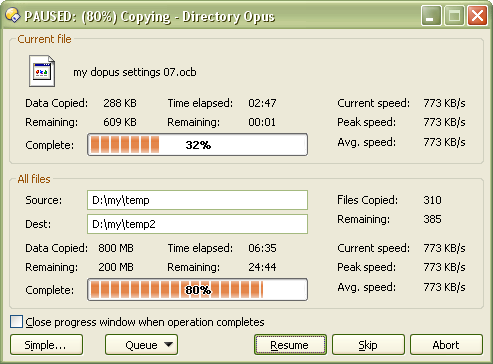
Sorry but (and this is my "opinion")... much of what you're asking to put on the "small" progress window would seem to make it NOT so small or simple a progress window. You're actually ADDING a few bits of information that isn't even on the current 'full' progress window.
I agree that the FULL copy progress dialog could do with a TOTAL 'amount (MB/etc) of data' copied and remaining... as right now it only has copied/remaining amount of data for the 'current' file... But it DOES already have TOTAL 'number of files' copied and remaining.
I also agree that it could be useful to have full path info for the source and destination directories... but again, just adding that bit of info makes your idea of a 'small' progress window just slightly less 'large' than the current large progress window .
The full dialog also already DOES have the name of the current file being copied to help you decide if you want to skip it or not, so I'm not sure what you mean there.
Don't understand your suggestion about "complete" being useless either... you then go on to say in your suggestion of what should be in the small progress window "percentage complete plus (possibly) progress bar"...?
About your suggestion that applications usually show estimated "remaining" time vs "elapsed"... the current full progress window shows 'both' and personally I'd like to know both; though I would amend my 'previous' example of the 'simple/small' progress window to do as you say - which I agree is more relevant for the 'simple' info...
The biggest difference between large and small progress window would be - the small one doesn't contain info about each file being copied, just overally what is being copied and some info about its progress. Large progress window is made up of two areas - info about current file beings copied and overall copy progress.
Look at your example of small progress window. You are wasting a lot of space to show me 'huge' progress bar which takes more space than any numerical values.
Information like copying c:\windows to d:\win_copy don't take a lot of space but is very useful.
[quote="steje"]
Don't understand your suggestion about "complete" being useless either... you then go on to say in your suggestion of what should be in the small progress window "percentage complete plus (possibly) progress bar"...?[/quote]
I meant that the word "complete" is useless. It takes some important space.
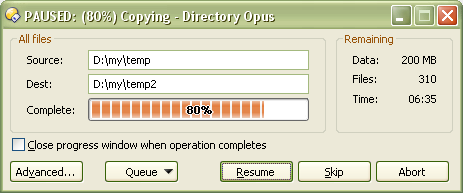
About the 'huge' progress bar... and the 'important' space it takes up in addition to the info YOU want on your idea of a small progress bar; keep in mind that it was a holdover of the very limited amount of info I was proposing in my idea of a simple progress bar...
Aside from that, I think the main reason we even see progress bars like this is that it gives you an 'at a glance' idea of the progress without having to home in on numeric values, especially if there are 'several' numeric values.
But it sounds like you'd more want something like THIS in terms of a small/simple progress window...
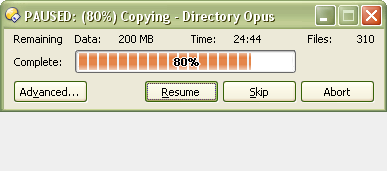
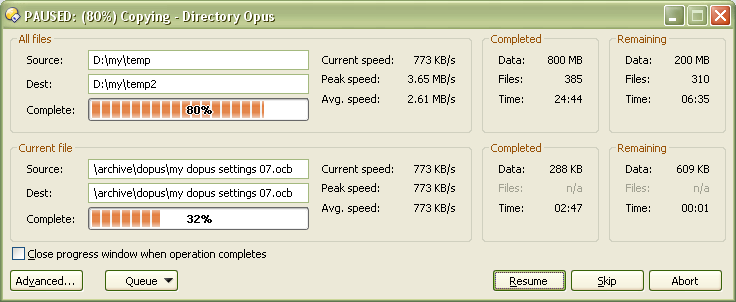
And having some more info on the 'small/simple' progress window would make more sense if the 'large/advanced' progress window were arranged differently such as:
And in case everyone keeps wondering why I insist on taking artistic license with the mock-ups... YES - I am a fan of the copy 'queue' request . For which I'd love a global option like Copy QUEUEWHENSAME... and would imagine something like:
Looks nice for me. Small progress window is still small (in my opinion) but provides information I need / would like to know.
Queue would be very interesting. When two files are copied simultaneously, especially to flash drives, it's several times slower.
But to stick to the point a little more please consider adding the functionality I mentioned in the first post in this thread - please make progress window appear in the background or minimized. This is my main issue.
I just thought I'd jump in and remind everyone that in the upcoming Windows 7, native Microsoft apps now show a progress bar in the app's taskbar button. Actually, the entire button turns into one big progress bar.
Hopefully Opus will take advantage of this functionality in the future. Progress bars could be sent to the back or minimized, and you could still check on the progress of an action very easily
Make a window roll into its title bar, send it to the back or make it stay on top. Minimize, maximize or close all visible windows, including minimizing to the tray area. Make a window translucent on Windows 2000 or above. WinRoll is lovingly hand-crafted in 100% pure assembly language to give the fastest response and the smallest memory footprint. WinRoll is a freeware and open source application.
Right Click Title Bar: Make a window roll into its title bar Middle Click Title Bar: Applies/removes transparency
You could (for example) also use Winroll with the DOpus find dialog!
Haha... sure, but my company might try and say they would own the IP (nah, they're not evil like that). I'm sure you're referring mostly to the 'copy queue' stuff eh ?
@daroc:
Yeah, the Minimize copy/move progress windows or Send copy/move progress windows to background would be a nice option... so have you actually submitted a feature request (progam suggestion) to GPSoft yet for it?
@Christiaan:
That looks pretty neat. Nice find... hey daroc, this looks like a quick and easy (free/low resource util) solution to your needs, you checking it out?
Ya know there ARE other ideas similar to what the stuff in Win7 that newguy pointed out as well...
for whatever source or dest tab was active when a copy job was initiated, have a progress bar and subset of the 'remaining' info appear in the status bar.
show copy/move 'progress' info in a SINGLE spot for all operations... say, a new copy/move tab on the Output Window. Or maybe a new 'Copy/Move' panel similar to the Find, Sync, and Dupe Files panels...
I'm sure others would have other suggestions... the 'roll-up' tool that Chris found is pretty neat... that could be an Opus implemented "Super Simple' progress meter option ...
I have submitted a request just after sending my first post in this thread so I included only features mentioned in my first post, but I pasted a link to this thread.
I have only just found out about Directory Opus today (what stone have I been under!) and it's amazing. The only thing that I can see is missing (and something I can't believe isn't common place in Windows Explorer) is the copy queueing mentioned in this topic. Not that it's needed, but I'll add my vote for getting copy queueing into DOpus
WELCOME! Stick around - you'll find that GPSoft is extremely generous to registered customers. They've expressed interest in the copy queue stuff - but it's a big job to do right, and there may be no shortage of feature enhancements competing for priority... so we'll see. Search the forums for "Copy Queue" and you'll find plenty of conversation - and feel free to submit a feature request / program suggestion weighing in with your opinion that copy queue is a killer enhancement - or in the meantime check out posts related to using "Teracopy" with Opus...
 .
.

 . For which I'd love a global option like