Slow FIND, but fast using the FIND panel

This code is attached to a button. It takes an agonizingly long time (5 minutes!) to produce the FIND result. Up until now, it's been working fine.

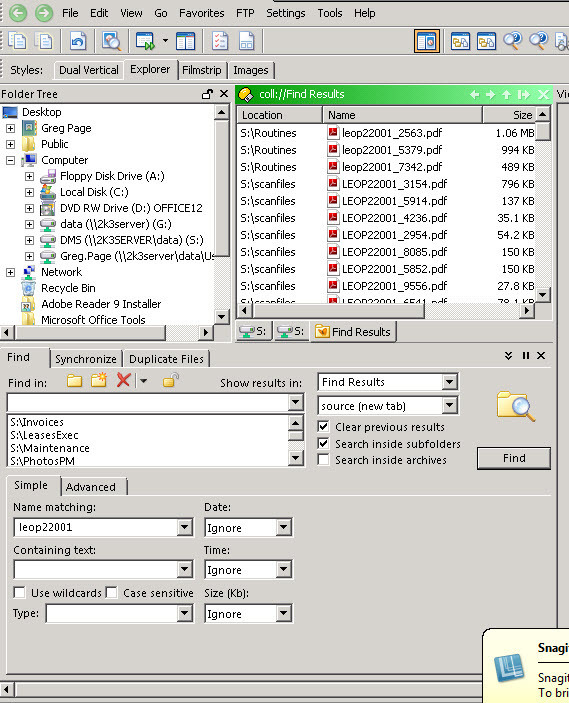
Duplicating the find criteria in using the FIND PANEL is virtually instant!

Find in S:\Scanfiles S:\Routines S:\Maintenance S:\PhotosPM S:\LeasesExec S:\Invoices NAME {dlgstring|In folders exc Archives, search for:} QUIET SHOWRESULTS=tab CLEAR COLLNAME "Find Results" SIMPLE

thanks, Greg

It might be searching inside of archives. I don't think you can control that setting from buttons right now and I think instead they inherit whatever is set in the GUI when you use the button.

If it's not that, can you post a screenshot showing the find panel setup that is fast? Maybe there will be some difference between the two which we can spot.

BTW, you might need to put quotes around the {dlgstring|...} part if you want to be able to search for names containing spaces.
Thanks for the fasy reply..most grateful.

the attched is the screen shot. The search is almost instant using this instead of the button!

What seems odd is that the button worked fine up until now ?!?

I have tried reinstalling Dopus...no change to the slow FIND though)

Thanks again


Please ignore my last post.

You were right...it was searching archives!

Thanks again for your fast responses. Truly appreciated.

greg Page