Some aspect ratio groups are displayed incorrectly.
In addition, 5:4 and 4:5 are also commonly used ratios in Photoshop, and it would be great if they could be displayed properly.
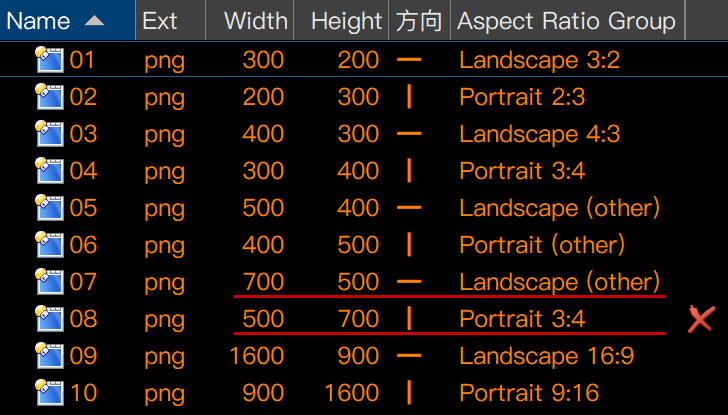
What is incorrect? What do you think should be displayed instead?
500 x 700 is a ratio of 0.71 which is close enough to 3:4 (0.75) to be put in the same group.
Adding a 4:5 (0.80) group wouldn't change this, as 0.71 would still be closer to 0.75 than 0.80; a 500 x 700 image would still be in the 3:4 group.
Things do not need to be exactly the ratio to go into a group. The exact ratio can be displayed via a separate column if you need that. The Aspect Ratio Group column is there so you can group similar things more approximately, without minor size differences creating lots of unwanted extra groups.
Also remember that you can use Evaluator Columns to create your own groupings based on the width & height or other details.