I'm not sure if this is a feature request or if I am looking for the tool that is already there! I've recently been familiarizing myself with the Synchronize and Find Duplicates Features in Dopus and am wondering if there is a similar feature that pairs well with the Navigation Lock between Source and Destination folders.
I am looking for something that actively compares files from source to destination while Nav Lock is on and, say, highlights byte matching files as green, source unique files as blue, destination unique files as yellow. Or perhaps newer versions of files might be green, older might be red etc. synchronous file selections would be fantastic as well! (selecting on one side highlights matching files on the other)
I am often copying job files from Work to dropbox at beginning/end of day and have large projects with the same folder structure across two different locations. I am looking for a visually easier way to ensure I have moved the files I modified back. I know that the Synchronize function can do this on a large scale but am looking for a more granular approach, where I don't accidentally copy over or overwrite files unintentionally.
Is there such a tool out there already? Any advice is appreciated!
As far as I know there's no file bytes comparison, but there's a way to compare filenames, exactly the way you want, don't know if it would be useful to you
SOURCETODEST /O
(no value) Selects all files and folders in the destination file display that are currently selected in the source. The comparison is only done on the filename - the files are not actually compared.
Example: Select SOURCETODEST
I use a button which launches Beyond Compare on the source and destination folders to quickly compare contents when the built-in sync function isn’t enough.
There are a few buttons in the Buttons & Scripts area for integrating different Diff tools like Beyond Compare and WinMerge.
FYI: For complex needs and situations, Duplicate Cleaner Pro 5 (by Digital Volcano) finds duplicates as you specify, but there’s also a ‘show remaining’ option for listing the files that don’t have a duplicate–those that are different. Then you can move or copy those ‘remaining’ files.
Opus 13.18.7 and later give script columns expanded access to both the source and destination. This allows labels to be assigned according to Filter values, which are determined by the results returned from script columns.
The example below shows a script column that compares files in the source with those in the destination, returning either unique, same_name, or same_hash.
In Preferences / Labels / Label Assignments, these three filter labels can be configured to display as red, orange, or green, depending on the script column’s output.
The script column can also be used in a Find filter. Note that the script looks for files directly in the destination and won't dive into subfolders, so be careful when checking Search subfolders.
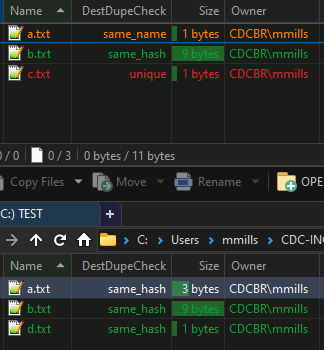
Wow, thank you for this excellent script and setup workflow @lxp! I am however having an issue with the ColumnnDestDupeCheck.js you provided.
It seems to always identify files in the destination lister as "same_hash". The Active lister identifies files correctly. Not sure what may be causing it to do this as your screenshot clearly shows it working.
I am using Dopus 13.19
See screenshot below where I replicated your example, top lister is the Active lister:
Edit:
After some experimenting - I believe there is nothing wrong with the script per se, but it is an issue with the destination tab not refreshing when the script is run or when folders change
Missing or delayed refreshes/hash calculations (potentially caused by the cloud storage) are the only explanation I can think of at the moment. I haven't been able to reproduce it otherwise.