Hi
I want to start Opus with the following options:
- open a certain directory
- open command prompt here.
(I use autohotkey to start dopus this way).
The first part I managed, but for the second I have no clue.
Can anybody help me out?
Thanks
Renger
Hi
I want to start Opus with the following options:
(I use autohotkey to start dopus this way).
The first part I managed, but for the second I have no clue.
Can anybody help me out?
Thanks
Renger
With the command line, you could use dopusrt
GO ""
CLI DOSPROMPT
(or another path if you installed DOpus somewhere else)
or just:
dopusrt.exe /cmd
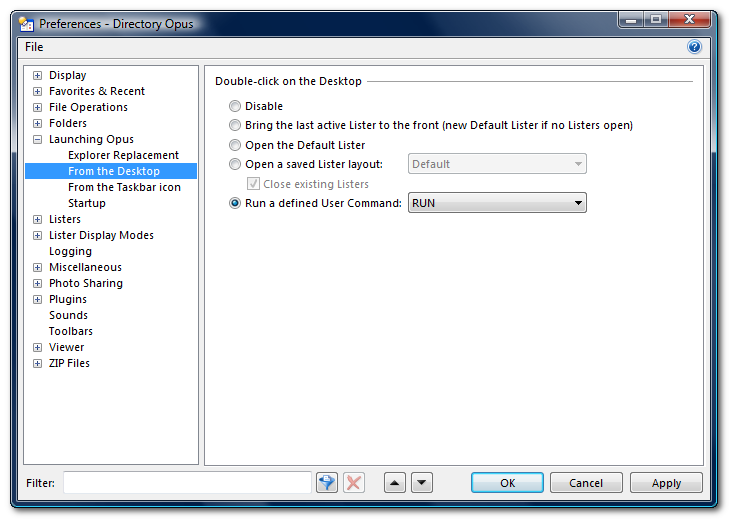
You could also create a user command and run it when you launch DOpus by double clicking the desktop or when you run DOpus from the taskbar Icon:
If you want AutoHotkey to open an Opus window and a command prompt for the same folder from a single keypress, why make Opus open the prompt? You could just have AutoHotkey run this sequence:
"C:\Program Files\Directory Opus\dopusrt.exe" /cmd GO "C:\blah"
cmd.exe /K CD /D "C:\blah"
That avoids having to create a user command.
If you meant that you wanted separate hotkeys to do the two actions, rather than doing them both at once, then you could create the command-prompt hotkey inside of Opus to make things easier.
(Finally, if Opus is set to run in the background on startup and this is all the script needs to do then you could use system-wide hotkeys in Opus for both things without using AutoHotkey at all.)