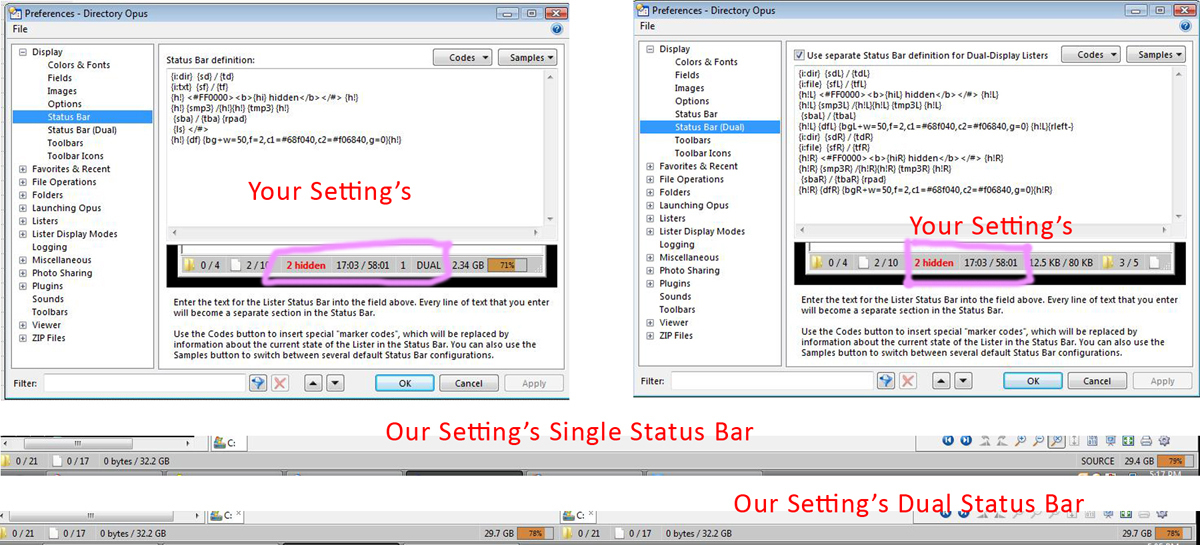
Just need a little help with your status bar settings.
We are enjoying using those settings but not getting the hidden files show up and everything that is inside the pink circle as marked in the image attached.
[quote="leo"]Do you actually have any files being hidden in those examples? The status bar is set up so that it won't show "0 hidden".
As a general note, if people have questions about status bar codes, please post them in the general Help & Support forum.
We'd like to keep this thread so that people can go through it and find status bar examples to use without having to skip over interwoven discussions.[/quote]
Hi Leo,
Sorry can you get the MOd to move the post so we can continue. Start the post in general.
Do you mean there are files with the H attribute in the directory? Those only count as "hidden" files to the status bar if they are actually hidden from display. If you can see them they're not "hidden" as far as the status bar is concerned. The purpose of the count is to tell you how many items are filtered out and warn you things are in the folder that you cannot see.
Remove the {h!} or {h!L} on either side of the hidden count line and see what appears. I suspect it'll show "0 hidden".
Similarly, the audio/video length fields are being hidden if empty (due to the {h!} or {h!L} on those lines), so they don't appear if you're in a folder without any files that Opus knows how to calculate the time duration of.