@jinsight
Thanks very much !
So far it seems to be a good program to have.
I'm still quite unfamiliar with it, but the output does look good.
I'm glad you pointed this out to me while it still can be done on this thread. 
@jinsight
Thanks very much !
So far it seems to be a good program to have.
I'm still quite unfamiliar with it, but the output does look good.
I'm glad you pointed this out to me while it still can be done on this thread.
The idea that “JPEG 9 is enough” is absurdly out of touch with modern imaging needs. JPEG — regardless of whether you call it “version 9” or “advanced” — is a 30-year-old format with deep, structural limitations:
Outdated compression core: Still built on 8×8 DCT blocks with fixed quantization tables, leading to blocky artifacts, ringing, and banding at moderate compression levels.
Inefficient entropy coding: Relies on legacy Huffman coding with no context modeling — vastly less efficient than modern ANS or arithmetic coding used in JPEG XL, AVIF, or HEIC.
Terrible at high-detail preservation: Fine textures and grain either get smeared or produce ugly mosquito noise.
Poor progressive behavior: JPEG’s progressive mode is inefficient and rarely used on the web because it adds file size overhead without delivering a smooth visual refinement.
No real lossless mode: JPEG’s “lossless” extensions are awkward, rarely implemented, and can’t even losslessly recompress an existing JPEG efficiently. JPEG XL can.
Limited color fidelity: No native support for wide-gamut color spaces (Rec.2020, P3) or high dynamic range — you’re stuck in 8-bit YCbCr SDR unless you bolt on proprietary extensions that no one supports.
Poor metadata handling: Easily strips or mangles EXIF, ICC, and other metadata during recompression.
Inefficient decoding for modern pipelines: Modern formats use transforms and storage layouts that are far more cache-friendly and GPU-friendly; JPEG remains CPU-bound with high decode overhead relative to quality.
Claiming that “JPEG XL is fake news” just because you’ve found a single JPEG image using rarely-implemented version 9 features is like pointing to a car from the 1980s with a turbocharger and declaring it can outperform a modern EV. It ignores the fact that JPEG’s underlying design is obsolete.
The truth is simple: JPEG is at the end of its evolutionary road. It can’t deliver the compression efficiency, dynamic range, or color precision that modern workflows demand. JPEG XL isn’t some fad — it’s the natural successor, designed to replace JPEG while offering backward compatibility, vastly better quality-to-size ratios, and capabilities JPEG will never have.
Trying to protect JPEG 9 as if it’s the pinnacle of imaging technology doesn’t make you a defender of “real things.” It just shows you’re stuck in 1992 with a fresh coat of paint.
Yes, JPEG 9 will soon be obsolete and replaced by JPEG 10, as announced in 33 Years JPEG: Ubiquitous Presence and Still in its Infancy.
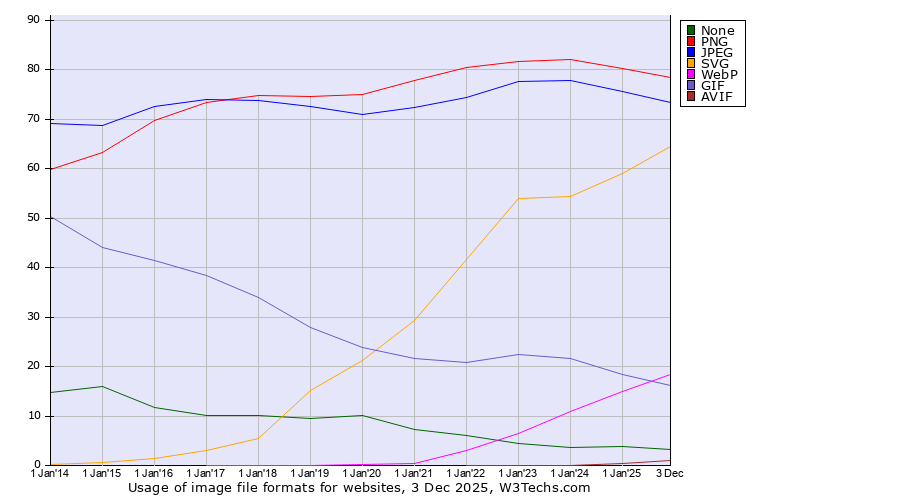
“JPEG XL” is totally useless, as everything else that came from their side, and it will never be used on the Web: Historical yearly trends in the usage statistics of image file formats for websites.
As you can see, WebP has just overtaken GIF, but nothing will ever overtake JPEG for natural images, because that is the only technology with substance. Your points are simply meaningless and have nothing to do with substance. The substance of JPEG is in four fundamental properties for image representation.
By the way, we released in 1991! It is the pretenders who refer to 1992, and from this case alone you can infer the fake. Everything they do is junk, to date, because it has no substance.
Regarding arithmetic coding, see my recent post here.
Regards
Guido
JPEG developer
The next beta will support JXL images via the WIC plugin, provided JPEG XL Image Extension - Free download and install on Windows | Microsoft Store is installed.
Jpegxl coming back from the dead is not something I saw coming.
I'm sure 5 more new image formats will still come out in the next year to replace the current ones again. 
Yes and each of them with an integrated Ai chat assistant. Lmao. Imagine every picture you look at loads an entire LLM.
There is really 1 new image format coming out in the next year to replace a current one again: JPEG 10! 
No integrated AI, just integrated NI (Natural Intelligence), guaranteed!
Still busy completing it, coming soon...
And don't worry, there is not so much happening here:
Historical yearly trends in the usage statistics of image file formats for websites
Regards
Guido
JPEG developer
Microsoft.JpegXLImageExtension_8wekyb3d8bbwe.x64.7z (2.0 MB)
The minimum version of JPEG-XLImageExtension provided by Microsoft is 1.2.36.0, which requires a minimum operating system version of 10.0.26100.0. This means it can only run on Windows 11 24H2. I have modified an application package with a minimum Windows version requirement of 10.0.19044.1288; please download it if needed.
C:\Program Files and create a new folder named JpegXLImageExtension.JpegXLImageExtension folder.JpegXLImageExtension folder.Add-AppxPackage -Register "AppxManifest.xml".Get-AppxPackage to view all application packages. Locate the application installed above and confirm successful installation.Great idea,
Why don't you use 10.0.0.0 instead of 10.0.19044.1288 ?
I tried your approach on a clean Windows 10 VM.
The command Add-AppxPackage -Register "AppxManifest.xml" fails with the error:
Add-AppxPackage : Deployment failed with HRESULT: 0x80073CFF, To install this application you need either a Windows developer license or a sideloading-enabled system.
Deployment of package Microsoft.JPEG-XLImageExtension_1.2.36.0_x64__8wekyb3d8bbwe failed because no valid license or sideloading policy could be applied. A developer license (http://go.microsoft.com/fwlink/?LinkId=233074) or enterprise sideloading configuration
(http://go.microsoft.com/fwlink/?LinkId=231020) may be required.
NOTE: For additional information, look for [ActivityId] 1048c42c-67a3-0007-48c7-4810a367dc01 in the Event Log or use the command line Get-AppxLog -ActivityID 1048c42c-67a3-0007-48c7-4810a367dc01
At line:1 char:1
+ Add-AppxPackage -Register "AppxManifest.xml"
+ ~~~~~~~~~~~~~~~~~~~~~~~~~~~~~~~~~~~~~~~~~~~~
    + CategoryInfo          : NotSpecified: (C:\Users\vmuser...ppxManifest.xml:String) [Add-AppxPackage], Exception
    + FullyQualifiedErrorId : DeploymentError,Microsoft.Windows.Appx.PackageManager.Commands.AddAppxPackageCommand

PS C:\Users\vmuser\AppData\Roaming\Microsoft.JpegXLImageExtension_8wekyb3d8bbwe.x64>
You need to enable developer mode to use sideloading!