When we switch from a light theme to a dark theme (or vice versa), the label assignment will not simultaneously switch to the right scheme that matches the theme, as the .dlt theme package is a zip file that won't be able to include label colors. This will cause the colors of files list look messy.
Now let's solve this problem.
Because non .dlt files in [/dopusdata\Thems] will not be backed up to the .ocb file,
but files in [/dopusdata\Images] will be backed up,
So we can place any files (such as .oxc) to [/dopusdata\Images], so that they can be backed up.
1st
Open [Preferences/Labels/Labels Definitions], and define a set of color labels that includes light and dark colors.
Then we get the file:colorgroups.oxc.
CreateFolder "/dopusdata\Images\Light\ConfigFiles"
CreateFolder "/dopusdata\Images\Dark\ConfigFiles"
Copy "/dopusdata\ConfigFiles\colorgroups.oxc" to "/dopusdata\Images\Light\ConfigFiles"
Copy "/dopusdata\ConfigFiles\colorgroups.oxc" to "/dopusdata\Images\Dark\ConfigFiles"
2nd
A:
Switch to a light theme, Open [Preferences/Labels/Labels Assignments],
assgin some labels to your filters.
Then we get the file:foldercolors.oxc.
Copy "/dopusdata\ConfigFiles\foldercolors.oxc" to "/dopusdata\Images\Light\ConfigFiles"
B:
Switch to a dark theme, Open [Preferences/Labels/Labels Assignments],
assgin some labels to your filters.
Then we get the new file:foldercolors.oxc.
Copy "/dopusdata\ConfigFiles\foldercolors.oxc" to "/dopusdata\Images\Dark\ConfigFiles"
This is my label assignments:
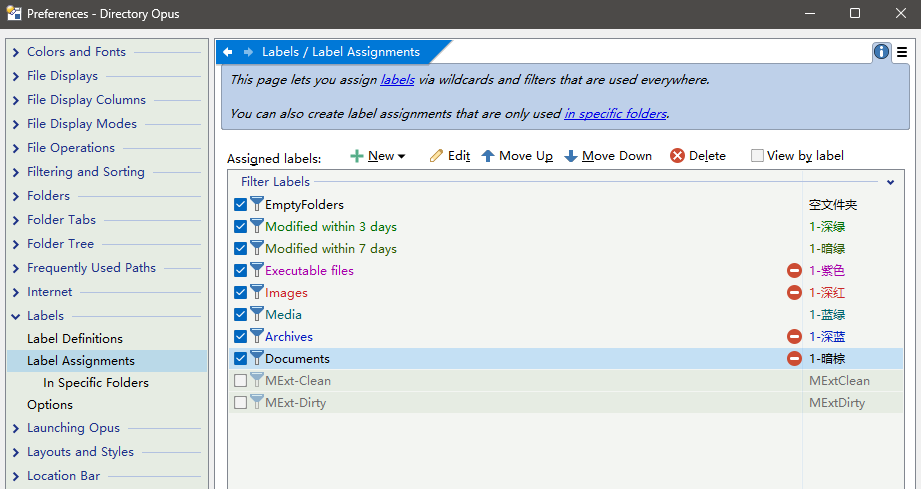
3rd
Modify the code in the button [Settings]➜〈Dark Mode〉to the following:
//Determine whether the current theme is Dark or Light, then replace the two .oxc files accordingly.
@if:Set DARKMODE=off
copy "/dopusdata\Images\Dark\ConfigFiles" to /dopusdata WHENEXISTS=replace
@if:else
copy "/dopusdata\Images\Light\ConfigFiles" to /dopusdata WHENEXISTS=replace
@if:common
Set DARKMODE=togglesmart
//Prefs PAGE=assignedlabels
//Disable and enable any filter label, it will take effect directly without restarting DOpus.
Set ENABLELABELFILTER "EmptyFolders",toggle
Set ENABLELABELFILTER "EmptyFolders",toggle
//This "EmptyFolders" is one of my filter labels. You may need to replace it with any filter name of your own filters.
This is a completed button, just download it:
en : Switch theme(auto-apply label assignments).dcf (4.1 KB)
chs : 切换主题(自动切换标记分配).dcf (4.0 KB)
切换主题的同时,切换适配的标记分配颜色
主题包.dlt是zip压缩包,不包含标记分配配置文件
标记和分配的配置文件是/dopusdata\ConfigFiles下的 foldercolors.oxc 和 colorgroups.oxc
因此可先判断当前主题是深是浅,然后对应替换这两个文件
由于 /dopusdata\Themes 路径下的非.dlt文件不会备份到.ocb中,
而在 /dopusdata\Images 路径下的文件都会备份到,
所以将 foldercolors.oxc 等文件放在Images中,就能完美备份了