Syncing between folders, destination items aren't deleted that are not in source

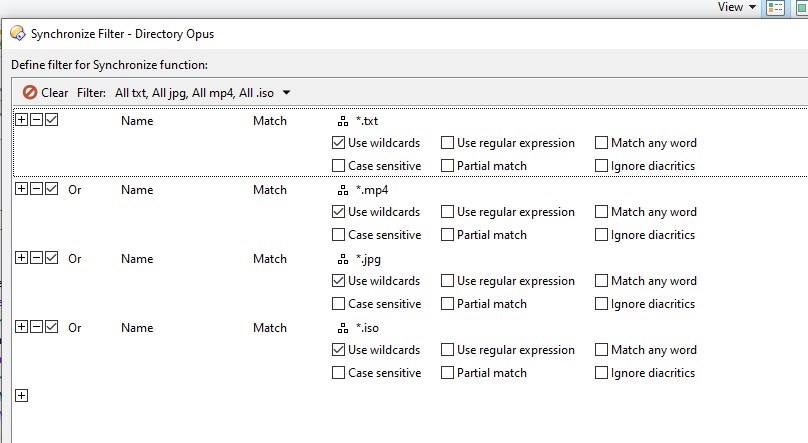
I made the following item up, see 1st. screenshot.

Even though "delete destination files that aren't in the source" is checked they are not deleted in the destination folder.

Using DO 13.21

So for example there is an .avi file in the destination folder but not in the source folder, it doesn't get deleted.

The sync won't affect things that don't match the filter.

By the way, you could do the filter as a single line/clause using *.(txt|mp4|jpg|iso)

Thanks for getting back, I was out and about, back now.

This looks cool. *.(txt|mp4|jpg|iso)

Before I posted I thought of that as an explanation but then I observed the checkbox for "delete destination files that aren't in the source" and so I posted.

So is that redundant? If so should it be greyed out?

If this item is not in use "delete destination files that aren't in the source" can the equivalent be added to say *.(txt|mp4|jpg|iso)

Where, how do I use *.(txt|mp4|jpg|iso)

I tried using in with "Edit as text" box checked but got a parsing error.

name match *.txt
or name match *.mp4
or name match *.jpg
or name match *.iso

This can be used also but i'd like to know where to use this *.(txt|mp4|jpg|iso) ?

name match *.(txt|mp4|jpg|iso)

I get a filter parsing error row 1 position 14 (

I copied and pasted your post.

Turn off 'edit as text' and just put the more complex pattern into the first of the Name Match clauses shown in your original screenshot, and then delete the other clauses.

That worked, thanks.

So "delete destination files that aren't in the source" is redundant?

No, but as Leo explained, it's subject to the filter.

Then perhaps when using the filter it should be greyed out?

Then you wouldn't be able to use it to delete files that aren't in the source that do match the filter.

I guess I'm lost at this stage because that's the very thing that doesn't happen, ie It doesn't delete files "that aren't in the source that do match the filter."

However, I'm very grateful for the prompt and helpful response plus the new (to me) way of doing it.

Thanks.

Avi files do not match the filter, hence they are not deleted.
If you had an mp4 file in destination not in source, it would get deleted.

Yes. Thank you. The mist is lifting.

Everything is dictated by the applied filter.

"The sync won't affect things that don't match the filter."