Systematic crash when accessing Script dialog after win11 24H2 upgrade

Just upgraded to Win11 24H2.
Since then, every time I open the Script dialog from settings menu, Opus crashes.
Dumps sent (ID: 456).
I tried to "process monitor" but couldn't see anything relevant. I can provide PML file if it helps.

EDIT : Running 13.13.4 (and tried to reinstall from this forum 13.13.4 installer - no change. I did the reinstall before sending the dumps)

EDIT2 : Opus is also crasing on exit with an exception in oleaut32.dll (the crashdump warning window appears twice - Both dumps sent with ID 457). Exit : not when closing last lister, but when asking (menu or notification tray icon) to exit Directory Opus.

EDIT 3: I did a full uninstall/reinstall. After re-installation, no more problem ... until I restored my configuration. I guess, there must be something in my config that leads to those crashes. I'll investigate and report back. If you see something in the dumps, I'll be glad to hear :slight_smile:

EDIT4: Found the culprit. I's a script I downloaded from the forum which is called UniversalOpen.js (from here, even though my version seems different ... but since I tried to help on that thread, I might have done some modifications ...).

The issue is coming from the declaration of a script parameter as an array which seemed tolerated before, but is not anymore (might be related to the change in the JScript engine updated by MS in 24H2 as I've read in some other threads in the last few months) :

	data.Config[option_name] = [
    [ ["zip", "7z", "tar", "gz" ], "%ProgramFiles%/7-Zip/7zFM.exe"                                                         ],
    [ ["lnk"                    ], "C:/my/apps/Easy.Link.File.Viewer/Easy Link File Viewer.exe"                       ],
    [ ["msi"                    ], "C:/my/apps/lessmsi/lessmsi-gui.exe"                                               ],
//    [ ["exe", "dll"             ], handleExeAndDllFiles                                                                    ],
    [ ["lnk"                    ], "C:/my/apps/Easy.Link.File.Viewer/Easy Link File Viewer.exe"                       ]];
	data.config_desc(option_name) = "Associations of file extensions and opening apps";

I don't know if this kind of crash could also occur in other circumstances, I'll let you check on that.

AFAIC, my problem is now solved.
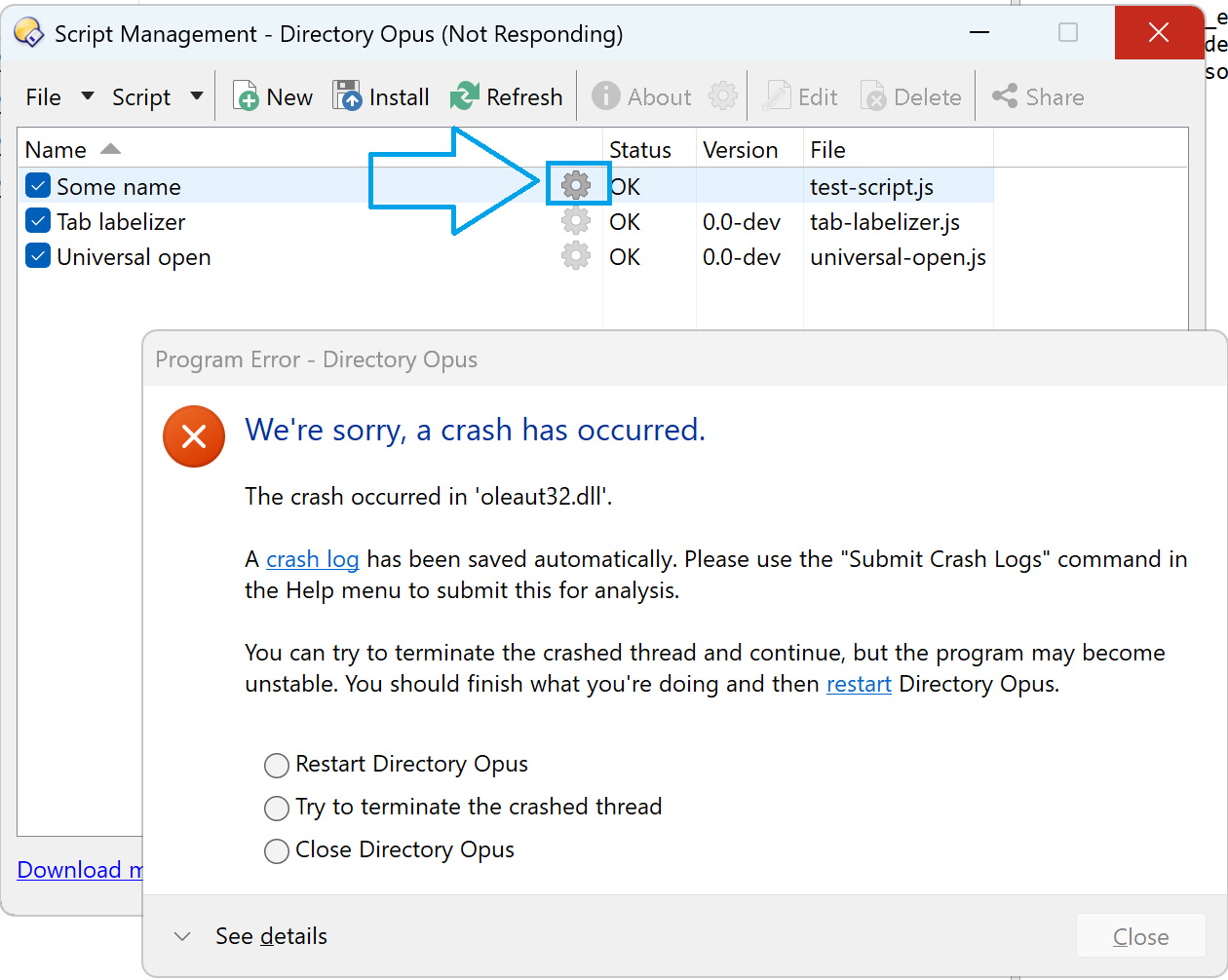
The version linked above doesn't seem to cause a crash here. If you can send the one that does I can look and see if we can at least catch the exception.

Here it is:
UniversalOpen.zip (2.1 KB)

@PassThePeas,

Sorry that my script caused problems.
By the way, you are using an old version, I have updated the script several times since then:
PolarGoose/DirectoryOpus-UniversalOpen-plugin
It doesn't use this trick anymore [ ["exe", "dll" ], handleExeAndDllFiles , and thus should work properly.

Thanks for your message.
No worries, it was a modified version anyway (from the original thread).
I'm not using it, so I didn't bother to keep it up 2 date.
Since I could isolate my issue, that's not that big a deal.
It may help Opus being a little more resilient to some scripting errors.

@PassThePeas,

Ok, thank you.
Looking at your modifications of the script, I think I saw a similar problem before.
This is the minimal reproduction scenario that also causes a crash on my machine:

function OnInit(/* ScriptInitData */ data) {
  data.name = "Some name"
  data.default_enable = true
  data.config_desc = DOpus.NewMap()
  data.config.someConfig = [] // <-- This is probably not allowed, it should be a string
}

That's what I thought, yes. I don't think you can assign an array to this property.
And this is the same dll involved in the exception on my side (except I couldn't even get the script dialog content to appear, it crashed before that).

Maybe this is Microsoft's way of getting us to stop using ActiveScripting, by taking something that had worked for literally decades and doing random changes to it that make scripts crash the host process or do strange things constantly. :slight_smile:

I'm curious what the point of this actually was:

	option_name = "FileExtensions";
	data.Config[option_name] = [
    [ ["zip", "7z", "tar", "gz" ], "%ProgramFiles%/7-Zip/7zFM.exe"                                                         ],
    [ ["lnk"                    ], "C:/my/apps/Easy.Link.File.Viewer/Easy Link File Viewer.exe"                       ],
    [ ["msi"                    ], "C:/my/apps/lessmsi/lessmsi-gui.exe"                                               ],
//    [ ["exe", "dll"             ], handleExeAndDllFiles                                                                    ],
    [ ["lnk"                    ], "C:/my/apps/Easy.Link.File.Viewer/Easy Link File Viewer.exe"                       ]];

That's setting a config item to a multi-dimensional JScript array, which would never have worked (even if it didn't crash). Opus only supports single dimensional arrays for config items (and they have to be an Opus Vector, I don't think a single dimensional JScript array would have worked there either).

Honestly Jon, I can't remember.
I downloaded the script to try and understand it and help in the thread, made some changes ... and forgot about it.
Don't waste time on this: if the exception is easy to catch and seems specific enough, do it to avoid opus crash, otherwise forget it.

@Jon,

I don't think a single dimensional JScript array would have worked there either

Indeed, as my example above shows, data.config.someConfig = [] would cause the same problem.

Opus only supports single dimensional arrays for config items

Is it possible to handle wrong config types without crashing DOpus?

It isn't Opus that's crashing, it's JScript (i.e. a component of Windows). But we think we have a workaround for it.

Since Jscript for Windows11 24h2 doesn't seem to have any real benefit in terms of speed or anything, and it is possible to switch to the old engine at a system level, I wonder if it's also possible for an application to decide which engine version to use (the new or the old one). If so, wouldn't it be useful to be able to define from a script itself which version of the engine to use, and for this property to override the user's advanced settings recently added?

You can do that already but I don't think it would help, since all it does is affect the feature set afaik. It doesn't actually change to the old jscript DLL