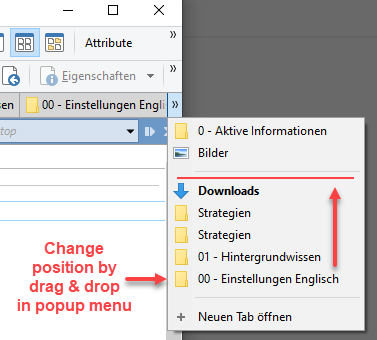
At the moment, I have disabled “Use popup menu when tabs exceed available space”, because without I can use the arrows to reorder the tabs. It requires a lot of clicking, but it's currently the only way.
So please consider either adding multi-row tabs, drag & drop sorting in the popup menu, or other features that would make tab management easier.
You can use CTRL + TAB to open the tab chooser popup which lists in two columns (on dual pane listers) all the open tabs in the order they are sorted in the lister.
Another thing that can make tab management easier is to actually have less tabs per lister. I’ve been there with multi-purpose listers having so many tabs I had trouble finding the appropriate one when needed.
My current workflows involve one lister (layout) per specific type of activities: each one has its own set of predefined tabs that open always in the same order/set-up (up/left or top/down) thanks to layout.
For occasionnal activites, I use Tab Groups and a script add-in I wrote to allow loading/unloading tab groups dynamically without replacing the current tabs ( FAYT script : Dynamic Tab Groups - #19 by PassThePeas ): it works either through the FAYT field to open/close groups with keyboard or with a button dynamically generated.
To make it short: less tabs means less cluttering means faster workflows.