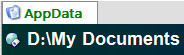
I cannot say when this first started happening as I have only just started playing with tabs. I am on DOpus version 9.5 with Vista 32-bit.
When I click on one of my buttons which opens three tabs (AppData, LocalAppData and CommonAppData) everything works as it should. But when I click on a new button, say the one that opens "My Documents" in explorer view with close existing tabs selected, the lister shows My Documents, but the tab retains the name of whichever tab was active last time.
Curiously, this does not happen on my Windows XP Pro SP3 computer with same config...
See snapshot attached for reference.
It's possible that the tab has been "renamed" in which case it will keep whatever name was given to it.
To remove the name, click on the tab's label (not the icon) and wait a second. You should see an edit box appear, like when renaming a file. Delete the name so the edit box is empty and then hit return.
After doing that, does it now follow the folder name?
If the tab was opened by a layout, style, tab group or the default lister then you'll probably need to remove the name and then save over that thing. Otherwise the next time you open the layout (or whatever) the tab name will be back.
When I try to erase the name and press enter it works and tags the tab according to the current path in the lister. But when I then press the Systems Tab button again that activates the three listers, it does the same thing over again....
Going to do some more investigation, but this is very odd, as both of my computers have exactly the same config, but one is XP Pro SP# and the one that doesn't work is Vista Ultimate SP1...
Okay, got it. Followed your logic from your last sentence, Leo, and thought it might have something to do with the tab group. Went into preferences and edited the tabs. I had put in different names for the tabs (as it does seem to imply that you can create your own name that might make more sense to you) and deleted any name that I had entered in the Name: field. Closede out after applying and now it works...So it seems that if you name the tab on Vista Ultimate (at least that's what I am on...) then it behaves like this. Leave the name blank and you'll be fine. On Windows XP Pro, I have the same config (named the tabs my own names) and it works fine....Is this a bug (or just a conspiracy)?
I think if the tab has been given a name then it should keep that name, even on XP. I just did a quick test on an XP machine and that seems to be the case.
Perhaps there's some connection between the folder on XP being called "Application Data" and the one on Vista being called just "AppData" (the same name as was given to the folder tab), but I can't think why that connection would have any effect, especially when it's XP (where the connection isn't present) where the difference seems to be for you.