Since DOpus can only restore only one tab that was just closed, this is not enough.
It‘’s better to be able to restore multiple closed tabs like a web browser.
This script can almost achieve this. Although not perfect, it is sufficient for restoring those tabs that were mistakenly closed.
Screenshot
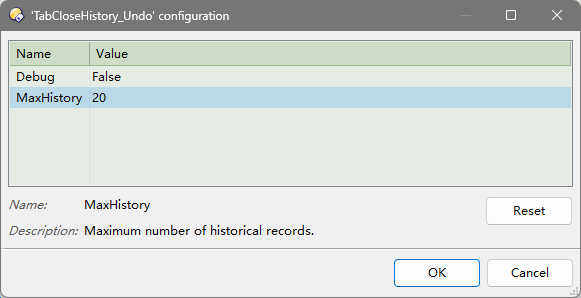
Script config:
MaxHistory: Maximum number of historical records (最大历史记录数)
Dynamic buttons list
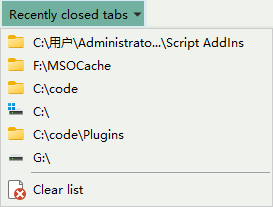
Usage / Command in a button
This script add a command: UndoCloseTab
We can using Ctrl+Shift+T to Undo CloseTab many times like in web browsers.
UndoCloseTab  → Restoring recently closed tabs (can be done and sequentially)
UndoCloseTab NUMBER=2 → Restore the second to last closed tab
UndoCloseTab NUMBER=3 → Restore the third to last closed tab
UndoCloseTab CLEAR → Clear history list
UndoCloseTab LIST → Generate a list of dynamic buttons which can restore paths of closed tabs
UndoCloseTab LIST=nosub  → Generate dynamic buttons (Non submenu)

UndoCloseTab  → 恢复刚刚关闭的标签 可连续依次恢复
UndoCloseTab NUMBER=2 → 恢复倒数第2个关闭的标签
UndoCloseTab NUMBER=3 → 恢复倒数第3个关闭的标签
UndoCloseTab CLEAR → 清除历史标签记录
UndoCloseTab LIST → 生成一系列动态按钮用以恢复关闭标签的路径
UndoCloseTab LIST=nosub  → 生成动态按钮(非子菜单形式)
Download
Download it and double-click it to install the script.
2026.6.10 : TabCloseHistory_Undo.opusscriptinstall (3.7 KB)
Buttons, drag .dcf file to your toolbar.
Ctrl+Shift+T : Undo CloseTab.dcf (865 字节)
Recently closed tabs.dcf (319 字节)
Ctrl+Shift+T : 取消关闭标签页.dcf (1.3 KB)
最近关闭的标签.dcf (328 字节)