I have been using DOpus for decades, both on a laptop and a desktop. I am used to right-clicking the taskbar (not system tray, but taskbar) icon and picking one of my favorite folders. Still works fine on my desktop.
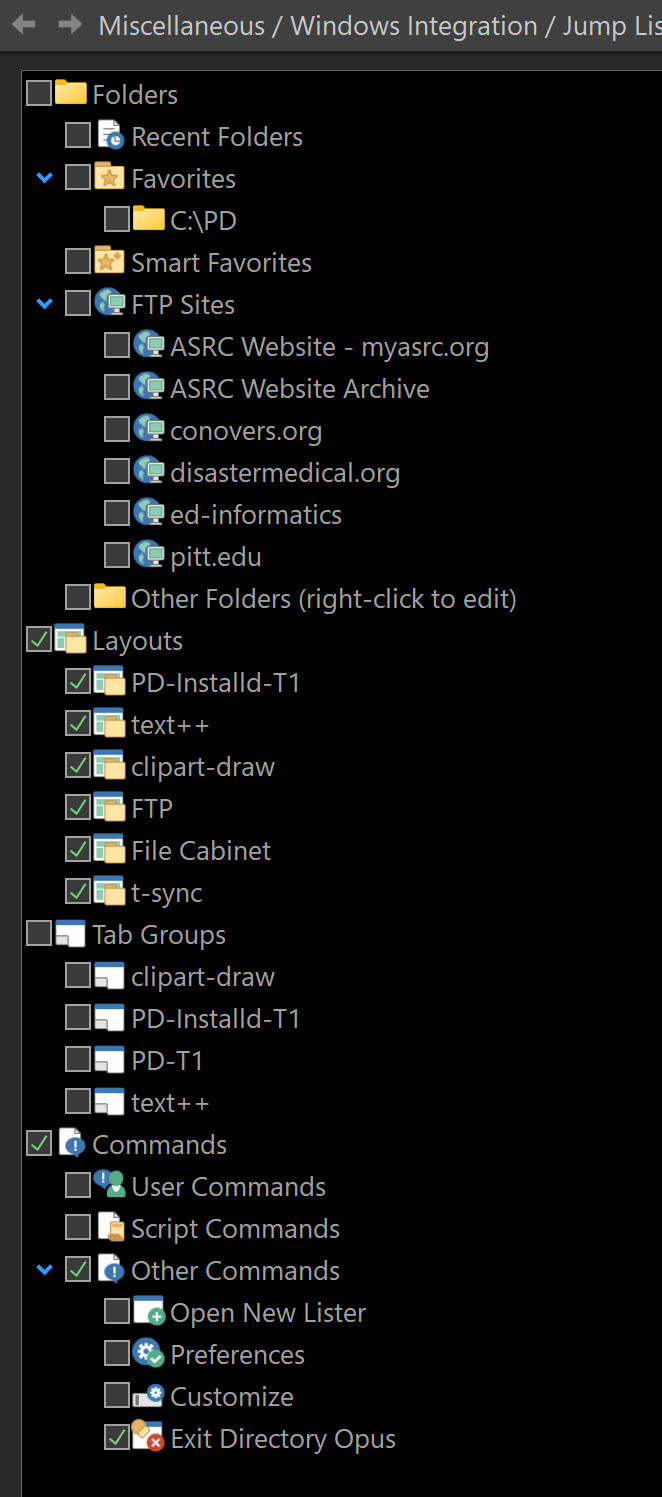
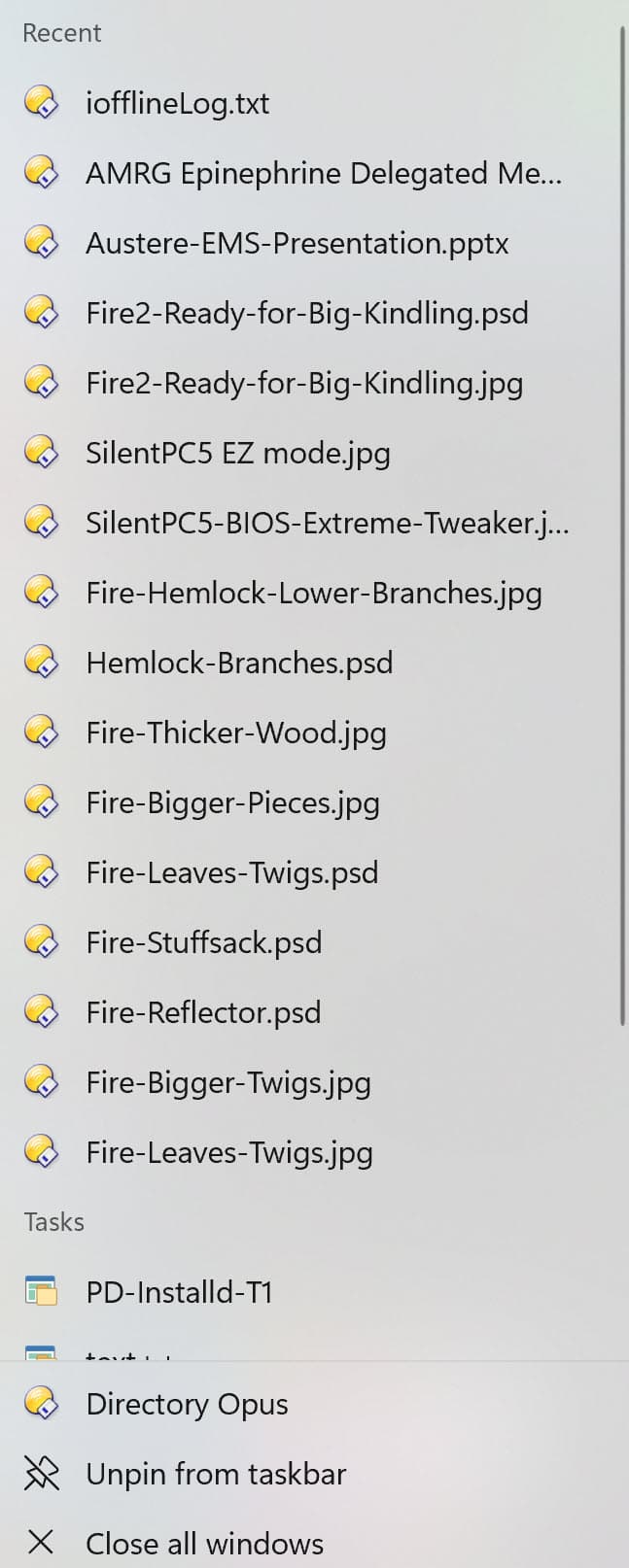
But recently, for no apparent reason, when right-clicking the taskbar icon on my laptop (but not my desktop) it shows recent files as well as folders, and the (mostly useless to me) list of files pushes what I really want – my list of folders – off the bottom of the list and I have to scroll to open a folder. I looked in Preferences > Miscellaneous > Windows Integration > Jump List and couldn't find a way to tweak this. (Version 13.14 x64).
Any thoughts on (a) what is happening and (b) how to fix it? Thanks in advance!
Windows gives applications very little control over the contents of their jumplists.
Your second screenshot shows two sections - Recent and Tasks. Tasks is the only section that we're able to add things to (and then it's up to Windows how many things it shows that we ask for). The options in the Jump List preferences control what gets added to the Tasks section.
The Recent section is completely under Windows' control. To be honest I'm not sure why it's showing content there at all - I don't think I've ever seen that section show up for our jump list. It would normally only show files there if Opus was registered as the default handler for those filetypes and one of them was double-clicked from Explorer (or you used Open With, and selected Opus manually to open the file). None of that should happen by default, however.
Hmm. I wonder if it's related to the registry hack I did to make the jumplist longer. However, I did this on both desktop and laptop.
Regedit HKCU\SOFTWARE\Microsoft\Windows\CurrentVersion\Explorer\Advanced
Add a DWORD (32) of JumpListItems_Maximum and set it to decimal 22
However, even though my desktop jumplists have stayed long like I want, that DWORD I added has now disappeared likely via a Windows 11 update! But I still have 22 items on my jumplists there, but not files on the DOpus desktop jumplist.
I did check Start > Settings > Personalization > Start > Show recommended files, recent files in File Explorer, and items in Jump Lists, which was toggled ON for both desktop or laptop PC.
Microsoft has broken jump lists in the Start menu and (partially) on the taskbar with the Windows 10 April 2025 Update.
That means that Windows 10 is now a broken system.
While they ADDED jump lists in the Start menu with the Windows 11 2024 Update (Version 24H2), which made the system much more usable for me, they have now REMOVED them in Windows 10, making the system much less usable for me.
See discussions in Microsoft community forums here and here.
No response from Microsoft to date.
Meanwhile there are further articles on the web, search for "jump lists windows 10 update".
The hope is that it is a bug and will be fixed.
The allegation is that it is intentional, quote from XDA article:
Instead of actually making Windows 11 worthwhile by adding features and resolving bugs that would convince a Windows 10 user to willingly upgrade, Microsoft takes a somewhat interesting approach. They quietly break Windows 10 features that people like, thinking that would finally convince users to take the plunge.
For instance, they recently removed the clock from Windows 10 (Flyout) just last week, only to reintroduce it in Windows 11. Now, the Start menu's jump lists have just disappeared with Windows 10's latest update.
In other words: Microsoft destroys Windows 10 to promote Windows 11.
The latest Windows 10 Update of 22 April 2025 (KB5055612 OS Build 19045.5796) does not fix the issue, which is confirmed here.
I had planned to take the announced offer for Windows 10 Extended Security Updates (ESU) with costs after end of support in October 2025.
But I will not pay for a broken system!
So this option falls away if the issue isn't fixed.
Even macOS has various kinds of jump lists in diverse places.
Removing an essential feature is simply not acceptable.
Some bozo at Microsoft seems to think:
Potential Bug:
Too many people will continue using Windows 10 after planned retirement date. Actual Fix:
Remove essential features from Windows 10 and add them to Windows 11.
But Windows 11 is still not an adequate replacement for Windows 10 because there are still essential features in Windows 10 left which are not present in Windows 11 (taskbar / Start menu). Whether they can fix all remaining issues in Windows 11 remains questionable.
Microsoft "Opened" the issue on 2 May 2025 13:24, and they "Resolved" it few minutes later on 2 May 2025 13:56.
Hopefully Windows 10 will retire sanely...
Windows 7 retirement was a bit flawed. Lifecycle ended on 14 Jan 2020. Last regular update had a known issue, which was resolved by following preview update of 31 Jan 2020 with no known issues.
Next regular update of Feb 2020 (ESU) was no longer available for the general public.
Windows 7 (32-bit) is still running pretty flawless here with the last public 31 Jan 2020 update, and is still receiving frequent Defender and Acrobat Reader updates.