I use the Edit control a lot in Opus dialogs. In a number of cases I use it to work with lists, each line of which I need to do something with. These are not static lists (which I could load in a ListView control), they are actively maintained and edited lists of data - for instance an url, a title, and a description. I’m of course using it with Edit type Multiline, and also Word wrap set to False. Then I select a line, and buttons do the work, capturing the selected line (using SelectRange() and all these handy methods) and doing a lot of stuff.
In many text editors (such as Notepad++, but also the standard script editor of Directory Opus) you can select a line by just clicking in the margin, close to the beginning of the line. I’m missing this in the Opus edit control, which makes selecting a line more like precision work.
Basically what is needed is a tiny vertical area, maybe 3 or 4 mm wide , where we can click in order to select the entire line at once. There should then of course be an option, something like Line select, which is by default set to False (for backward compatibility) but which can be activated in order to get the additional mouseclick area. Needless to say, when word wrap is active in the control, it should equally select the line (which in that case we use to call a “paragraph”).
I think this would be added value for this control.
PS. If the edit control would produce an event every time I click in it, I could probably have coded the auto-selection, but the control only produces an event the first time you click into the editor field. (It would also require me to search back and forth to find the line breaks, but more importantly, it would probably disable the possibility to select just part of a phrase - which is also sometimes needed to copy some part of the line). So the better option would really be having a small mouse-click area on the left.
But I can imagine few people have a need for this. So it’s just an idea. Ideas and business (ROI) are two very different things.
In the next beta we'll make it so that script dialogs can use the code editor control that Opus uses in various dialogs (e.g. the script editor), as this has that feature (plus others of course).
It works fantastic! Even includes hyperlinks being control-clickable, putting lines in comments colours them green and all that stuff. And all standard functions still seem to work too (although I would expect to find some glitches anyway, because magic rarely comes without some unexpected side-effects).
That’s an undesirable side-effect then. I can’t think of many people who would like their code editor to become a non-fixed-width font, for instance.
But it is unavoidable if the implemented new editor is the original code editor (passed by reference'). To me that’s still okay but it would be wise to warn the user about it when choosing this setting, or they may end up discovering a font change in their code editor later on, and not realizing where that comes from.
I mean via Preferences, via the "code editor" font choice.
You can only select fixed-width fonts for the code editor, so that's not an issue.
I doubt many people would want to choose different fonts for different code editors, or have some code editors ignore their font choice, so I think it makes sense how it is.
(Dialogs that need editors with custom fonts can always use the normal edit control as before.)
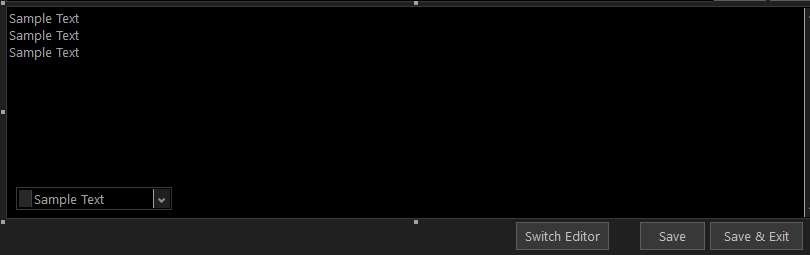
For those interested: if you want to switch between the standard (multiline) text edit mode and the new code edit mode of the edit control, you cannot set the mode dynamically, but you can of course duplicate your edit control, rename it (from “texteditor” to “codeeditor” for instance) and set its properties enabled and/or visible to false. (You can then move it out of your way by making it smaller and move it somewhere at the bottom of your visible editor control.
PS. This inactive control will remain visible in your Opus code editor, but that should not be disturbing: it’s just reminding you that it is there, so to speak. For instance:
You can then, under an editor switch button, jump to some function like this:
function SwitchEditor() {
	//textobj & codeobj are predefined as our 2 text objects
	//editobj will be re-associated with one of these when doing the switch...
	var editType = textobj.enabled==true ? "text" : "code";
	vec=editobj.SelectRange(); //Remember cursor position
	switch (editType) {
	case "text":
		var text=editobj.value;editobj.value="";
		codeobj.x=editobj.x;codeobj.y=editobj.y;
		codeobj.cx=editobj.cx;codeobj.cy=editobj.cy;
		editobj.enabled=false;editobj.visible=false;
		codeobj.enabled=true;codeobj.visible=true;
		codeobj.value=text;
		editobj=codeobj; editobj.SelectRange(vec(0),vec(1)); editobj.focus=true;
		break;
	case "code":
		var text=editobj.value;editobj.value="";
		textobj.x=editobj.x;textobj.y=editobj.y;
		textobj.cx=editobj.cx;textobj.cy=editobj.cy;
		editobj.enabled=false;editobj.visible=false;
		textobj.enabled=true;textobj.visible=true;
		textobj.value=text;
		editobj=textobj; editobj.SelectRange(vec(0),vec(1)); editobj.focus=true;
		//And, because textedit mode does not auto-visualize cursor position:
		DOpus.SendKey("shift+right");DOpus.SendKey("shift+left");
		break;
	}
}
This will make you switch back and forth easily. The text is always copied to the active editor.
Notice that after switching, the code edit mode automatically visualizes the cursor position after restoring it with SelectRange(), but the text edit mode does not. In the code sample above, this is solved by sending the key Shift-Right and Shift-Left. In case something was really selected, this will preserve the selection. In any case, it preserves your cursor position.