By the way, the image also has a standard JFIF APP0 marker before the other auxiliary markers.
I didn't mention it because it has no effect on the rendering.
Here is the other analysis tool:
F:\>djpeg -v Z52_002591F.jpg nul
Independent JPEG Group's DJPEG, version 9f  14-Jan-2024
Copyright (C) 2024, Thomas G. Lane, Guido Vollbeding
Start of Image
JFIF APP0 marker: version 1.02, density 300x300  1
Miscellaneous marker 0xe1, length 1248
Miscellaneous marker 0xe2, length 594
Miscellaneous marker 0xe1, length 4427
Define Quantization Table 0  precision 0
Define Quantization Table 1  precision 0
Start Of Frame 0xc0: width=4032, height=6048, components=3
    Component 1: 1hx1v q=0
    Component 2: 1hx1v q=1
    Component 3: 1hx1v q=1
Define Huffman Table 0x00
Define Huffman Table 0x10
Define Huffman Table 0x01
Define Huffman Table 0x11
Start Of Scan: 3 components
    Component 1: dc=0 ac=0
    Component 2: dc=1 ac=1
    Component 3: dc=1 ac=1
  Ss=0, Se=63, Ah=0, Al=0
End Of Image
It is a bad practice to place a JFIF APP0 marker before the Exif APP1 marker, because in this way it is not even a proper Exif image.
This was explained here over 20 years ago.
Here is the cPicture rendition:
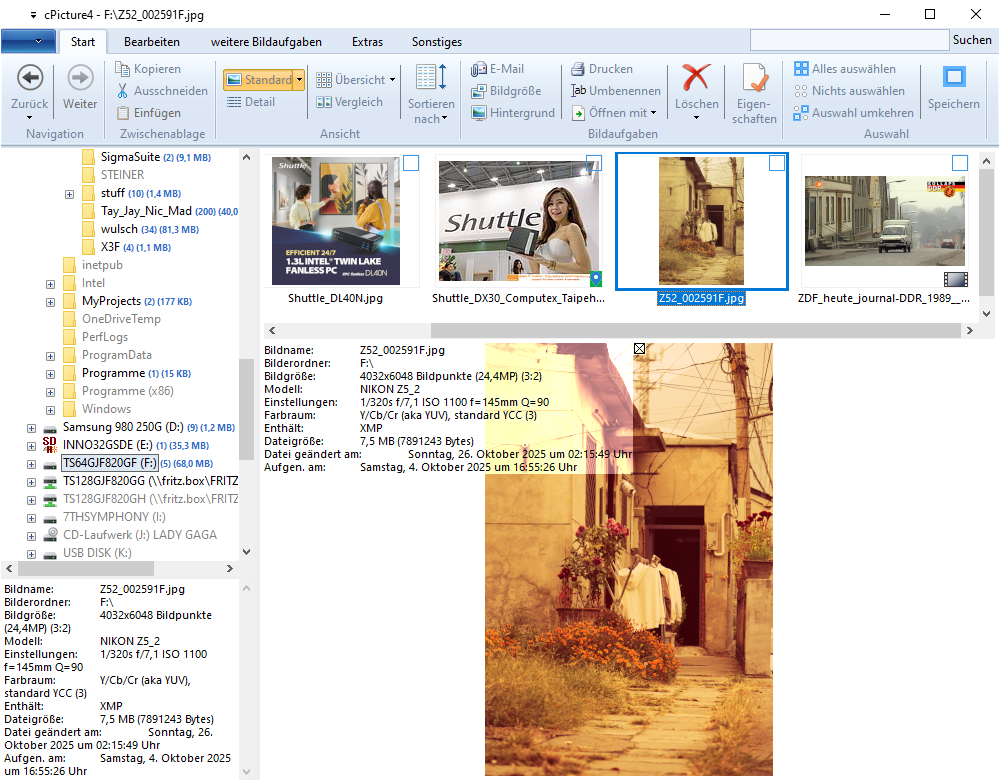
You see that it reports the color space as "Y/Cb/Cr (aka YUV), standard YCC", which is taken from the JPEG reference source (file jpeglib.h):
/* Known color spaces. */

typedef enum {
	JCS_UNKNOWN,	/* error/unspecified */
	JCS_GRAYSCALE,	/* monochrome */
	JCS_RGB,		/* red/green/blue, standard RGB (sRGB) */
	JCS_YCbCr,		/* Y/Cb/Cr (also known as YUV), standard YCC */
	JCS_CMYK,		/* C/M/Y/K */
	JCS_YCCK,		/* Y/Cb/Cr/K */
	JCS_BG_RGB,		/* big gamut red/green/blue, bg-sRGB */
	JCS_BG_YCC		/* big gamut Y/Cb/Cr, bg-sYCC */
} J_COLOR_SPACE;
Then it reports "contains XMP".
Interestingly, the image seems to be differently rendered in the thumbnails strip above than in the single preview below.
This shows the ambiguity resulting from such practice.
Regards
Guido
JPEG developer