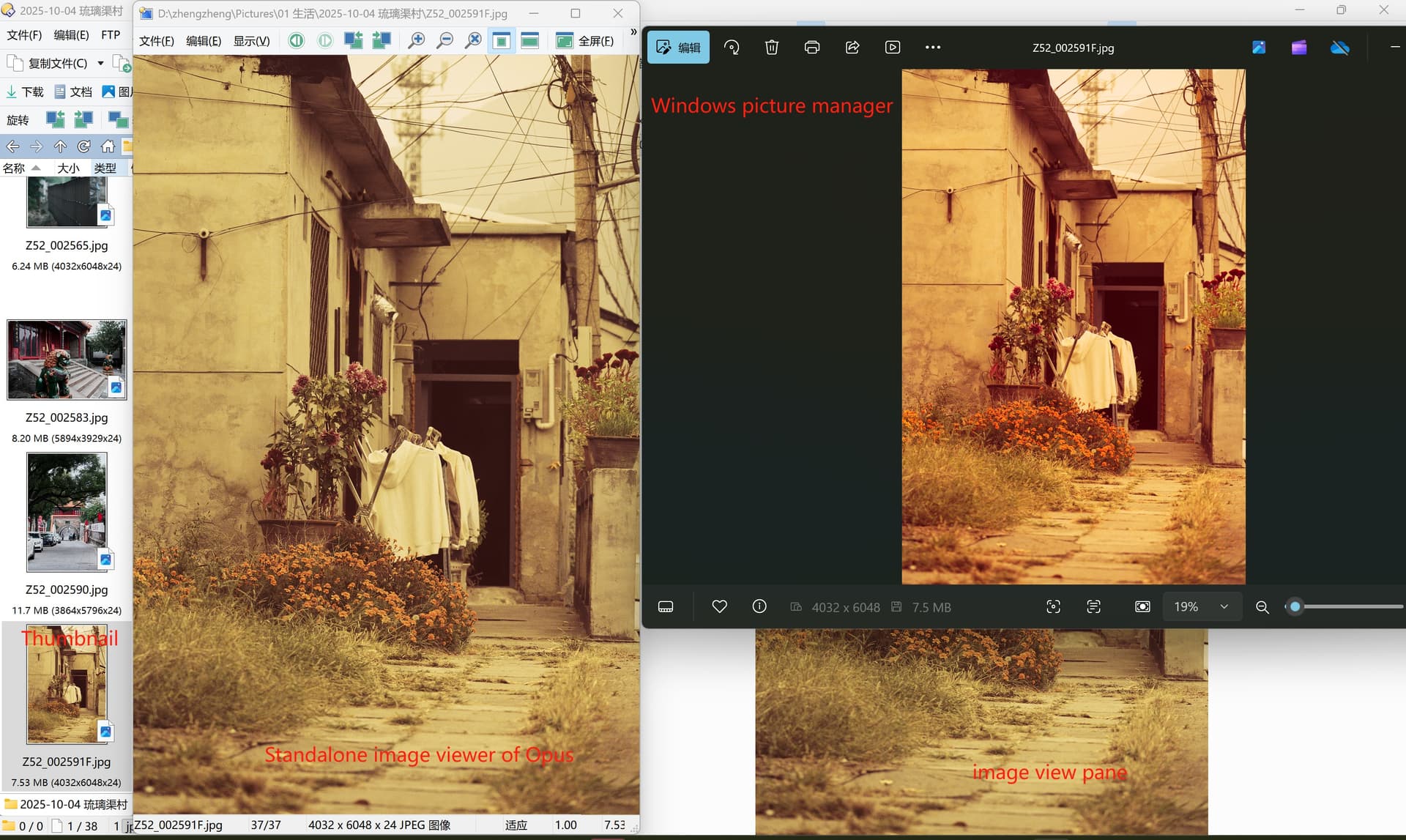
The preview of image is not correct

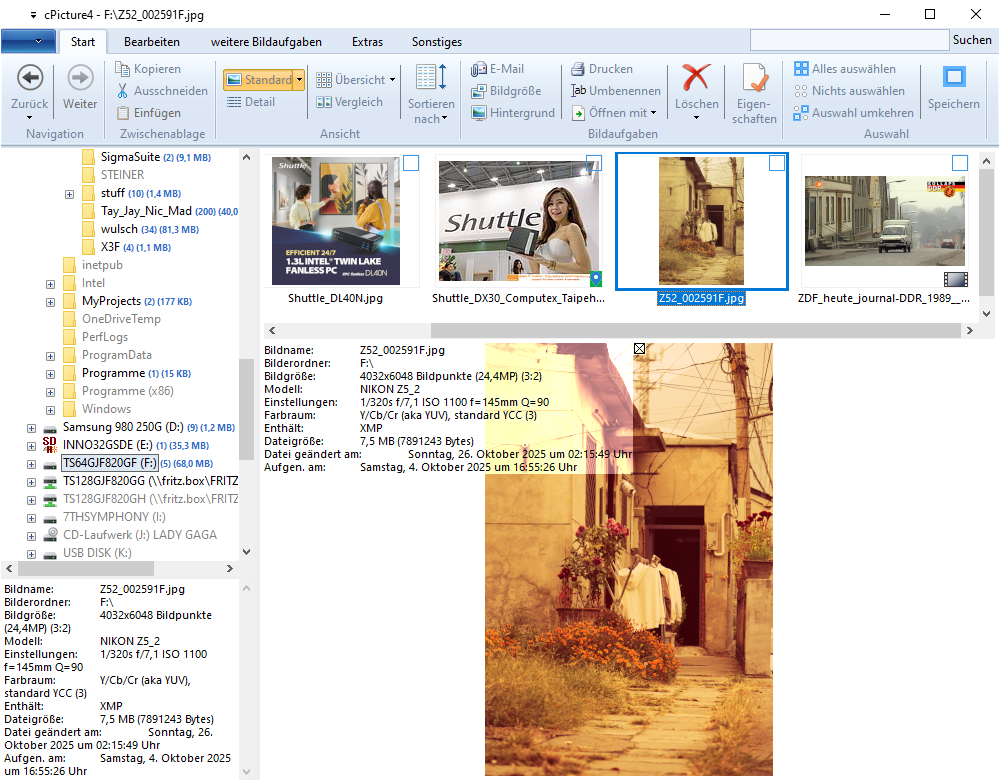
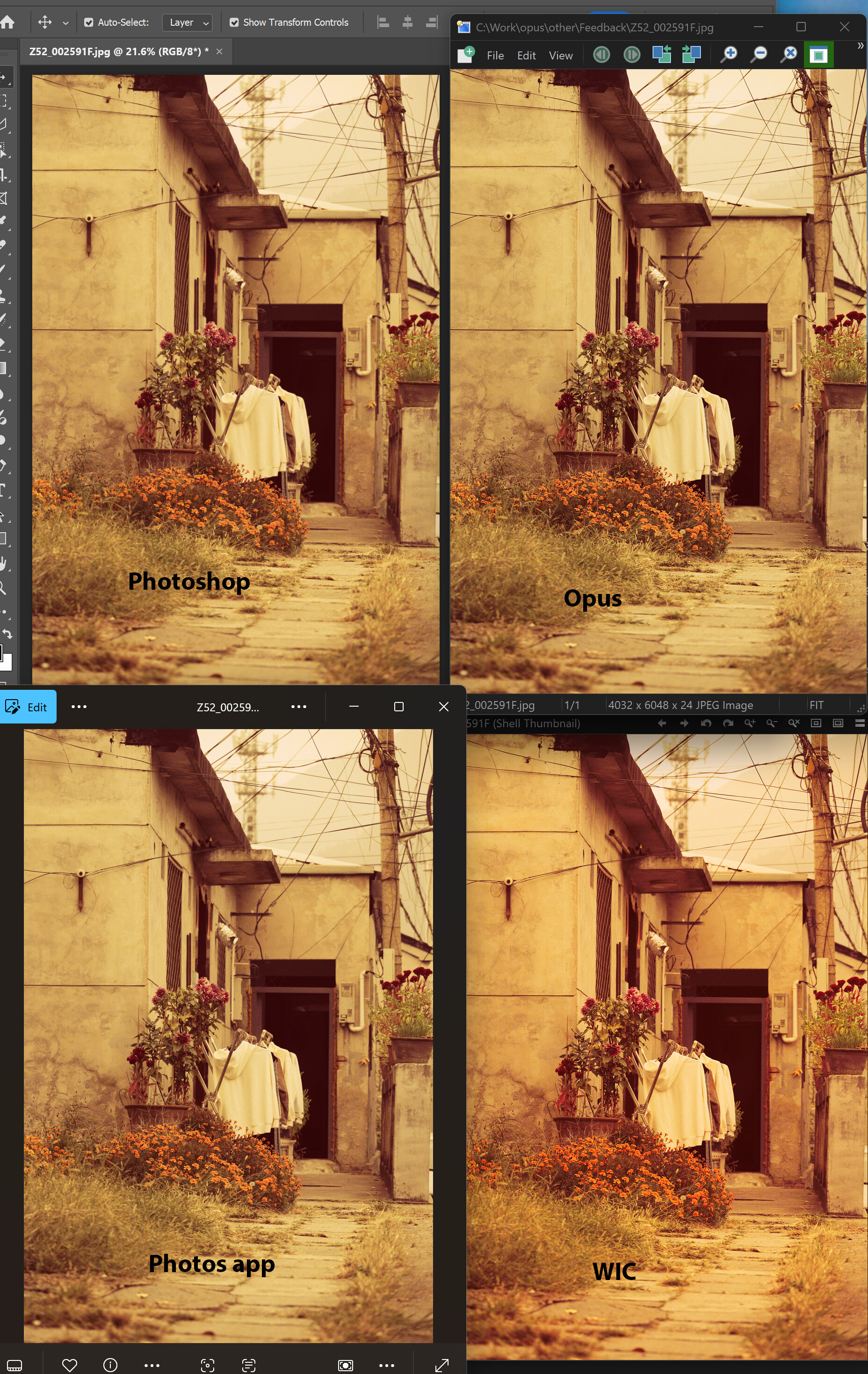
Either the preview of thumbnail in the folder, or display image in standalone image viewer, the image can't not be displayed correctly, which it seems the color space is not correct. It is correct displayed while I open the same image by windows image viewer or the 3rd plugin in the view pane in opus. Attached snapshot to see what happened for me.

Looking forward to your help to get it addressed.

Can you zip and upload the image file in question?

Z52_002591F.zip (7.5 MB)

Thanks for your quick response. This file was exported by DXO filmpack. It’s normal for DO to view images not generated by DXO filmpack. But the question is other software (eg. captureone, windows build-in image viewer) can decode the images correctly no mattter it is exported from DXO filmpack or not.

This is a JPEG image, and JPEG defines the JPEG File Interchange Format (JFIF) for, as the name suggests, the interchange of images.

JFIF specifically defines the standard color spaces to be used for the interchange of images.

The standard color spaces are defined by component identifier configurations in the SOF (Start Of Frame) marker in the head of the JPEG file.

This image is marked as standard luma-chroma-chroma color space with extended gamut (sYCC), which is defined per IEC 61966-2-1:1999 Amendment A1:2003 Annex F.
It is the most commonly used color space in JPEG (JFIF) images.

Directory Opus renders the image correctly according to this indication.
The Microsoft GDI+ system component renders the image in the same way, as can be seen with the SimpleImage sample application.

Some people believe that it would be useful to deploy non-standard color spaces and indicate those in auxiliary markers in the head of the JPEG file.
Notice that such images are no longer JFIF images, thus hampering the proper image interchange!

This image has 3 auxiliary markers:

  1. an Exif marker (APP1, 0xFFE1)
  2. an ICC Profile marker (APP2, 0xFFE2)
  3. an XMP marker (APP1, 0xFFE1)

ICC is International Color Consortium, XMP is Extensible Metadata Platform.

When this auxiliary indication is utilized, differing display is the result.
cPicture, which is also JPEG 9 reference application like Directory Opus, thus shows the different display.

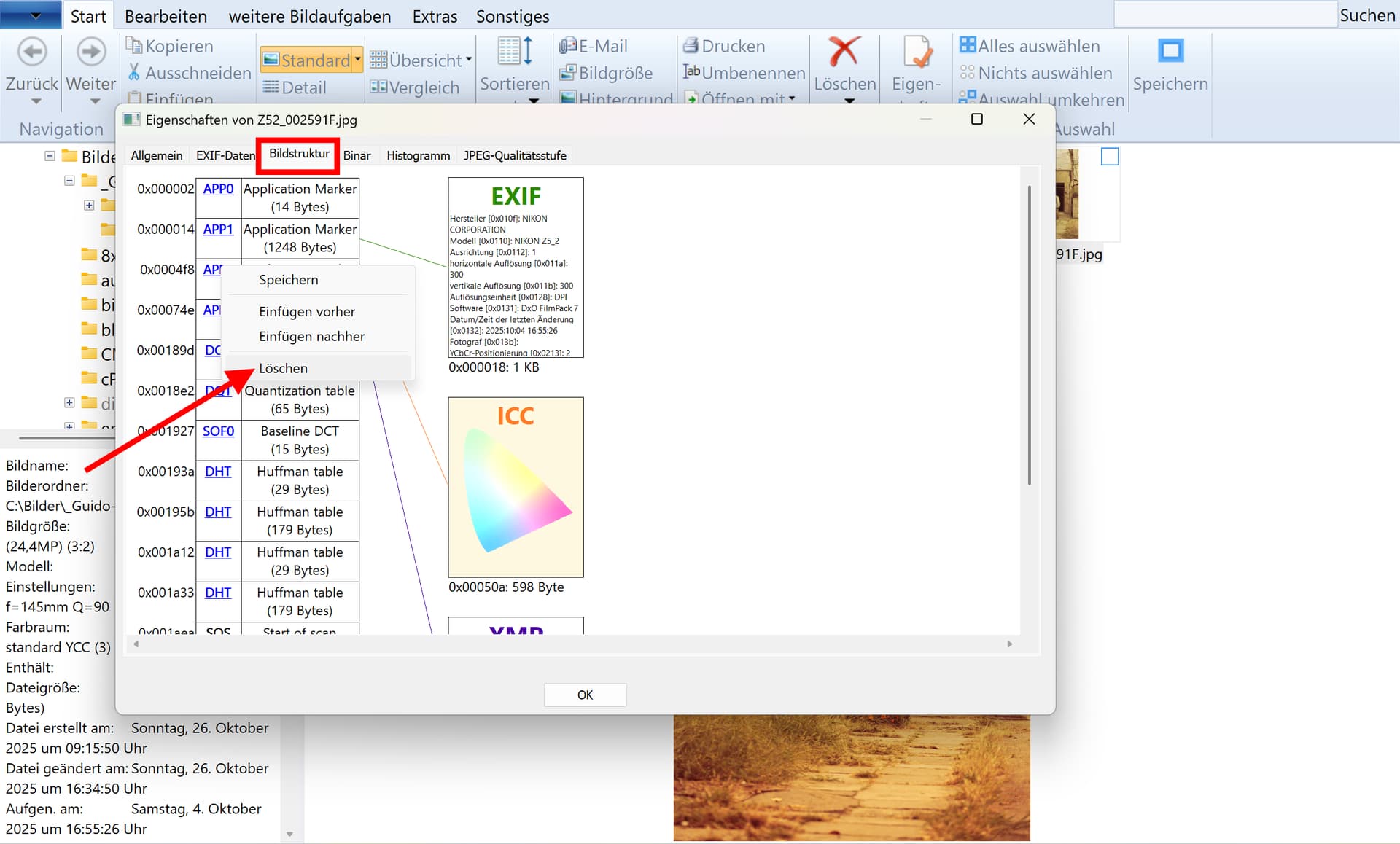
Below is the interpretation of the auxiliary markers.

Regards
Guido
JPEG developer

JPEGsnoop 1.8.0 by Calvin Hass

  Filename: [F:\Z52_002591F.jpg]
  Filesize: [7891243] Bytes
 
*** Marker: APP1 (xFFE1) ***
  OFFSET: 0x00000014
  Length          = 1250
  Identifier      = [Exif]
  Identifier TIFF = 0x[49492A00 08000000]
  Endian          = Intel (little)
  TAG Mark x002A  = 0x002A

  EXIF IFD0 @ Absolute 0x00000026
    Dir Length = 0x000F
    [Make                                ] = "NIKON CORPORATION"
    [Model                               ] = "NIKON Z5_2"
    [Orientation                         ] = 1 = Row 0: top, Col 0: left
    [XResolution                         ] = 300/1
    [YResolution                         ] = 300/1
    [ResolutionUnit                      ] = Inch
    [Software                            ] = "DxO FilmPack 7"
    [DateTime                            ] = "2025:10:04 16:55:26"
    [Artist                              ] = ""
    [YCbCrPositioning                    ] = Co-sited
    [Copyright                           ] = ""
    [ExifOffset                          ] = @ 0x0172
    [GPSOffset                           ] = @ 0x04B4
    Offset to Next IFD = 0x00000000

  EXIF SubIFD @ Absolute 0x00000190
    Dir Length = 0x002D
    [ExposureTime                        ] = 10/3200 s
    [FNumber                             ] = F7.1
    [ExposureProgram                     ] = Shutter priority
    [ISOSpeedRatings                     ] = 1100
    [DateTimeOriginal                    ] = "2025:10:04 16:55:26"
    [DateTimeDigitized                   ] = "2025:10:04 16:55:26"
    [ShutterSpeedValue                   ] = 8726173/1048576
    [ApertureValue                       ] = 565564/100000
    [ExposureBiasValue                   ] = 0.00 eV
    [MeteringMode                        ] = Pattern
    [LightSource                         ] = unknown
    [Flash                               ] = Flash did not fire
    [FocalLength                         ] = 145 mm
    [UserComment                         ] = ""
    [SubSecTime                          ] = "26"
    [SubSecTimeOriginal                  ] = "26"
    [SubSecTimeDigitized                 ] = "26"
    [ColorSpace                          ] = Uncalibrated
    [ExifImageWidth                      ] = 4032
    [ExifImageHeight                     ] = 6048
    [SensingMethod                       ] = One-chip color area sensor
    [FileSource                          ] = DSC
    [SceneType                           ] = A directly photographed image
    [CFAPattern                          ] = 0x[02000200 00010102]
    [CustomRendered                      ] = Custom process
    [ExposureMode                        ] = Auto exposure
    [WhiteBalance                        ] = Auto white balance
    [FocalLengthIn35mmFilm               ] = 145
    [SceneCaptureType                    ] = Standard
    [GainControl                         ] = 1
    [Contrast                            ] = 0
    [Saturation                          ] = 0
    [Sharpness                           ] = 0
    [SubjectDistanceRange                ] = 0

  EXIF GPSIFD @ Absolute 0x000004D2
    Dir Length = 0x0001
    [GPSVersionID                        ] = 2.3.0.0
 
*** Marker: APP2 (xFFE2) ***
  OFFSET: 0x000004F8
  Length          = 596
  Identifier      = [ICC_PROFILE]
    ICC Profile:
      Marker Number = 1 of 1
        Profile Size                      : 580 bytes
        Preferred CMM Type                : 'lcms' (0x6C636D73)
        Profile Version                   : 0.4.3.0 (0x04300000)
        Profile Device/Class              : Display Device profile ('mntr' (0x6D6E7472))
        Data Colour Space                 : rgbData ('RGB ' (0x52474220))
        Profile connection space (PCS)    : 'XYZ ' (0x58595A20)
        Profile creation date             : 2022-05-23 00:00:00
        Profile file signature            : 'acsp' (0x61637370)
        Primary platform                  : ? (0x00000000) ('....' (0x00000000))
        Profile flags                     : 0x00000000
        Profile flags                       > Profile not embedded
        Profile flags                       > Profile can't be used independently of embedded
        Device Manufacturer               : '....' (0x00000000)
        Device Model                      : '....' (0x00000000)
        Device attributes                 : 0x00000000_00000000
        Device attributes                   > Reflective
        Device attributes                   > Glossy
        Device attributes                   > Media polarity = negative
        Device attributes                   > Black & white media
        Rendering intent                  : Perceptual
        Profile creator                   : 'lcms' (0x6C636D73)
        Profile ID                        : 0x00000000_00000000_00000000_00000000
 
*** Marker: APP1 (xFFE1) ***
  OFFSET: 0x0000074E
  Length          = 4429
  Identifier      = [http://ns.adobe.com/xap/1.0/]
    XMP = 
          |<?xpacket begin="" id="W5M0MpCehiHzreSzNTczkc9d"?>
          |<x:xmpmeta xmlns:x="adobe:ns:meta/" x:xmptk="XMP Core 5.5.0">
          |   <rdf:RDF xmlns:rdf="http://www.w3.org/1999/02/22-rdf-syntax-ns#">
          |      <rdf:Description rdf:about=""
          |            xmlns:xmp="http://ns.adobe.com/xap/1.0/"
          |            xmlns:crd="http://ns.adobe.com/camera-raw-defaults/1.0/"
          |            xmlns:tiff="http://ns.adobe.com/tiff/1.0/">
          |         <xmp:CreateDate>2025-10-04T16:55:26.26</xmp:CreateDate>
          |         <xmp:CreatorTool>DxO FilmPack 7</xmp:CreatorTool>
          |         <xmp:Rating>0</xmp:Rating>
          |         <crd:Exposure2012>0.33</crd:Exposure2012>
          |         <crd:Highlights2012>-21</crd:Highlights2012>
          |         <crd:Shadows2012>10</crd:Shadows2012>
          |         <crd:LuminanceSmoothing>56</crd:LuminanceSmoothing>
          |         <crd:LuminanceNoiseReductionDetail>75</crd:LuminanceNoiseReductionDetail>
          |         <crd:LuminanceNoiseReductionContrast>0</crd:LuminanceNoiseReductionContrast>
          |         <crd:ColorNoiseReduction>25</crd:ColorNoiseReduction>
          |         <crd:ColorNoiseReductionDetail>50</crd:ColorNoiseReductionDetail>
          |         <crd:ColorNoiseReductionSmoothness>50</crd:ColorNoiseReductionSmoothness>
          |         <crd:Sharpness>56</crd:Sharpness>
          |         <crd:SharpenRadius>2.00</crd:SharpenRadius>
          |         <crd:SharpenDetail>25</crd:SharpenDetail>
          |         <crd:SharpenEdgeMasking>0</crd:SharpenEdgeMasking>
          |         <crd:Contrast2012>0</crd:Contrast2012>
          |         <crd:Saturation>0</crd:Saturation>
          |         <crd:Clarity2012>4</crd:Clarity2012>
          |         <crd:Texture>8</crd:Texture>
          |         <crd:HueAdjustmentRed>-3</crd:HueAdjustmentRed>
          |         <crd:HueAdjustmentOrange>-7</crd:HueAdjustmentOrange>
          |         <crd:HueAdjustmentYellow>-3</crd:HueAdjustmentYellow>
          |         <crd:SaturationAdjustmentRed>-6</crd:SaturationAdjustmentRed>
          |         <crd:SaturationAdjustmentOrange>-12</crd:SaturationAdjustmentOrange>
          |         <crd:SaturationAdjustmentYellow>-6</crd:SaturationAdjustmentYellow>
          |         <crd:LuminanceAdjustmentRed>4</crd:LuminanceAdjustmentRed>
          |         <crd:LuminanceAdjustmentOrange>8</crd:LuminanceAdjustmentOrange>
          |         <crd:LuminanceAdjustmentYellow>4</crd:LuminanceAdjustmentYellow>
          |         <crd:CameraProfile>Camera Vivid</crd:CameraProfile>
          |         <tiff:Orientation>1</tiff:Orientation>
          |      </rdf:Description>
          |   </rdf:RDF>
          |</x:xmpmeta>
2 Likes

By the way, the image also has a standard JFIF APP0 marker before the other auxiliary markers.
I didn't mention it because it has no effect on the rendering.
Here is the other analysis tool:

F:\>djpeg -v Z52_002591F.jpg nul
Independent JPEG Group's DJPEG, version 9f  14-Jan-2024
Copyright (C) 2024, Thomas G. Lane, Guido Vollbeding
Start of Image
JFIF APP0 marker: version 1.02, density 300x300  1
Miscellaneous marker 0xe1, length 1248
Miscellaneous marker 0xe2, length 594
Miscellaneous marker 0xe1, length 4427
Define Quantization Table 0  precision 0
Define Quantization Table 1  precision 0
Start Of Frame 0xc0: width=4032, height=6048, components=3
    Component 1: 1hx1v q=0
    Component 2: 1hx1v q=1
    Component 3: 1hx1v q=1
Define Huffman Table 0x00
Define Huffman Table 0x10
Define Huffman Table 0x01
Define Huffman Table 0x11
Start Of Scan: 3 components
    Component 1: dc=0 ac=0
    Component 2: dc=1 ac=1
    Component 3: dc=1 ac=1
  Ss=0, Se=63, Ah=0, Al=0
End Of Image

It is a bad practice to place a JFIF APP0 marker before the Exif APP1 marker, because in this way it is not even a proper Exif image.
This was explained here over 20 years ago.

Here is the cPicture rendition:

You see that it reports the color space as "Y/Cb/Cr (aka YUV), standard YCC", which is taken from the JPEG reference source (file jpeglib.h):

/* Known color spaces. */

typedef enum {
	JCS_UNKNOWN,	/* error/unspecified */
	JCS_GRAYSCALE,	/* monochrome */
	JCS_RGB,		/* red/green/blue, standard RGB (sRGB) */
	JCS_YCbCr,		/* Y/Cb/Cr (also known as YUV), standard YCC */
	JCS_CMYK,		/* C/M/Y/K */
	JCS_YCCK,		/* Y/Cb/Cr/K */
	JCS_BG_RGB,		/* big gamut red/green/blue, bg-sRGB */
	JCS_BG_YCC		/* big gamut Y/Cb/Cr, bg-sYCC */
} J_COLOR_SPACE;

Then it reports "contains XMP".
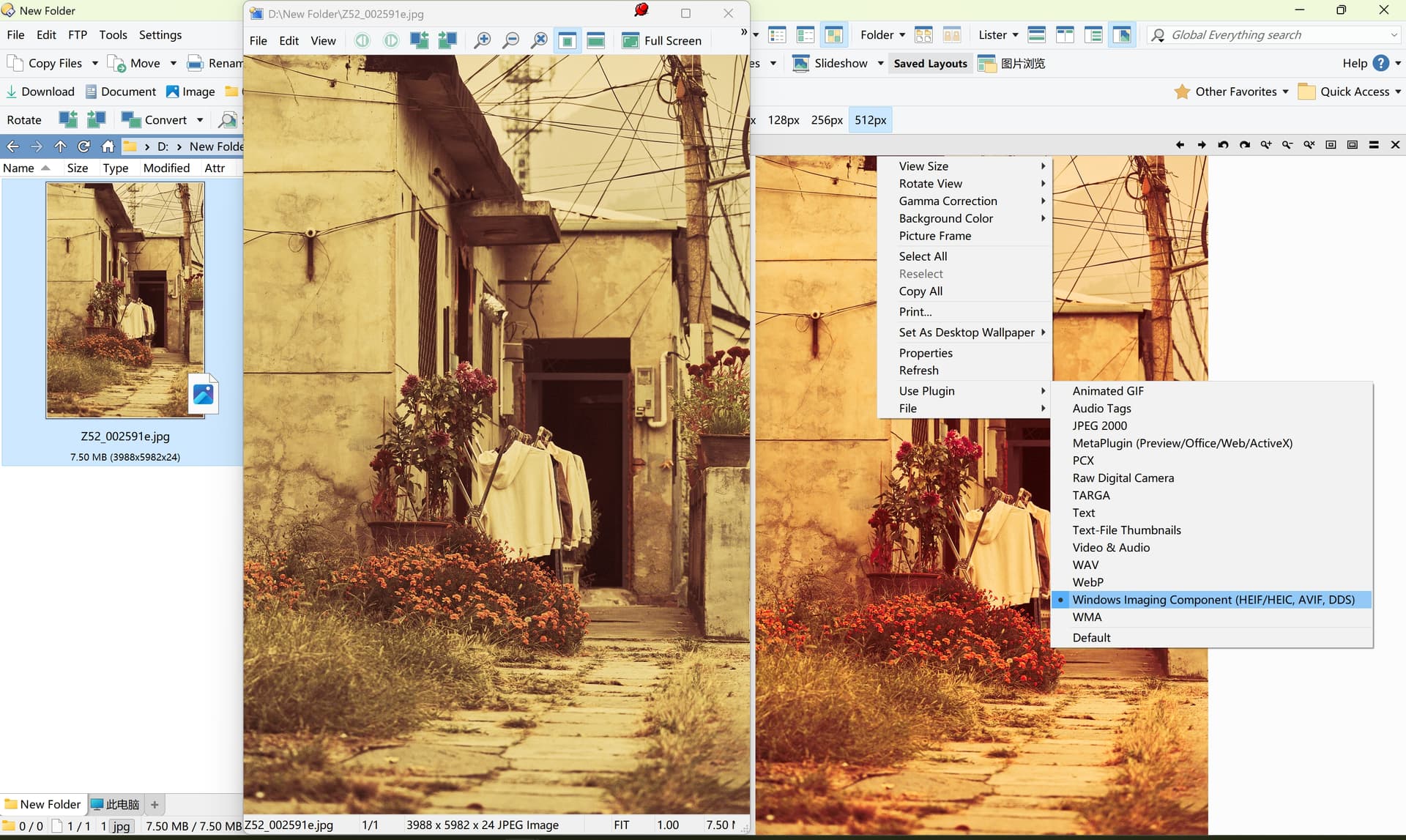
Interestingly, the image seems to be differently rendered in the thumbnails strip above than in the single preview below.
This shows the ambiguity resulting from such practice.

Regards
Guido
JPEG developer
Notice that the shown component numbers are in fact the identifiers used to detect the color space:

D:\Driver\Windows_on_ARM>djpeg -v Task_Manager_GPU.jpg nul
Independent JPEG Group's DJPEG, version 9f  14-Jan-2024
Copyright (C) 2024, Thomas G. Lane, Guido Vollbeding
Start of Image
Adobe APP14 marker: version 100, flags 0x0000 0x0000, transform 0
Define Quantization Table 0  precision 0
Start Of Frame 0xc9: width=1136, height=918, components=3
    Component 82: 1hx1v q=0
    Component 71: 1hx1v q=0
    Component 66: 1hx1v q=0
Define Arithmetic Table 0x00: 0x10
Define Arithmetic Table 0x10: 0x05
Start Of Scan: 3 components
    Component 82: dc=0 ac=0
    Component 71: dc=0 ac=0
    Component 66: dc=0 ac=0
  Ss=0, Se=63, Ah=0, Al=0
End Of Image

These are the character codes of 'R', 'G', 'B', so this is detected as RGB color space.
1, 2, 3 identify YCbCr as mentioned.
Simple and robust.
SOF is an essential marker for image reconstruction.
Auxiliary markers can be intentionally or unintentionally lost, and the image can still be properly reconstructed.

Regards
Guido
JPEG developer

To me it looks like the WIC component oversaturates the colours.

From what I can tell Opus gives the same results as both Photoshop and the Microsoft Photos app.

1 Like

Jon, you are right, I didn't test with Opus because I took what was given by the original poster for granted.

So Opus seems to somehow do the extra color management steps which give what the original poster seems to want.

Yes, my impression is also that the colors look oversaturated and unnatural.
The unmanaged colors look more natural to me.
But perhaps the color boost is that what was wanted.

Anyway, so the only mystery remaining is why the display in Opus of the original poster is different.

Regards
Guido
JPEG developer

Is it possible that the monitor drivers have a part in this ?
I remember years ago on Vista that Dopus rendered images correctly, but Windows Photos were very yellowed until I installed the proper monitor drivers.

This is only a very humble wild guess.

1 Like

Thanks, yes, that could be, as they bring their own color profile.

I have asked Jürgen Eidt, the author of cPicture, about the issues.
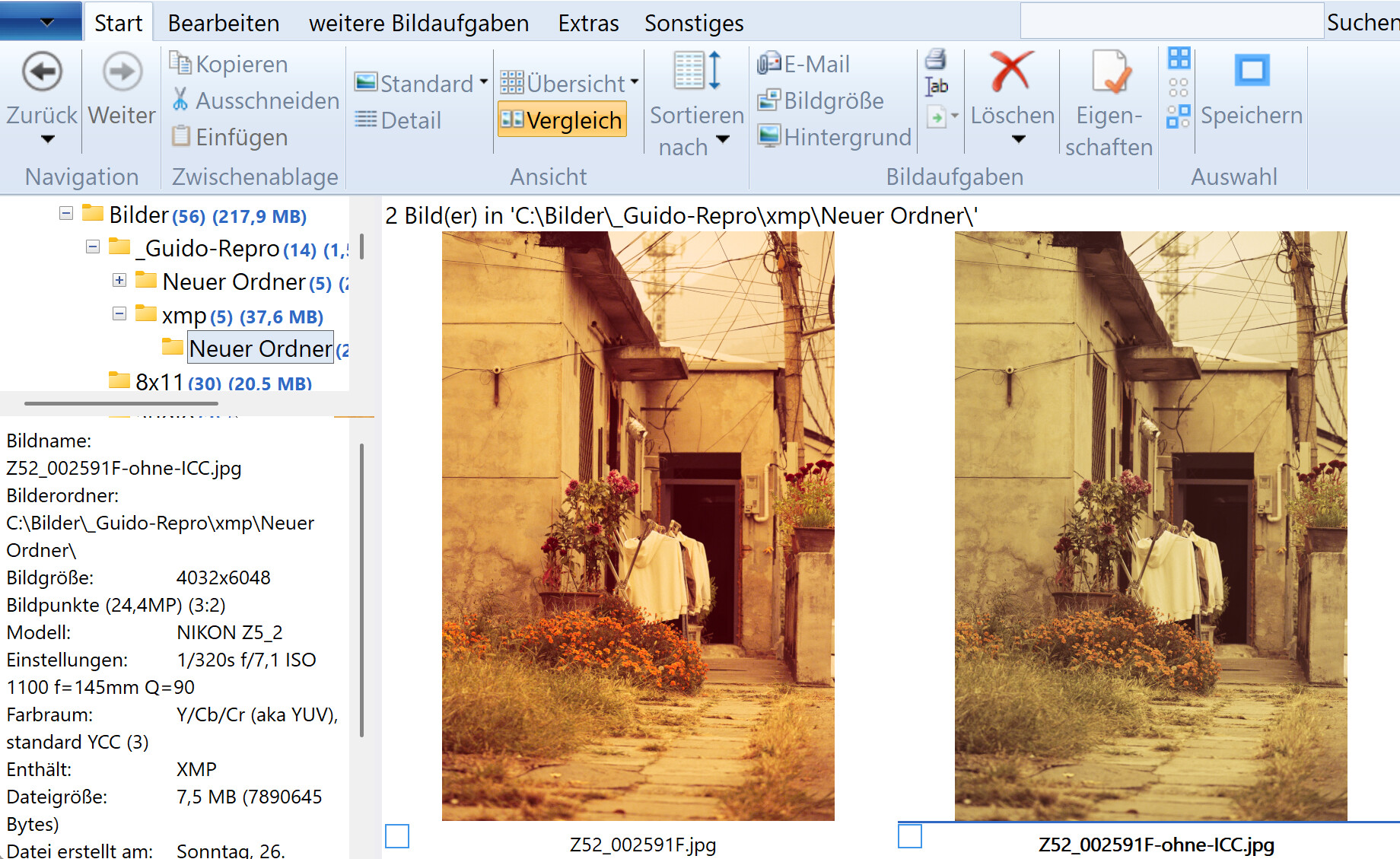
He just replied and says that the differences are due to the ICC Profile.
The thumbnail above is shown without ICC Profile to accelerate the display.
The image below is rendered with ICC Profile.
He will offer an option in the next update, using LittleCMS he could not really see a speed difference.

For comparison he suggests a procedure to copy the image => right click => properties => image structure => right click to remove or add single sections:

Regards
Guido
JPEG developer

There is warm discussion with too much professional term to be understood by me. I just want to make sure you understand my question and i uploaded the snapshot again. The picture opened in windows picture manager has been displayed correcly as I expected, which the color is what I made it in DXO filmpack. But it can’t be displayed with the right color when I view it in Opus no matter in thumbnail, standalone image viewer or impage view pane with the defalut plugin. When i switch to the 3rd plugin in view pane, it can also be viewed with right color.

Maybe have a play with the Preferences / Miscellaneous / Advanced: [Image Formats] use_color_management setting.

You can specify an external ICC profile if the default color management options aren't satisfactory.

Yes. It worked while I change use_color_management to sRGB. Thank you very much.

The default setting for use_color_management here is "primary monitor".
This explains the dependency on the monitor driver as suspected.

Notice from the code given above that there is also a big gamut standard YCC color space.
This is defined per IEC 61966-2-1:1999 Amendment A1:2003 Annex G.

The point of defining standard color spaces is to be independent from dubious color management systems.

The latest release version 12.4.3 of GraphicConverter has a respective issue, which is solved in version 12.4.4 (currently beta):

This is checked here.

Regards
Guido
JPEG developer