Drag files and folders to another folder and when you drop the same file already exists.
I have to copy only new thing was the file modified date of drag possible?
In the dialog that appears, I would not be able to copy only the new date.
Not synchronized, Drag & Drop is the operation.
Thank you.
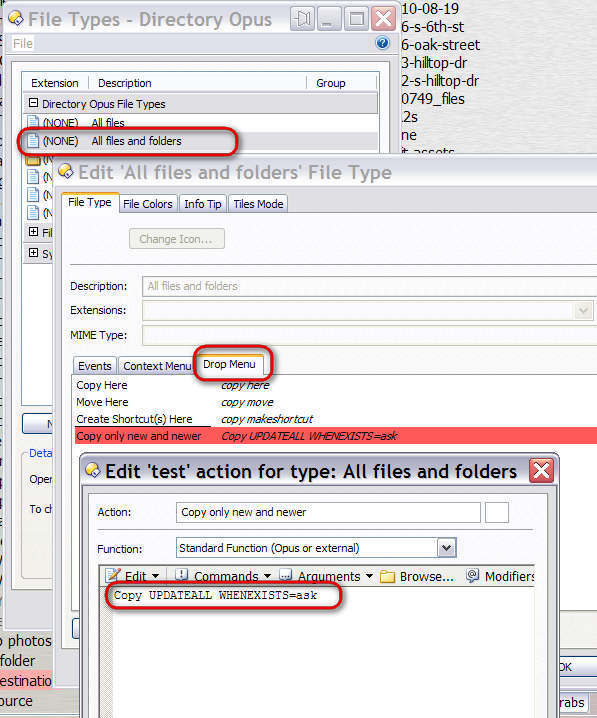
I would do this with right click drag and drop because you can have several different ways of copying or moving selected files and folders that way. To set that up go to settings/file types and configure the file type Drop Menu for All Files and Folders like as shown in the image below.
Thanks, JohnZeman.
If you specify it every time I meet have never been about things in a new date?
Or, in this operation "replace all" in the case of the same file name, what new ones are replaced, only the date?
Copy UPDATEALL WHENEXISTS = replace
It is almost like I want to work.
To add DropMenu is not the problem.
But I want confirmation dialog appears only when you first found the same file name, if possible.
And yet, in the dialog for the same file name later, you can copy only the ones that work the new date.
This is even better the next version, I Give me support.
Until then you can handle it and add the drop menu.
Thank you.
Yes, only the files in the source with a newer last modified date will be copied to the destination. Files with the same (or older) last modified dates will be ignored. Also any files in the source which did not exist in the destination will be copied to the destination.
I understand.
Thank you. 