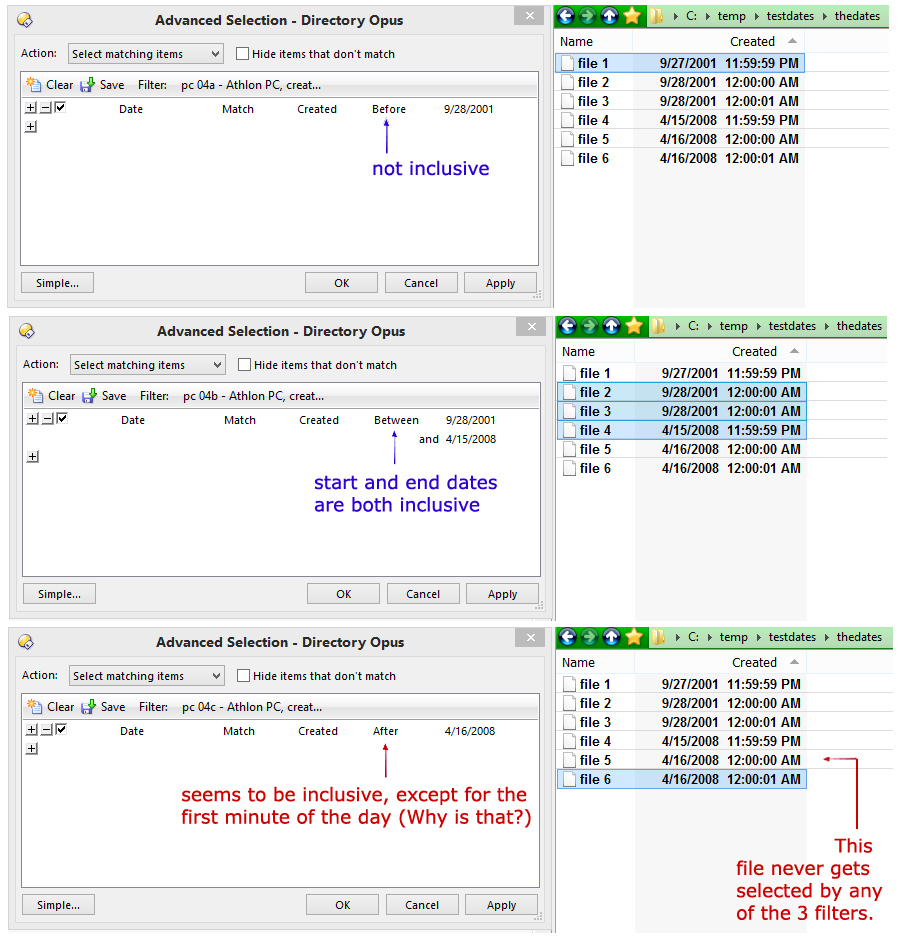
Hi. I'm trying to make sense of filters based on file dates. Since I was unable to find any information on whether the "before" and "between" and "after" operators are inclusive or not, I created some files and I set their creation dates and ran a little experiment using some filters I built. (Screen shots illustrating my results are shown below.)
What I found is:
The "before" operator is NOT inclusive of the date entered into the filter.
The "between" operator IS inclusive of both dates entered into the filter.
The "after" operator IS inclusive of the date entered ito the filter, EXCEPT FOR THE FIRST MINUTE OF THE DAY.
I'm planning to construct about 35 of these filters, so before I get too far down a possibly wrong road I'm just trying to understand the logic behind the inclusiveness or exclusiveness of these kinds of filters, so any explanation would be welcome. Thanks.
I'm trying the date-time filter, but something's odd. For the time -- hh:mm:ss -- it keeps forcing the seconds to be 00. For example, if I put in a time of 23:59:59, DOpus changes that to 23:59:00. I'm wondering what's the point of having two digits for the seconds if Dopus is just going to change whatever you put in there for seconds to 00? I don't understand.
I haven't figured this out on my own, although I have tried. I still don't understand why DOpus forces the seconds field in the time part of the date-time search parameter to always be 00, no matter what I enter. Said another way, DOpus changes anything I enter in the seconds field, from 01 through 59, to 00. Why? Or better yet, how can I stop it from doing that, and make it simply use what I've typed in?
If you look at how the Between mode acts, it sets the first time to :00 and the second to :59. I think the aim is to ignore seconds but show what it's doing with them for clarity (although it's possibly just confusing things by doing that and could arguably be changed).
Just ignore the seconds and use the minutes to get what you want, unless you're doing something very unusual and really need to search for files with a date-time accurate down to seconds.
Got it. I had noticed the change of the seconds in the 1st time to :00 but I hadn't noticed the change of the seconds in the 2nd time to :59. And I see how that can make sense for the majority of uses. Including my own particular use, since I certainly don't need accuracy down to seconds.
Thanks again for the help, Leo. I do appreciate it.