Hi guys
I've tried a few renaming programs and the command prompt to no avail. Is it a OS limitation to not be able to rename Russian/UNicoded files or a Dopus shortcoming?
Thanks
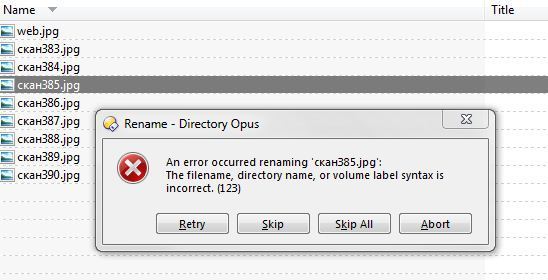
Hi guys
I've tried a few renaming programs and the command prompt to no avail. Is it a OS limitation to not be able to rename Russian/UNicoded files or a Dopus shortcoming?
Thanks
[quote="debug"]Hi guys
I've tried a few renaming programs and the command prompt to no avail. Is it a OS limitation to not be able to rename Russian/UNicoded files or a Dopus shortcoming?
Thanks[/quote]
Opus is unicode throughout and, normally, should have no problems renaming those files.
Are you able to rename them using Windows Explorer?
If you've tried a lot of tools and none of them have been able to rename the files then it sounds like the problem is somewhere else, not in Opus.
What kind of filesystem are the files on? Is it a local drive or a network drive? If it's local, what kind of drive is it? If it's network, what kind of computer is it? (Windows or something else?)
Hi Leo
Its Win 7 32bit NTFS running off a 10 x 500 GB raid everything standard. I picked up on Google that some guys recommend installing the Language packs for those languages. They're almost 200 megs each ... yikes. Will see it that fixes anything. These files were un-rar'ed so not sure why I cant access / move or rename them. Removing the directory from cmd console with rd /s works good but obviously I'd like to the files. 
Thanks
Is the full path to the files around 260 characters (or more)? You may be running into the MAX_PATH limit in Windows.
(Opus generally lets you rename files below such long paths but it also tries to avoid allowing you to accidentally create such a path/name, as it causes huge problems with most other programs. So it could be something like the path being below 260 characters before the rename but longer than that after the rename. Not sure exactly what the rules are, off the top of my head, though.)
Are you able to open the files okay, or can programs not see them at all? (It could be something more strange like a space on the end of the names, which NTFS allows but Win32, by default, does not.)
Hi Leo
Thank for the effort. The full path is: D:/Unsorted MP3/One Night in London - Vol. 1 (2004)/Covers/скан383.jpg. Dopus displayed the file attribs sizes etc but nothing opens the files or can do anything with them, you cannot even rightclick on them in Dopus. Weird.
Thanks
Sounds like something has the files locked.
Try using Process Explorer, run as admin, and use Ctrl-F to find out which processes appear to have the files open.
(If it indicates dopus.exe or explorer.exe then it's possible a shell extension is going crazy with the files and leaving them locked open.)
Hi
Process explorer runs perm on my PC its great. I cannot find a lock. Unclocker checked the contents of the directory also - nothing. When trying to copy the Russian file name скан390 to search for it you get ????390 on the clipboard, somewhere something does not support those unicode chars.
Nothing seems to interpret them correctly.
Something that might work is renaming them at a DOS prompt, using the short file names. Opus has a column thay shows them, or a dir /x will as well, if I remember the right switch (not at a PC to check at the moment).
Its no go ... I get the msg on the 1st post in the dos prompt ... "The file ... cannot be found"