Update year using regex (YY to YYYY)

Up front: I am an absolute newbie on Regex.. Over the last few days I gave it a try to get a little(!) bit familiar with this.
There are no good video tutorials for the absolute beginners, having no knowledge of programming. Most tutorials
quickly switch into a 'higher gear' with scripting and so on, meant for the fanatics. So pls bear with me .. :slight_smile:

That said I am stuck with the following

Current format is ddmmyy
I'd like to add 19 in front (or 20, if yy is 00,01 at the end)

example:
010185 -> 01011985
010195 -> 01011995
010100 -> 01012000

I got as far as:
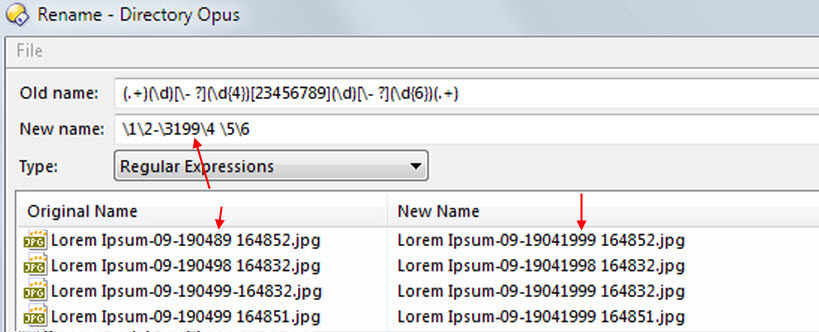
Old Name: (.+)(\d)- ?23456789- ?(.+)
New name: \1\2-\3199\4 \5\6

--

Can this be done in 1 rename?

Else I guess I have to create a various renames, like

(.+)(\d)- ?9- ?(.+)
\1\2-\3199\4 \5\6

(.+)(\d)- ?8- ?(.+)
\1\2-\3198\4 \5\6

and so on..

then go on to do the same for
dd-mm-yy
dd-mm-yyyy
resulting in a lot of individual renames.

TIA

You're going to have to use a script for this, since DOpus's regular expressions can't perform conditional replacements. They can be used to match the dates however.

What are all the date formats you have. You've listed:

dd-mm-yy
dd-mm-yyyy

What others formats need to be matched?

I will provide the script once we know what formats need to be matched.

Thanks for the offer.
I meanwhile solved the problem using various different renames (regex).

Regretfully, as far as I know, within Opus there is no option to "combine" various rename-instructions into 1 preset.
Meaning, once this 1 "combined" preset is run (containing various instructions), then all are being executed.

Some external renamers (e.g. Flash Renamer) have such an option. Have 1 preset with 15 or more various renames.

For this Opus has the scripting option, but for most of the users I think this is too complex.

Anyway, thanks again for your kind offer!
Truly appreciated.

You can put several rename commands into a single button, which is the quickest way to combine them.

You should only need two regexps here, one for the 19xx years and one for the 20xx years.

Eh ... How?

Maybe, one day, there will be one/two extra button(s) in the rename panel (right of "Presets:")
Add/Rename/Delete + Modify/Add to existing preset.

As said, I have over 15 renames to cover all the various possibilities, incl removing spaces, etc.

But 2 or 3 different consecutive renames into 1 wud be nice, I guess.
first do this, then do that, then that.

Put this in a button:

Rename REGEXP PATTERN "(^.+\d-\d{4})([2-9]\d \d{6}.+$)" TO "\119\2" Rename REGEXP PATTERN "(^.+\d-\d{4})([0-1]\d \d{6}.+$)" TO "\120\2"

Thanks a lot! :thumbsup:

Still got to learn a whooole.. lot, that's for sure.
RegExr is a helping hand here, but not always, like : do you a solution for the following?

Example:
This is some filename-1234-5678.ext
This-is-some-other-filename-1234-5678.ext
Last-one-11-222.ext

How (in regex) to select the '-' between the words? (rest remaining untouched)
So I cud rename it to:
This is some other filename-1234-5678.ext

Sorry, but cud not figure this out. :cry:

Hope you can help me out for the last time...

When you're working with pattern matching, you have to define the pattern that is to be matched. Is there a pattern from your example files that can be defined? In your examples, it isn't simply a dash. Are you trying to remove all but the last two dashes? Or is there some other consistent pattern?

Try this.

Type: Regular Expression
Old Name: (.)-([a-z]+.)#
New Name: \1 \2

Button code

Rename REGEXP PATTERN "(.*)-([a-z]+.*)#" TO "\1 \2"

Regret there is no real pattern.
Maybe only that it is :
character dash character dash character etc

i.e. the only those dashes when they start and end with a character.

[quote="leo"]Put this in a button:

Rename REGEXP PATTERN "(^.+\d-\d{4})([2-9]\d \d{6}.+$)" TO "\119\2" Rename REGEXP PATTERN "(^.+\d-\d{4})([0-1]\d \d{6}.+$)" TO "\120\2"[/quote]

Am unsure about the possibility of a preview.

I tried with adding Showpreview but that does not work.

rgds

If you want to use multiple regexps at once in the Rename dialog (instead of in a command), you'll need to use a rename script at the moment. There is an example one in the rename scripting forum for doing exactly this.